Pinterest Marketing for Senior Affiliate Bloggers Over 60: The Complete Guide
If you are over 60, running an affiliate blog, and wondering whether Pinterest is worth your time, the short answer is yes, and it suits you better than almost any other platform.
Pinterest is a visual search engine, not a social feed. That means the content you create today can drive traffic and affiliate commissions for months or years — not just the 24 hours a social post is visible. It rewards consistency over virality. It works without a big following. And it does not require you to be on camera or post every day.
For senior affiliate bloggers specifically, Pinterest marketing senior affiliate bloggers is one of the most practical traffic sources available. This guide covers everything you need to know about Pinterest marketing senior affiliate bloggers to use it effectively — from setting up your account to creating pins that rank, drive clicks, and convert. By incorporating Pinterest marketing senior affiliate bloggers into your strategy, you can elevate your affiliate blogging efforts.
Affiliate disclosure: This post contains affiliate links. If you buy through them, I may earn a small commission at no extra cost to you.
TL;DR
- Pinterest is a search engine — your pins surface in search results for months, not hours.
- Senior bloggers have a credibility advantage because experience produces specific, trustworthy content.
- Start with a free Pinterest Business account and 5–8 focused boards
- Create keyword-rich pins in Canva — tall 2:3 ratio, clear text, specific title
- Post 5–10 pins per week consistently and link each pin to a blog post
- Results compound slowly — give it 3–6 months before judging
Why Pinterest Works Especially Well for Senior Affiliate Bloggers
Most social platforms reward newness. A post has 24–48 hours to gain traction before it disappears into the feed. Pinterest works entirely differently. A well-optimised pin can surface in search results for two or three years after you publish it.
This compounding effect suits the pace and approach of senior bloggers particularly well. You are not chasing trends or posting three times a day. You are building a library of helpful, evergreen content that quietly generates traffic month after month.
There is a second advantage. Pinterest users search with intent — they are planning purchases, researching products, looking for solutions. Searches like “best garden tools for seniors,” “gentle exercises for adults over 60,” or “simple healthy meals for one person” are exactly the kinds of queries that match what a senior affiliate blogger with genuine experience can answer better than anyone else.
Your decades of real knowledge in a hobby, career, or lifestyle area produce the specific, honest content that Pinterest rewards and that converts into affiliate commissions.
Step 1: Set Up Your Pinterest Business Account
If you have a personal Pinterest account, convert it to a Business account — it is free and gives you access to Pinterest Analytics, which shows which pins are driving traffic and clicks.
For example, Pinterest marketing senior affiliate bloggers can help you reach a demographic that values your expertise and insights.
Understanding Pinterest marketing, senior affiliate bloggers can significantly enhance your blogging strategy.
Go to pinterest.com/business and either create a new Business account or convert your existing one.
Profile setup:
Profile name: Use your name or your blog name — something clear and recognisable. Avoid keyword-stuffed names like “Senior Affiliate Tips Gila” — just your blog name is fine.
Profile photo: A warm, clear headshot. The same credibility principle applies here as everywhere — people trust people, not logos.
Bio: One sentence on what you help people do, one sentence on who you are. Include your main keyword naturally. Example: “Helping retirees build calm online income through affiliate marketing. Practical guides for beginners over 60.”
Website: Link directly to your blog. This is essential for driving Pinterest traffic to your affiliate content.
Utilizing Pinterest marketing senior affiliate bloggers provides a unique opportunity to connect with your target audience effectively.
Step 2: Create 5–8 Focused Boards
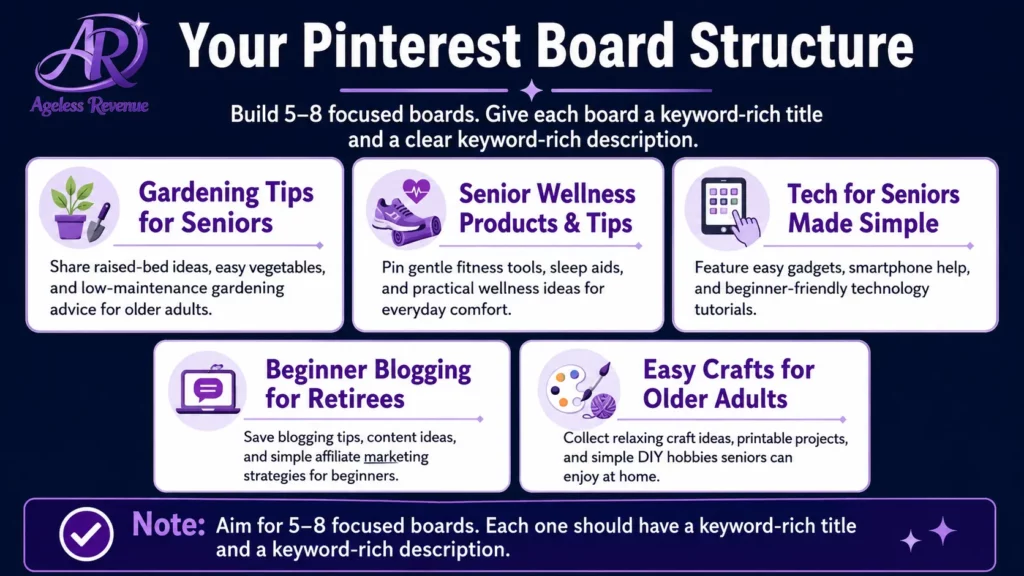
Boards are how Pinterest organises your content and understands what your account is about. Each board should represent a specific topic within your niche.
A gardening-focused affiliate blogger might have boards for: Raised Bed Gardening for Seniors, Lightweight Garden Tools, Container Gardening, Easy Vegetables to Grow, and Accessible Garden Design.
A general affiliate marketing blogger might have: Pinterest for Beginners, Affiliate Marketing Tips, Blogging for Retirees, Passive Income Ideas, and Work From Home Over 60.
Board name rules:
- Use your main keyword in every board name
- Be specific, not vague — “Lightweight Garden Tools for Seniors” beats “Garden Stuff.”
- Write a keyword-rich board description for each one (2–3 sentences)
Pinterest uses board names and descriptions to understand your account’s topic and serve your pins to relevant searches. Generic board names mean your pins surface in fewer searches.
Step 3: Create Pins That Rank and Convert
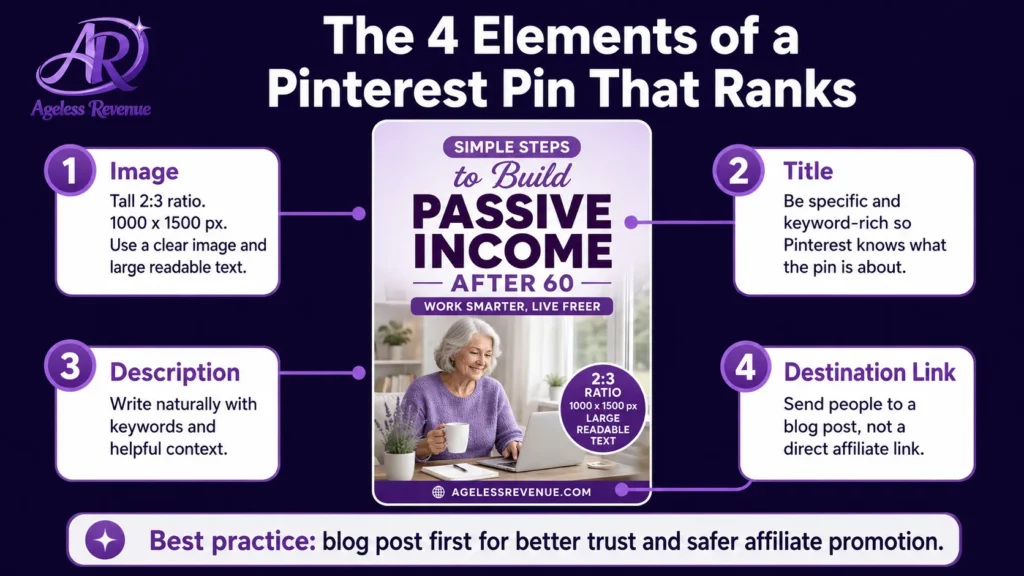
A Pinterest pin has four elements that determine whether it reaches your audience and whether they click through to your blog.
The image. Use a tall 2:3 ratio (1000×1500 pixels). Pinterest displays tall images more prominently in search results than square or landscape images. Design your pins in Canva — it has free Pinterest templates and requires no design experience. Use large, easy-to-read text overlaid on a clear background. Senior audiences (and their adult children, who are often the ones searching) need text that is readable at a glance.
The title. This appears below your image in search results and is the first thing people read. Make it specific and keyword-rich. “5 Lightweight Garden Tools That Actually Help With Arthritic Hands” will surface in more searches and get more clicks than “Garden Tools I Love.”
The description. Up to 500 characters. Write it as a natural sentence that includes your main keyword and explains what the reader will find when they click. Do not keyword-stuff. Do not write a list of hashtags. Example: “These five garden tools are specifically useful for adults managing arthritis or limited grip strength. Includes a comparison of handle types and which tools work best in raised bed gardens.”
Incorporate insights from Pinterest marketing senior affiliate bloggers into your content strategy for a competitive edge.
The destination link. Always link to a blog post, not directly to an affiliate product. Your blog post provides the context, depth, and trust that converts a Pinterest visitor into a buyer. A pin links to a post. The post earns the commission.
Step 4: Write Content Your Pins Can Link To
Pinterest drives traffic. Your blog converts it. For this to work, your blog posts need to be genuinely helpful and contain natural affiliate link placements.
The content types that work best for senior affiliate bloggers on Pinterest:
Product roundups. “7 Garden Kneelers That Actually Work for Adults Over 60” — one paragraph per product, honest about what each does and does not do, affiliate link per product. These match the “best [product] for seniors” searches that Pinterest users make regularly.
How-to guides with product mentions. “How to Start a Raised Bed Garden When You Have Limited Mobility” — step-by-step guide with tools mentioned naturally alongside the steps. Readers who follow the guide trust your tool recommendations.
Comparisons. “Foam Kneelers vs Knee Pads — Which Is Better for Gardening Over 60?” — honest pros and cons, a clear recommendation, and affiliate links to the recommended option.
Problem/solution posts. “My Hands Hurt When I Garden — Here Is What Actually Helped” — personal, specific, honest. Exactly the kind of content that pins well and converts.
Step 5: Use Keywords the Pinterest Way
Pinterest SEO is different from Google SEO. The fastest way to find keywords that real people are searching for on Pinterest is to use the platform’s own search bar.
Type your topic into the Pinterest search bar and look at the autocomplete suggestions. These are real searches people are making right now. Type “garden tools seniors” and Pinterest might suggest “garden tools seniors arthritis,” “garden tools seniors raised beds,” “lightweight garden tools seniors” — each of these is a keyword worth targeting.
Use your chosen keyword in:
- The pin title (exactly as typed)
- The first sentence of the pin description
- The board name where the pin lives
- The blog post title you are linking to
Do not use the same keyword on every single pin — vary them naturally. Pinterest understands related concepts and surfaces content for multiple related searches.
Explore various formats that leverage Pinterest marketing senior affiliate bloggers to maximize engagement.
Developing problem/solution posts with a focus on Pinterest marketing senior affiliate bloggers can significantly enhance your visibility.
Step 6: Build a Sustainable Weekly Routine
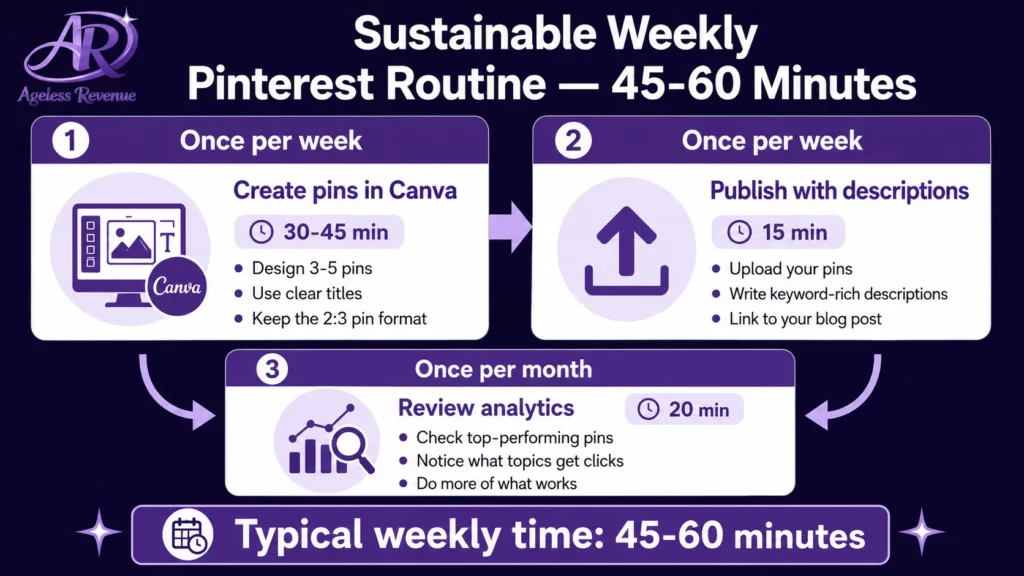
Consistency matters more than volume. 7 pins per week, every week, for six months, produces far better results than 50 pins in one week followed by nothing.
A manageable weekly routine for senior bloggers:
Once per week — create pins (30–45 minutes):
- Open Canva and duplicate your pin template
- Change the text overlay to your new pin title
- Change the background image or colour
- Download the new pin
Once per week — publish pins (15 minutes):
- Upload your new pins to Pinterest
- Write keyword-rich descriptions for each
- Link each pin to the relevant blog post
- Assign each to the correct board
Once per month — review analytics (20 minutes):
- Check Pinterest Analytics for which pins are getting saves and clicks
- Identify your top 3 performing pins
- Create more content similar to those topics
That is roughly 45–60 minutes per week total. Manageable alongside regular blogging.
For a complete guide to creating evergreen content that compounds over time, read Evergreen Pinterest Content Ideas for Affiliate Marketers.
Step 7: Connect Pinterest to Your Blog Properly
Plan to utilize Pinterest marketing senior affiliate bloggers in your weekly routine for sustained results.
For Pinterest to send consistent traffic to your blog, your blog needs to be verified with Pinterest.
In your Pinterest Business account, go to Settings → Claimed Accounts → and claim your website. You will need to add a small piece of code to your WordPress site — most themes make this straightforward, or you can use a plugin like RankMath, which has a Pinterest verification field built in.
Once verified, your profile photo appears on every pin that links to your blog — which increases click-through rates because it signals to Pinterest users that the content comes from a real, verified source.
Also, install the Pinterest Save button on your blog. This lets readers pin your content directly from your posts, which creates additional pins pointing back to your content without any extra work on your part.
What Makes Senior Bloggers’ Pinterest Content Stand Out
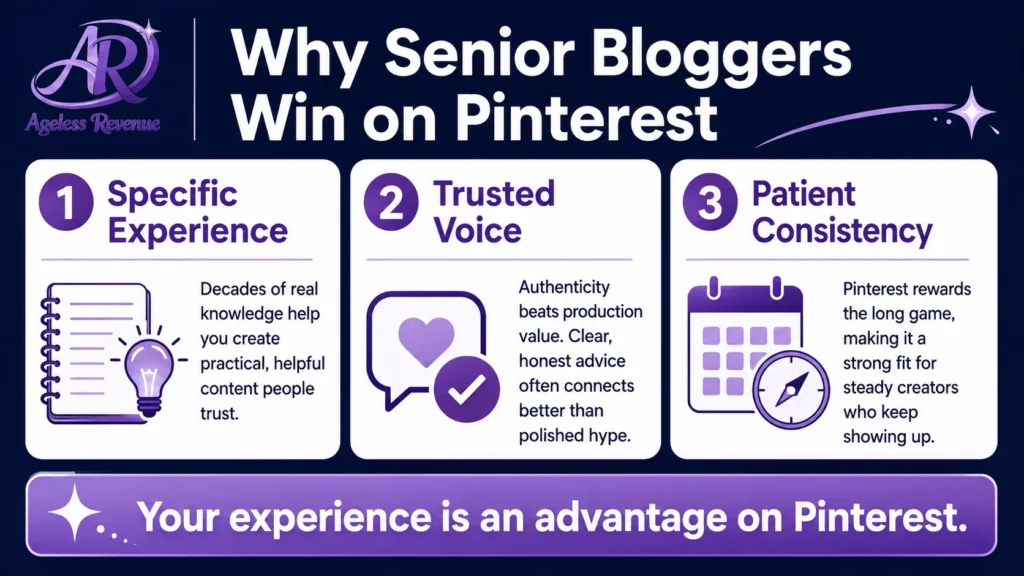
The most effective Pinterest content for affiliate conversions is specific and personal. Not “good garden tools” but “the trowel I have been using for three years that works with my arthritic left hand, and here is exactly why.”
Generic content — the kind that could have been written by anyone, about anyone, for anyone — performs poorly on Pinterest because it does not answer the specific question the searcher typed. Your personal, specific, experience-based content performs well because it does.
A retired nurse writing about joint supplements she has genuinely trialled. A lifelong gardener writing about the specific tools that made raised bed gardening possible again after a knee replacement. A retired teacher writing about educational software she has used with grandchildren. These are the recommendations that Pinterest users click, trust, and buy through.
Your age and experience are not a disadvantage here. They are the reason your content converts.
For the complete guide to Pinterest setup for affiliate marketing beginners, read Pinterest for Affiliate Marketing Beginners.
Tracking Results Without Overwhelm
Pinterest Analytics (free with your Business account) shows you three things worth checking monthly:
Impressions: How many times your pins appeared in search results. This tells you whether your keyword targeting is working.
Saves: How many people saved your pin to their own boards? High saves indicate content worth creating more of.
Identifying the needs of your audience through Pinterest marketing senior affiliate bloggers will guide your content creation.
Link clicks: How many people clicked through to your blog? This is the number that matters most for affiliate income.
Check these once per month. Identify which pins are getting the most link clicks. Create more content similar to that. Update the description of your lowest-performing pins to use different keywords. That is the entire optimisation routine.
For a guide to tracking affiliate performance across all your social channels, read How to Track Social Media Affiliate Performance.
Frequently Asked Questions
Adopt best practices that leverage Pinterest marketing senior affiliate bloggers for maximum engagement.
How long before Pinterest drives meaningful traffic to my blog?
Most consistent bloggers see their first meaningful Pinterest traffic at 4–8 weeks. Monthly traffic that makes a real difference to affiliate income typically takes 3–6 months to develop. Pinterest results are slow to start and long to last — a well-optimised pin from month one can still drive traffic two years later.
Do I need a large following to get traffic from Pinterest?
No. Pinterest surfaces content in search results based on keyword relevance, not follower count. A new account with 50 followers and strong keyword-targeted pins will reach more people than an established account with 5,000 followers posting generic content.
How many pins should I create per blog post?
Create 2–3 pins per blog post with different images and slightly different titles and descriptions. This gives Pinterest more opportunities to match your content to different searches without duplicating the exact same pin, which can trigger spam filters.
Can I use affiliate links directly on Pinterest pins without a blog?
Most programmes allow direct affiliate links on Pinterest when properly disclosed. However, a blog post converts at a significantly higher rate than a direct affiliate link because it provides the context and depth that builds purchase confidence. Always link to a blog post when possible.
What is the best tool for creating Pinterest images?
Canva is the standard recommendation — free, drag-and-drop, with Pinterest templates built in. No design experience required. Aim for tall 2:3 ratio images (1000×1500px) with large, easy-to-read text on a clear background.
Your Next Step
The journey of Pinterest marketing senior affiliate bloggers is ongoing, requiring adaptation and growth.
Open a Pinterest Business account today if you do not already have one. Create five focused boards with keyword-rich names and descriptions. Then create your first three pins — one for each of your three most recent blog posts — using Canva and the keyword format from this guide.
Commit to 5–10 pins per week for three months before evaluating results.
For a structured path to building the affiliate blog that works alongside your Pinterest presence, try Wealthy Affiliate free → — it combines training, hosting, and keyword tools in one place.
This post contains affiliate links. If you buy through them, I may earn a small commission at no extra cost to you.
For those committed to growth, mastering Pinterest marketing senior affiliate bloggers is essential.
For new insights, consider the evolving trends in Pinterest marketing senior affiliate bloggers.
Learn about creative ways to engage through Pinterest marketing senior affiliate bloggers.
Ultimately, the landscape of Pinterest marketing senior affiliate bloggers will continue to evolve, so stay informed and flexible.
Utilizing Pinterest marketing senior affiliate bloggers consistently will enhance your online presence and authority.
Make it a point to explore innovative strategies within Pinterest marketing senior affiliate bloggers.
Finally, embrace the potential of Pinterest marketing senior affiliate bloggers to transform your blogging journey.
By focusing on Pinterest marketing senior affiliate bloggers, you align your content with user intent, ensuring better engagement.
As you implement these strategies, remember that Pinterest marketing senior affiliate bloggers is your pathway to success.
Now, implement what you’ve learned about Pinterest marketing senior affiliate bloggers to achieve your blogging goals.