

How To Track Social Media Affiliate Performance (2026): Simple Tools & Metrics That Matter
Affiliate marketing on social media is like your personal billboard on the internet highway. You get to champion products or services while earning a commission every time someone interacts positively with your promo link. But here’s the kicker — how do you really know your strategy’s working?
That’s where performance tracking comes in. In 2026, tracking your social media affiliate performance isn’t optional anymore — it’s essential. Whether you’re promoting on Instagram, Facebook, Pinterest, or TikTok, understanding which posts drive clicks and conversions sets successful affiliates apart from those who just post and hope. To effectively track social media affiliate performance, you need to know what tools to use and what metrics to monitor.
The good news? You don’t need expensive software or a data science degree. Free tools like Google Analytics, platform-specific insights, and even a simple Excel spreadsheet can give you everything you need to track what matters. This guide walks you through the exact tools, metrics, and methods to monitor your affiliate performance without overwhelm.
Affiliate disclosure: This post contains affiliate links. If you buy through them, I may earn a small commission at no extra cost to you.
TL;DR
- Why track? Know which posts make money, which platforms perform best, and where to focus your energy for maximum ROI
- Essential metrics: click-through rate (CTR), conversion rate, engagement rate, revenue per post, and cost per acquisition
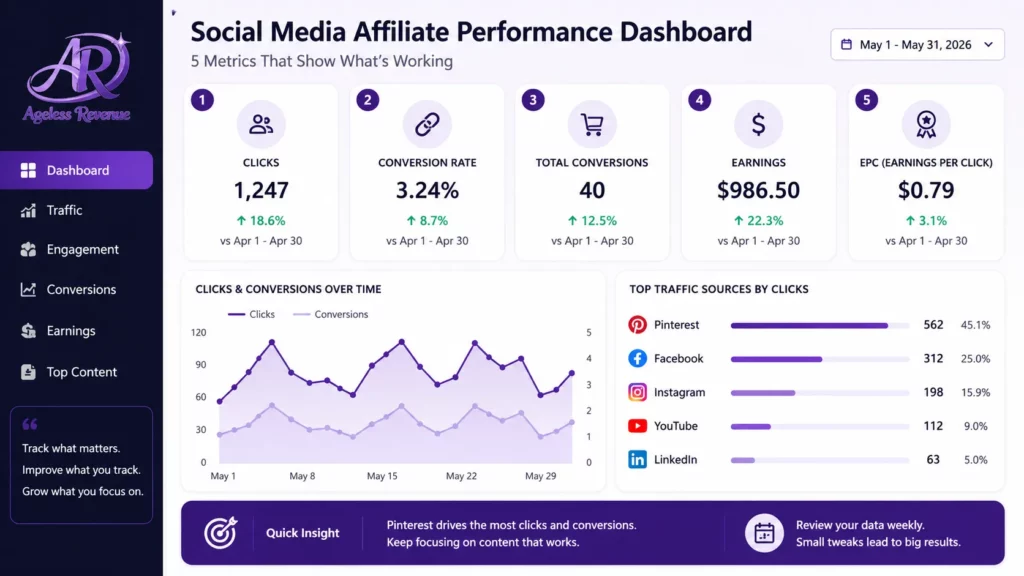
- Free tools that work: Google Analytics for website conversions, Instagram Insights/Facebook Analytics/Pinterest Analytics for platform data, Hootsuite or Buffer for multi-platform tracking, Excel for custom dashboards
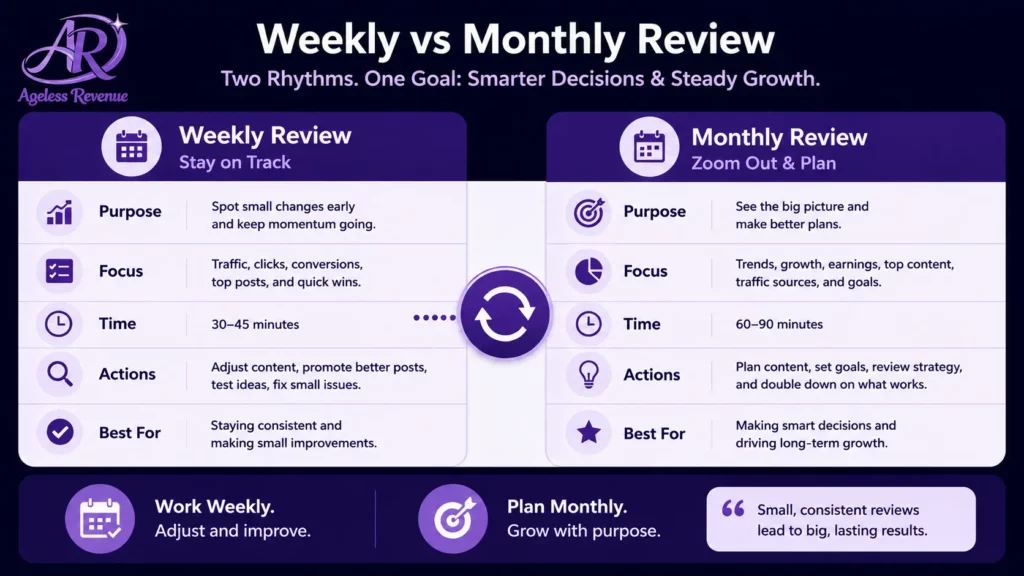
- Track weekly, review monthly: check metrics weekly to spot trends, but review monthly for deeper insights
Bottom line: start with free tools, focus on metrics that drive revenue, and use data to create more of what works.
The Best Free Social Media Analytics Tools
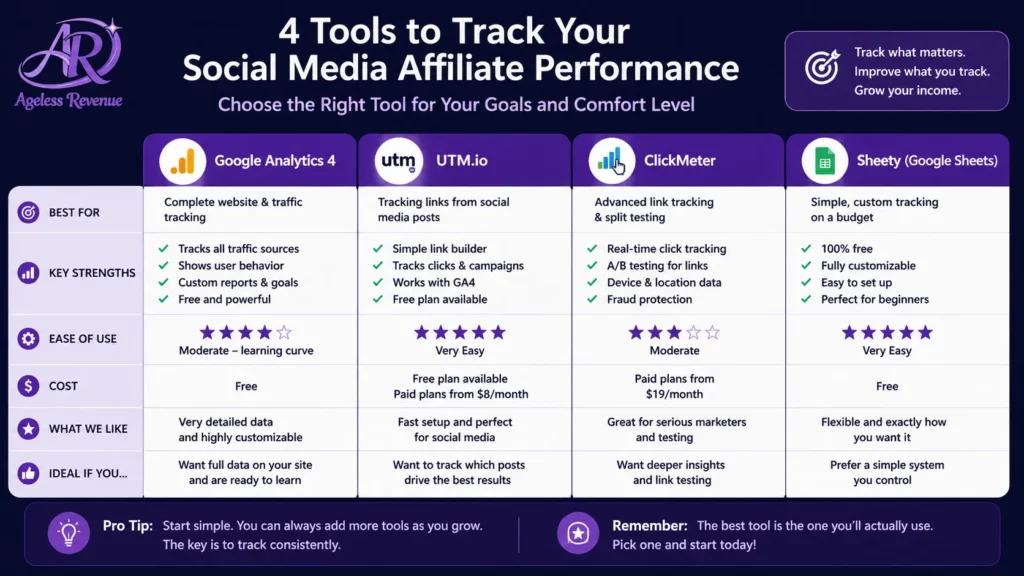
Free tools can be your best allies in tracking social media affiliate performance without burning a hole in your pocket.
Google Analytics is a great starting point for anyone diving into the analytics game. It helps you figure out where your audience is coming from and what content keeps them hanging around.
Hootsuite is another gem that deserves mention. It doesn’t just schedule your posts; it gives you a clear picture of how your content is performing across various platforms.
How to Effectively Track Social Media Affiliate Performance
Buffer is a favourite among many for its straightforward analytics dashboard. Insights on post performance and audience engagement, plus easy-to-digest reports — perfect when you’re juggling a lot of tasks.
Each of these tools brings something unique to the table, so choose based on what suits your needs best.
Using Excel for Social Media Analytics Tracking
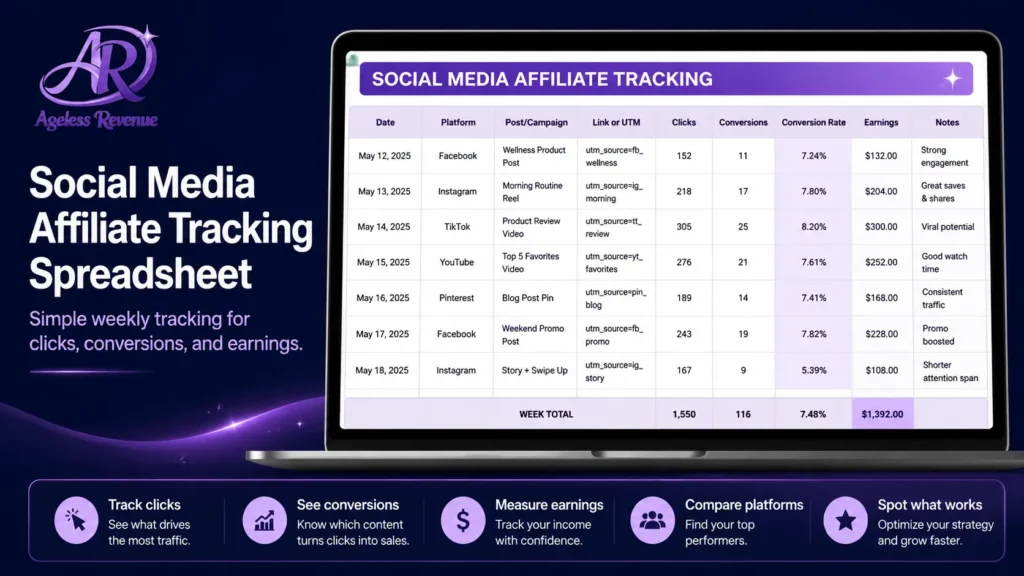
Excel might not be the flashiest tool out there, but it’s a powerhouse for analytics if you know your way around a spreadsheet. Setting up a tracker in Excel helps keep all your important metrics in one handy place.
Start by listing your key performance indicators — engagement numbers, conversion rates, and so on. With the right formulas, you can automate the number-crunching process. VLOOKUP and pivot tables are your friends for pulling insights from heaps of data.
One of the coolest things about using Excel is customisation. Design your dashboard to focus on metrics that matter most to you. Add colourful charts and graphs to make data visualisation pop. Whether you’re a pro or just getting started, Excel lets you take control of your data without monthly subscription fees.
Analyzing Competitors With Free Social Media Tools
Sizing up the competition can give you that extra edge in your affiliate game.
SocialBlade offers in-depth analytics on YouTube, Instagram, and Twitter — views, followers, and content success, painting a clear picture of what the top players in your niche are doing right.
SimilarWeb is your magnifying glass into website traffic and market insights. You can get data-driven answers about your competitors’ audience sources and engagement levels.
Using these tools, you can gain insights into what’s working for others and adapt those strategies to enhance your own performance. Keep an eye on competitors’ content types, posting frequency, and engagement tactics, and see how they align with your goals.
For more strategies, read Getting Traffic to Your Affiliate Blog.
Deep Dive Into Analytics for Specific Platforms
Each social media platform plays by its own rules and has its own nuances.
Facebook offers tools like Creator Studio and Facebook Insights to help you see how well your posts are performing. You can track engagement metrics to find out what kind of content your audience loves most.
Instagram has built-in analytics tools where you can check profile views and website clicks directly from your business profile. It’s perfect for understanding how your visuals and hashtags are landing with your audience.
Pinterest has built-in analytics tools that show what pins are leading to website clicks and saves, telling you a lot about how users are interacting with your pins and how your content is spreading across the platform.
By mastering platform-specific analytics, you’re not just understanding the numbers — you’re reading the pulse of your audience.
Integrating Website Analytics for a Holistic View
Social media isn’t its own walled garden — it’s part of a bigger ecosystem that includes your website. Bridging the gap between social media analytics and website analytics gives you a complete picture of your audience’s journey.
Using Google Analytics helps paint this broader picture by linking social media efforts to website hits and conversions. This integration allows you to see how traffic from platforms like Facebook or Instagram behaves once it lands on your site.
Pay attention to tools that offer comprehensive insights, combining metrics across platforms, like Google Data Studio. By weaving together insights from both social media and website analytics, you’re equipped to tailor content strategies that align with your broader business goals.
Frequently Asked Questions
Why is tracking social media affiliate performance important?
Tracking helps you understand which content drives clicks and conversions, which platforms perform best, and where to focus your efforts for maximum ROI. Without tracking, you’re guessing instead of making data-driven decisions. You might be spending hours creating content for Instagram when Facebook is actually driving 80% of your sales.
What are the best free tools for tracking affiliate performance on social media?
Google Analytics is essential for tracking website conversions and understanding where your traffic comes from. Platform-specific tools like Instagram Insights, Facebook Analytics, and Pinterest Analytics show engagement and reach metrics specific to each platform. Hootsuite and Buffer help you track performance across multiple platforms in one dashboard. For custom tracking, Excel or Google Sheets work perfectly.
How do I track affiliate links on Instagram?
Use Instagram’s built-in analytics (available for business accounts) to track profile visits and website clicks. Create unique tracking links for each post using UTM parameters or your affiliate network’s tracking system. Monitor link clicks in your bio and tag each link with campaign identifiers in Google Analytics to see exactly which posts drive conversions.
What metrics should I track for affiliate marketing on social media?
Focus on: click-through rate (percentage of people who click your affiliate link), conversion rate (percentage of clicks that turn into sales), engagement rate (likes, comments, shares relative to your reach), reach and impressions, revenue per post, and cost per acquisition. These show which content resonates and generates actual sales, not just vanity metrics like follower count.
Can I use Excel to track my social media affiliate performance?
Yes. Set up columns for date, platform, post type, clicks, conversions, and revenue. Use formulas to automatically calculate CTR (clicks/impressions), conversion rate (conversions/clicks), and ROI (revenue/cost). Add charts to visualise trends over time.
How often should I check my affiliate performance metrics?
Check weekly to spot trends and make timely adjustments. Review monthly for deeper analysis of what’s working long-term and to identify seasonal patterns. Daily monitoring can lead to overreacting to normal fluctuations — the sweet spot is weekly check-ins plus monthly deep dives.
Conclusion
For the habits that make tracking meaningful, read Social Media Affiliate Marketing Best Practices.
Tracking your social media affiliate performance doesn’t have to be complicated or expensive. With the free tools and simple methods covered in this guide, you now have everything you need to understand what’s working, what’s not, and where to focus your efforts.
Your action plan to start tracking today:
- Set up the basics — install Google Analytics on your website and enable business accounts on your active social platforms to access built-in analytics
- Choose your tracking method — start with platform-specific tools and add Google Analytics for website conversions. Use UTM parameters on all affiliate links
- Create your tracking system — whether you use Excel, Google Sheets, or a tool like Hootsuite, build a simple dashboard that tracks clicks, conversions, revenue, CTR, and conversion rate
- Review weekly, optimise monthly — check metrics every week to spot trends, but make bigger strategic decisions based on monthly patterns
- Focus on what drives revenue — track engagement for insights, but prioritise metrics that directly tie to affiliate commissions
Remember, the goal isn’t to become a data analyst — it’s to make smarter decisions about your content. Which posts drive the most clicks? Which platforms generate the most revenue? What types of content resonate best with your audience? These are the questions tracking answers.
Start simple. Pick one or two tools from this guide, track your top three metrics, and build from there.
For a structured path that includes tracking guidance from day one, try Wealthy Affiliate free →
This post contains affiliate links. If you buy through them, I may earn a small commission at no extra cost to you.