
AI Blogging for Seniors: A Practical Guide to Writing Faster Without Losing Your Voice (2026)
You have something most AI tools do not: decades of real experience in a specific topic. A retired pharmacist who knows drug interactions. A lifelong cook who has adapted recipes for health conditions. A former engineer who understands how things are built. That knowledge is your greatest asset as a blogger.
In this context, AI blogging for seniors can enhance your unique voice while streamlining your writing process.
Consider how AI blogging for seniors can help you engage your audience in ways you never thought possible.
AI blogging for seniors provides a unique opportunity to share wisdom while embracing modern technology. By integrating AI blogging for seniors into your writing routine, you can enhance both your efficiency and creativity.
Furthermore, AI blogging for seniors allows you to focus on what truly matters: sharing your invaluable knowledge and insights.
With AI blogging for seniors, your authentic voice can shine through, making your content resonate with readers.
With AI blogging for seniors, you can leverage your expertise while using technology to your advantage.
AI tools can help you turn that knowledge into published content more efficiently. This guide shows you how to do that practically — without your posts sounding like they were written by a machine, and without needing any technical background to get started.
Affiliate disclosure: This post contains affiliate links. If you buy through them, I may earn a small commission at no extra cost to you.
TL;DR
- AI tools help with the mechanics of blogging — drafting, editing, image creation, and keyword ideas.
- Your personal experience and voice are what AI cannot replicate — and what readers trust.
- ChatGPT and Claude are free to start and handle most writing assistance tasks.
- Canva creates professional blog images and Pinterest pins without design experience.
- The best process: write your key points yourself, use AI for drafts, rewrite in your own voice
- One tool at a time is the right pace — overwhelm is the main risk for senior bloggers.
Why Seniors Have an Advantage in AI-Assisted Blogging

The biggest misconception about AI blogging is that it levels the playing field — that anyone can now produce expert-sounding content on any topic. In practice, the opposite is true.
AI-generated content tends to sound generic because it is. It draws from the average of what has been written about a topic rather than from specific personal experience. Readers can feel this difference. The content that builds trust — and earns affiliate commissions — is specific, opinionated, and personal.
Senior bloggers have something that younger generalist bloggers do not: depth. A 65-year-old who has gardened for 40 years has lived through approaches that did not work, tools that broke, seasons that failed, and methods that succeeded. That accumulated specific knowledge is exactly what AI cannot generate and what readers find genuinely valuable.
AI blogging for seniors emphasizes the importance of personal touch, which is irreplaceable by AI.
For many, AI blogging for seniors represents a bridge to connect with the younger generation of bloggers.
Through AI blogging for seniors, you can showcase your depth of experience like never before.
AI blogging for seniors helps streamline the tedious aspects of writing, giving you more freedom to express yourself.
Incorporating AI blogging for seniors into your routine can boost your productivity significantly.
Utilizing AI blogging for seniors means you can overcome writer’s block effectively.
Many have found that AI blogging for seniors not only saves time but also enhances creativity.
The right way to think about AI as a senior blogger: it handles the parts of the job that do not require your specific expertise, so you have more time and energy for the parts that do.
Each session of AI blogging for seniors can lead to new insights and fresh ideas.
Embracing AI blogging for seniors empowers you to stay relevant in the digital age.
AI blogging for seniors is not just about using tools; it’s about enhancing your unique storytelling ability.
Many senior bloggers have successfully integrated AI blogging for seniors into their workflows.
The future of content creation is brighter thanks to AI blogging for seniors.
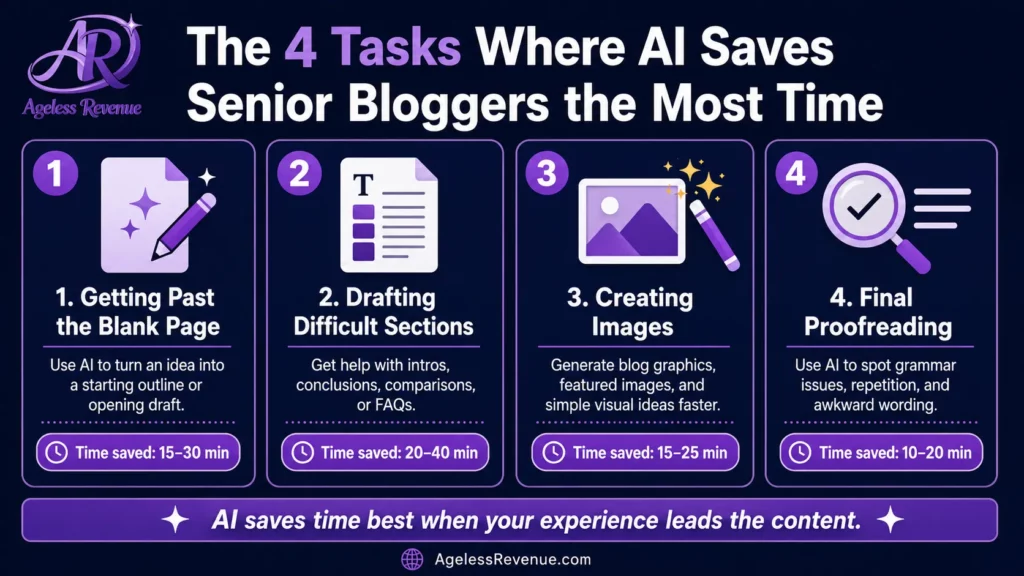
The 4 Tasks Where AI Saves Senior Bloggers the Most Time
Task 1: Getting Past the Blank Page
With AI blogging for seniors, you can refine your ideas and present them more effectively.
AI blogging for seniors can help define your niche and attract a dedicated audience.
In the age of technology, AI blogging for seniors allows you to share your passions with the world.
As a senior, AI blogging for seniors opens doors to new opportunities and collaborations.
AI blogging for seniors can lead to meaningful connections with readers who appreciate your insights.
Utilizing AI blogging for seniors helps maintain your relevance in a rapidly changing digital landscape.
AI blogging for seniors is a strategic approach to modern writing that respects your expertise.
With AI blogging for seniors, the balance between technology and personal touch is essential.
AI blogging for seniors paves the way for a thriving blogging journey.
The hardest part of writing a blog post is often starting. AI tools eliminate this problem entirely.
Give ChatGPT your topic, your key points, and your keyword, and ask for an outline. Within seconds, you have a structure to work from — headings, subheadings, and suggested content for each section. You do not have to use it as given. Change the order, add sections, and remove what does not fit. But starting from a structure is far easier than starting from nothing.
Example prompt: “I am writing a blog post for retirees about the best lightweight garden tools for adults with arthritic hands. I want to cover: why grip matters, the 5 tools I personally recommend, what to look for when buying, and common mistakes. Please write an outline with suggested headings.”
Task 2: Drafting Sections You Find Difficult
Most bloggers find some sections easier to write than others. Introductions are often the hardest. Transitions between sections. Conclusions that say something useful rather than just summarising.
Give Claude or ChatGPT the section heading and the key points you want to make, and ask for a draft. Then rewrite it in your own voice, adding specific detail and personal experience. This is significantly faster than drafting from scratch.
Example prompt: “Write an introduction for a blog post about accessible raised bed gardening for adults with limited mobility. The tone should be warm and encouraging, not medical. The reader is a retiree who loves gardening but is finding it increasingly difficult due to joint pain.”
Task 3: Creating Images Without Design Skills
Canva’s free plan gives you access to thousands of professional templates, AI image generation, and simple editing tools — all without any design background.
For affiliate bloggers, the most useful Canva tasks are:
Featured images: Use a Canva template sized for blog (1920×1080px). Add your post title as a text overlay. Use a relevant photo from Canva’s free library or an AI-generated image as the background.
Pinterest pins: Pinterest requires tall 2:3 ratio images (1000×1500px). Canva has dedicated Pinterest templates. Create two or three pin variations per post with different images and slightly different titles — this gives Pinterest more opportunities to surface your content in search.
Infographics: For posts that involve steps, comparisons, or lists, a simple Canva infographic can make complex information much clearer than text alone.
Task 4: Checking Your Writing Before Publishing
Grammarly’s free browser extension works directly in your WordPress editor. As you write, it flags grammar errors, misspellings, and unclear sentences in real time. Before you publish, it gives you a summary of suggestions to review.
Accept the grammar corrections. Be selective about style suggestions — sometimes they make your writing sound less like you, which defeats the purpose.
How to Write a Blog Post With AI Assistance (Step by Step)
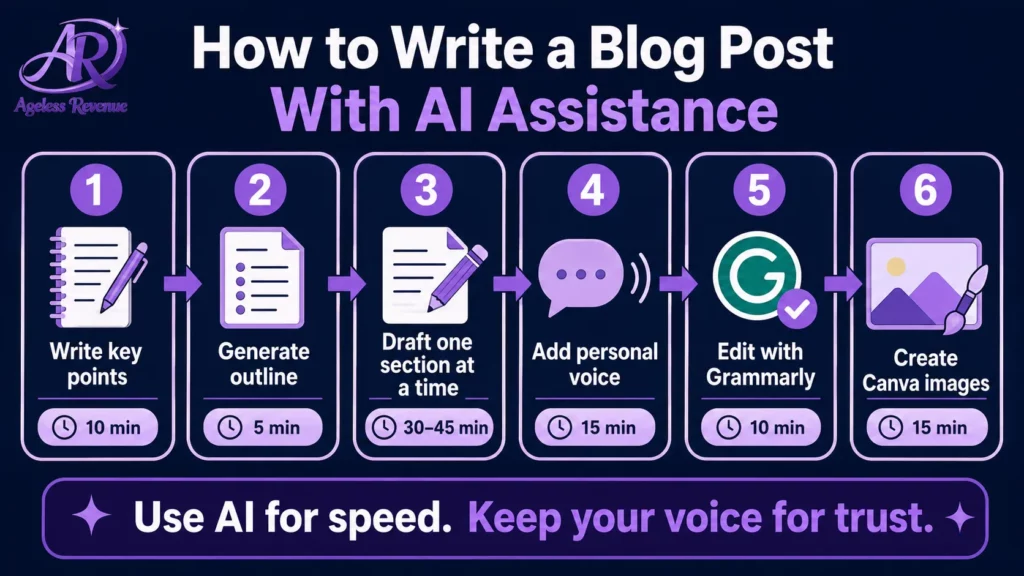
Step 1 — Write your key points first (10 minutes). Before opening any AI tool, spend 10 minutes writing down: the specific experience you want to share, the products or approaches you want to recommend, the questions your reader is probably asking, and anything you want to say that nobody else would say.
This is your raw material. AI cannot generate it. If you skip this step, your AI-assisted post will sound generic because it will be.
Step 2 — Generate an outline (5 minutes). Give ChatGPT your topic, your key points, and your keyword. Ask for a blog post outline. Adjust it to match what you actually want to say.
Step 3 — Draft one section at a time (30–45 minutes). Work through the outline section by section. For each one, either write it yourself or ask Claude/ChatGPT for a draft paragraph based on the specific points you noted in Step 1. Whichever approach you use, add your specific detail and rewrite any sentence that does not sound like you.
Finally, remember that AI blogging for seniors is a tool to enhance your already valuable insights.
Step 4 — Add your personal voice explicitly (15 minutes). Go through the finished draft and look for places to add: “In my experience…”, “After trying three different approaches, I found…”, “The mistake I made initially was…”, “What surprised me about this product was…”. These moments of genuine personal experience are what convert readers into buyers.
Step 5 — Edit with Grammarly (10 minutes) Run the finished post through Grammarly. Accept grammar corrections. Read the post aloud — if any paragraph sounds robotic, rewrite it.
Step 6 — Create images in Canva (15 minutes). Open your saved Canva templates. Swap the background image and update the text overlay with your post title. Create one featured image and two Pinterest pin variations.
Total time: approximately 90 minutes to 2 hours for a 1,200-word post. Without AI tools, the same post typically takes 3–4 hours.
The Mistakes Senior Bloggers Make With AI Tools
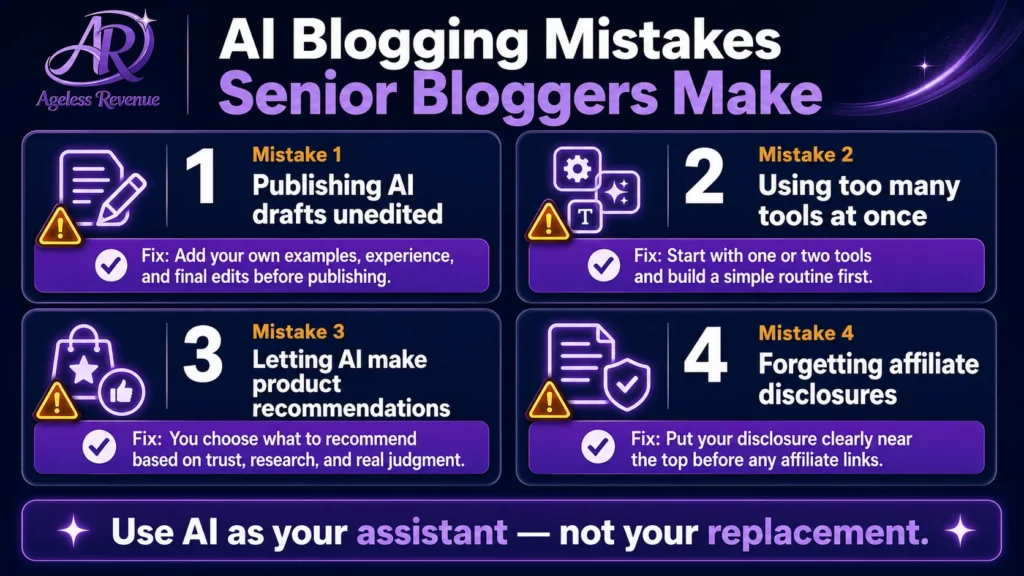
Publishing AI drafts without editing them. An unedited AI draft is the fastest way to produce content that neither ranks nor converts. The draft is a starting point. The editing — especially adding specific personal experience — is what makes it valuable.
Using too many tools at once. Starting with five AI tools simultaneously creates overwhelm and produces no better results than starting with one. Begin with ChatGPT for writing and Canva for images. Add others only when you have identified a specific gap.
Letting AI make your product recommendations. If you ask ChatGPT, “What are the best garden kneelers for seniors?” and publish its answer, you are publishing content that any reader could get directly from ChatGPT. The affiliate content that converts is your personal recommendation based on your personal experience.
Forgetting to disclose affiliate links. AI tools do not add your affiliate disclosures. You must add these manually to every post that contains affiliate links. This is a legal requirement and a trust signal.
Tools Specifically Suited to Senior Bloggers
ChatGPT (free): Writing outlines, drafts, FAQs, headline ideas. Most senior bloggers find the interface intuitive — it is simply a conversation.
Claude (free): Longer drafts and editing. Many seniors prefer its writing style to ChatGPT’s.
Canva (free plan generous): Images, Pinterest pins, infographics. The drag-and-drop interface requires no design training.
Grammarly (free plan sufficient): Proofreading. The browser extension works directly in WordPress, so there is no copy-pasting required.
Google Search Console (free): Shows which of your posts are appearing in search results. Check monthly.
All four of these have free plans that cover everything most senior bloggers need in their first year of blogging.
For a complete list with specific guidance on each tool, read Best AI Tools for Retiree Bloggers.
Frequently Asked Questions
Do I need any technical skills to use these AI tools?
No. ChatGPT and Claude work like text conversations — you type what you need and read the response. Canva uses drag-and-drop with no design knowledge required. Grammarly works automatically in the background. Google Search Console has a straightforward dashboard. Most senior bloggers feel comfortable with the basics within one or two sessions.
How do I make sure my AI-assisted posts sound like me?
The most effective method is to write your key points and personal experiences before using any AI tool. Then use AI for the structure and draft, and rewrite any sentence that does not match your voice. Reading the post aloud before publishing is the best test — if a paragraph sounds stiff or as if it came from a textbook, rewrite it.
Can I use AI for product reviews?
You can use AI to generate the structure of a product review — introduction, pros, cons, verdict, and FAQ. But the actual review content must come from your personal experience with the product. A product review that converts affiliate clicks contains specific details that only someone who has used the product could know.
What if I am worried about AI making mistakes?
AI tools do make mistakes — they sometimes state incorrect facts, use outdated information, or make up details that sound plausible but are wrong. Always review AI output carefully, especially any specific claims, statistics, or product details. Your personal expertise is your safeguard against AI errors.
Your Next Step
Open ChatGPT’s free plan at chat.openai.com. Type: “I am writing a blog post about [your topic] for retirees. Write me an outline with 5 main sections and 4 FAQ questions.” Spend 10 minutes adjusting it to match what you actually want to say. Then write the post from that structure.
For a complete structured path to building your affiliate blog with training, hosting, and a community of other senior bloggers, try Wealthy Affiliate free →
This post contains affiliate links. If you buy through them, I may earn a small commission at no extra cost to you.