If the idea of building a website makes you feel nervous, you are in the right place. This guide is written specifically for retirees and complete beginners who have never built a site before — and it assumes zero technical knowledge. Every step is explained in plain English, nothing is skipped, and you will know exactly what to do next at every point.
Starting your first affiliate site can feel exciting… and also a little intimidating if you’re not “techy.” The good news is that in 2026, you can build a clean, beginner-friendly website without coding, without complicated tools, and without turning it into a stressful project.
This guide is written for calm progress—especially if you’re a retiree or a true beginner who wants clear steps, simple choices, and a plan you can repeat. You’ll learn what to do first, what to skip for now, and how to avoid the common “I’m stuck” moments that waste hours.
If you want printable checklists to go with this guide, grab the free Affiliate Marketing Starter Kit here:
https://agelessrevenue.com/starter-kit/
TL;DR (2026)
• Pick a niche direction you can stick with for months.
• Get a domain + hosting and connect them (SSL on).
• Install WordPress and choose a clean theme (GeneratePress is great).
• Set the essentials: permalinks, site title, basic layout, simple menu.
• Create key pages: Home, About, Contact, Privacy Policy, Affiliate Disclosure.
• Publish your first 5–10 helpful posts (beginner guides + checklists work best).
• Apply to 1–2 affiliate programs after your site looks “real.”
• Focus on SEO first, then add one extra traffic channel (Pinterest works well for many beginners).
Why Affiliate Sites Make Sense for Beginners (2026)
Affiliate marketing is popular because it’s one of the simplest online business models to start. You don’t need to create a product, stock inventory, ship anything, or handle customer service. Your job is to publish helpful content and recommend useful products or services with tracked links.
If you are still deciding whether this business model fits your stage of life, read my guide to affiliate marketing for retirees for a calm, realistic overview.Here’s the basic idea: you write a post that solves a problem, you recommend a tool or resource that helps, and if someone buys after clicking your affiliate link, you earn a commission. In 2026, this still works very well—especially if you focus on being genuinely helpful and clear.
Affiliate sites are also “compound” businesses. The first month often feels slow. The second month feels a bit better. Then, as your library grows, you start getting more traffic, more clicks, and more sales—without having to start from zero each day. One good post can earn for months (sometimes years). Your job is simply to build the library.
Step 1: Pick a Calm Niche (2026)
A niche is the topic your website focuses on. Choosing a niche doesn’t mean you’re locking yourself into something forever. It means your site has a clear direction so readers (and Google) understand what you’re about.
A strong niche usually has three things:
- Real demand (people search for it).
- Products or services people buy.
- Enough depth for at least 30+ posts over time.
The beginner niche test (super simple)
Answer these four questions:
• Who is your reader? (Example: retirees learning a new hobby, seniors improving health, beginners learning WordPress)
• What problem do they want solved? (Example: “I need a simple plan to start” or “I want tools that are easy to use”)
• What do they buy to solve it? (Supplies, equipment, subscriptions, courses, software)
• Can you list 20 post ideas right now? If yes, you have enough runway.
Retiree-friendly niches that work well in 2026
• Low-impact fitness at home
• Accessible gardening (raised beds, ergonomic tools)
• Beginner crafts and DIY
• Simple cooking and small appliances
• Travel comfort for seniors
• Tech for seniors (simple devices + how-tos)
• Affiliate marketing for beginners over 60
If you want more details on how to do research, read. If you want a calm way to validate your niche before you invest lots of time, start here :
Step 2: What You Need to Start Your Affiliate Site (2026)
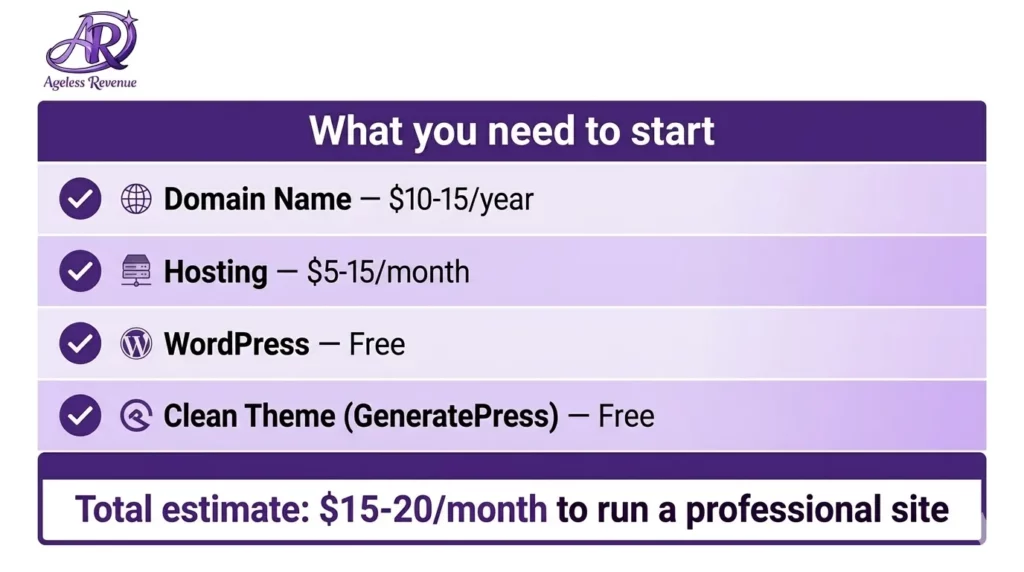
You only need a few basics:
• Domain name: usually $10–$15 per year
• Hosting: often $3–$10 per month on beginner plans (pricing varies)
• WordPress: free
• Theme: a clean, lightweight theme (GeneratePress is excellent)
Most beginners can launch for roughly $40–$100, depending on hosting and any extras. The calm approach is to start simple, publish content, and upgrade only after you have traffic.
Hosting checklist (beginner-friendly)
Choose hosting that has:
• One-click WordPress install
• Free SSL (https)
• Helpful support (chat or tickets)
• Backups (included or easy to add)
• Decent speed and uptime reputation
Tip: Don’t get stuck comparing hosting companies for weeks. Pick a reputable beginner host, launch, and focus on content. Content matters more than “perfect hosting” in the beginning.
Step 3: Setup Step-by-Step (Domain → Hosting → WordPress) (2026)
If you’ve never done this before, follow this sequence:
- Buy your domain (from your host or a registrar like Namecheap/GoDaddy).
- Connect your domain to your hosting (sometimes automatically; sometimes you update DNS nameservers).
- Turn on SSL so your site loads with https://
- Install WordPress using your host’s one-click installer.
- Log in at yoursite.com/wp-admin
Beginner note: DNS is the part that confuses most people. If your domain isn’t connecting, don’t panic. This is normal. Hosting support can usually fix it quickly if you tell them: “My domain isn’t pointing to the hosting yet—can you help confirm my DNS settings?”
What to do if something doesn’t work (quick troubleshooting)
• If your site doesn’t load: Wait 30–60 minutes after DNS changes. Sometimes it takes a few hours. If it’s still not working, contact hosting support.
• If WordPress login doesn’t work: Make sure you’re using /wp-admin. Use “Lost your password” if needed.
• If the browser says “Not secure”: SSL may not be fully enabled yet. Turn it on in hosting, then confirm your WordPress URL settings use https.
• If you see a “coming soon” page: Some hosts enable it by default. Disable it in hosting or ask for support.
• If the site looks strange on mobile: Large images can break layouts. Use smaller images and avoid copy/pasting huge images from other sources.
Calm tip: keep a tiny “site notes” document with your domain login, hosting login, WordPress login URL, and admin email. It saves hours later.
Step 4: WordPress Settings to Do Immediately (2026)
These settings prevent headaches later.
Permalinks (do this first)
Go to Settings → Permalinks → choose “Post name” → Save.
This creates clean URLs like /start-your-first-affiliate-site/ instead of messy links with numbers.
Site title + tagline
Go to Settings → General and set:
• Site Title: your brand name
• Tagline: one clear sentence about what you help with
Timezone + visibility
Set your correct timezone (so scheduling works) and make sure “Discourage search engines” is not checked once you’re ready for traffic.
Plugins (a beginner-safe rule)
In 2026, keep plugins minimal. Add only what you need:
• SEO: The SEO Framework
• Contact form: one lightweight form plugin
• Backups: only if your host doesn’t include them
• Security: optional, but helpful
Too many plugins can slow your site and cause conflicts. Start simple.
Step 5: GeneratePress Setup Tips (Simple + Senior-Friendly)
Before you go live, work through the full affiliate website launch checklist to make sure Google finds your site from day one.
GeneratePress is a strong theme choice because it’s lightweight and content-focused. For an affiliate site, clarity matters more than fancy design.
Use these beginner-friendly design basics:
• Larger text than default (tiny text loses readers)
• Comfortable line spacing
• Short paragraphs (2–4 lines)
• Clear headings for scanning
• Simple menu (5 items or less)
Home
Start Here
Blog
About
Contact
A good beginner sidebar includes:
• Starter Kit CTA
• Top posts (3–5 links)
• Short “About” snippet
Avoid stuffing your sidebar with too many widgets. Too many options create decision fatigue.
Step 6: Create Your Key Pages (2026)
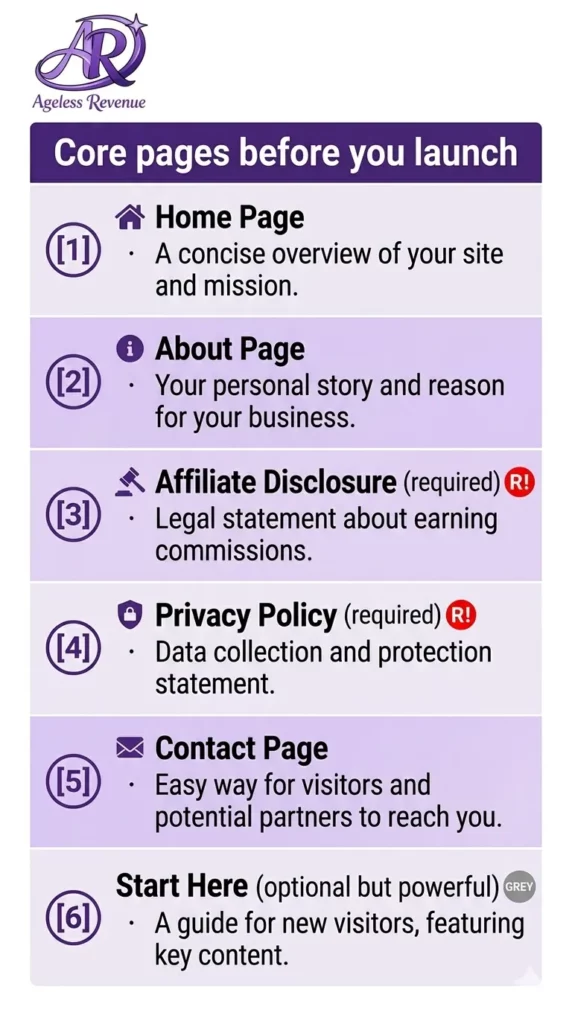
Before you apply to affiliate programs, your site should look real and trustworthy. Start with:
• Home: welcome + who you help + links to your best posts
• About: your story + why you created the site
• Contact: simple form
• Privacy Policy: basic template is fine
• Affiliate Disclosure: required for compliance and trust
Beginner-friendly About page structure
- Who you are (2–4 sentences)
- Who you help
- What visitors will find here (guides, reviews, checklists)
- A gentle invitation to download the Starter Kit
Quick “Start Here” page (optional but powerful)
If visitors land on your site and don’t know what to do next, they leave. A simple Start Here page fixes that. Keep it short:
• A welcome sentence (“If you’re new, start here…”)
• Links to your 3 best beginner posts
• One line about your free Starter Kit
• A calm next step (“Read this first, then this…”)
Step 7: Your First 10 Posts (So You Never Run Out of Ideas)
Most beginners stall because they don’t know what to write. Use this simple plan.
Start with these 5 foundation posts
- Beginner guide: “How to start ____ step-by-step (2026)”
- Checklist: “Beginner checklist for ____ (2026)”
- Mistakes post: “Common ____ mistakes beginners make (and fixes)”
- Best-for-beginners list: “Best ____ for beginners (2026)”
- Simple review: one product or service you can recommend honestly
Then add 5 support posts
- FAQ post: answer the top 10 questions your audience asks
- Comparison post: “A vs B” (once you understand both)
- How-to tutorial: teach one clear action
- Buyer guide: “What to look for when choosing ____”
- Beginner resources page: recommended tools in one place
A simple writing template you can reuse (2026)
Use this structure for almost any post:
• Short intro: who it’s for + what you’ll help them do
• Step-by-step section with headings
• Tips section: what you’d do if starting today
• Mistakes section: what to avoid
• FAQ: 3–5 beginner questions
• Gentle CTA: Starter Kit or your recommended tool
This makes writing easier and makes your site feel consistent.
Step 8: Apply to Affiliate Programs (2026)
Apply after your site has:
• About + Contact + Privacy Policy + Disclosure
• 2–5 real posts published
• Clean navigation
Beginner-friendly choices:
• Amazon Associates (readers trust it, huge product variety)
• One affiliate network (Impact, ShareASale, CJ)
Approval tip: Some programs decline new sites if they look unfinished. A clean About page plus a few helpful posts makes a big difference.
Step 9: Where to Put Affiliate Links (Beginner-Safe)
A simple rule: place links where readers are deciding what to do next.
Good places for affiliate links:
• After you explain the solution (“If you want an easy option, this is a good beginner choice…”)
• Near the end, in a short “My recommendation” section
• In a resources section (only if it fits naturally)
Avoid:
• Stuffing links into every paragraph
• Linking without context
• Overwhelming readers with too many options
One helpful link in the right place is better than ten links scattered everywhere. Step 10: SEO Basics With The SEO Framework (2026)
The SEO Framework is clean and lightweight. Use it consistently, and you’ll get strong results over time.
For every post, do these 6 actions:
- SEO title: clear benefit + beginner wording + (2026) if relevant
- Meta description: 1–2 sentences that say what the reader will get
- One main keyword: use it naturally in the title and near the top
- Headings: break the post into clear sections
- Internal links: add 2–5 links to related posts on your site
- Image ALT text: describe the image in plain language
Beginner SEO tip: Don’t chase perfection. Do the basics consistently. Consistency wins.
Traffic in 2026: A Calm Plan That Works
Without visitors, your site can’t earn commissions. The calm plan is:
• SEO first (publish helpful posts that answer real questions)
• One support channel, second (Pinterest is great for evergreen posts)
• Email list optional (your Starter Kit is perfect for this)
Beginner keyword research without fancy tools
You don’t need expensive tools. Use:
• Google autocomplete
• “People Also Ask” questions
• Forums and Facebook groups (repeat questions = content ideas)
• Amazon reviews (common complaints = topics)
Then write one post per question. Over time, that becomes a helpful library.
The calm 8-week routine (so you actually finish)
Week 1: niche choice + WordPress setup + key pages
Week 2: publish Post #1 + add one image + basic SEO title/description
Week 3: publish Post #2 + add internal links
Week 4: publish Post #3 + add a short FAQ
Week 5: apply to 1–2 affiliate programs
Week 6: publish Post #4 + add gentle CTAs
Week 7: publish Post #5 + improve one older post
Week 8: improve one thing across the site (speed, links, headings, clarity)
Even if you go slower, the routine still works. The point is steady progress without burnout.
What Your First Affiliate Site Should Look Like When It Is Ready to Launch
A common reason retiree bloggers delay launching is that they are not sure what “ready” actually looks like. They keep tweaking the design, adding pages, and adjusting colours — when the site is already good enough to go live.
Here is a simple checklist. If you can tick every item below, your site is ready. Not perfect — ready. There is a big difference, and “ready” is what matters.
Launch Checklist (Before You Go Live)
Your site is ready to launch when it has all of these
- A clear site title and tagline — someone landing on your homepage should understand within five seconds what your site is about and who it is for
- A Home page — even a simple one that introduces your topic and links to your most important content
- An About page — a short paragraph about who you are and why you write about this topic. It does not need to be long. Two or three paragraphs is enough.
- An Affiliate Disclosure page — a standalone page clearly stating that your posts contain affiliate links. This is a legal requirement and builds trust with readers.
- A Privacy Policy page — required if you are collecting any data, including email addresses or using Google Analytics. Free generators like TermsFeed create one in minutes.
- A Contact page — a simple form so readers can reach you. WPForms free version handles this.
- At least three published blog posts — these are your proof of content when you apply to affiliate programs. Each one should answer a real question in your niche.
- A simple, readable menu — Home, Blog, About, Start Here (optional), and Contact. That is all you need.
- SSL certificate active — your URL should show https:// (with the padlock), not http://. Your host activates this for you — check it is on before you share the site anywhere.
- Readable on mobile — open your site on your phone and check that the text is a comfortable size, the menu works, and nothing looks broken.
- No broken links or placeholder text — search your posts for any “lorem ipsum” placeholder text, check all your internal links actually work, and make sure images have loaded correctly.
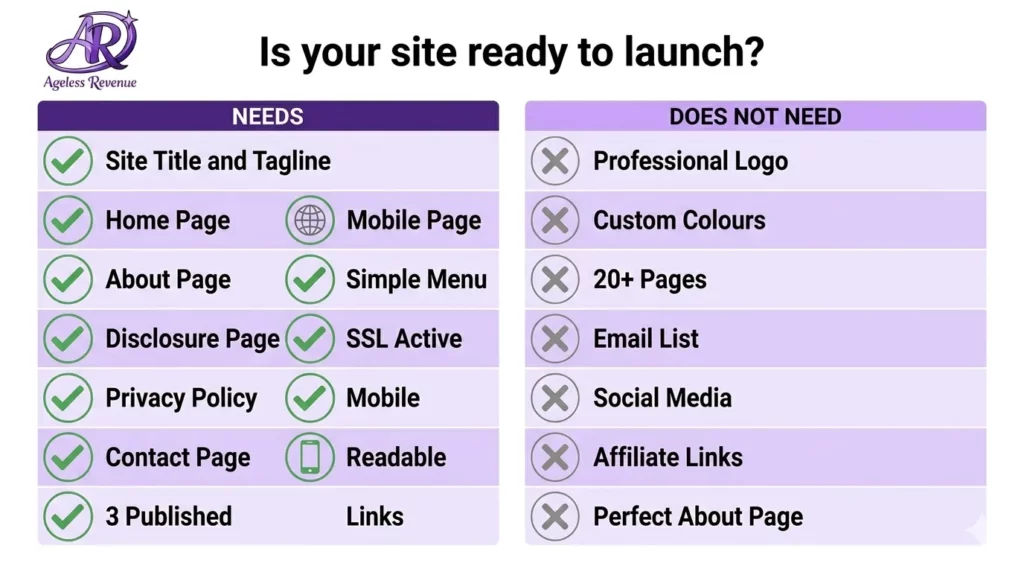
What your site does NOT need before launching
- A professional logo (a text-based site name works perfectly)
- Custom brand colours or a designed header image
- More than three to five published posts
- An email list is set up
- Social media accounts linked
- Affiliate links already in place
- A perfectly written About page
All of those things are valuable — but they come after your site is live, not before. Waiting for any of them to be perfect before launching is one of the most common ways beginners lose months of potential progress.
If you have ticked all the items in the first list above, your site is ready. Publish it today.
• Permalinks set to “Post name.”
• Menu organized (Home, Start Here, Blog, About, Contact)
• SSL enabled (https)
• Sitemap enabled (SEO Framework usually does this)
• Google Search Console added
• Basic analytics installed
• Images compressed (avoid huge files)
• Affiliate disclosure visible and clear
Mini Case Study (2026): What a Calm Beginner Affiliate Site Looks Like
Let’s make this real. Imagine you choose the niche “easy home fitness for beginners over 60.” You’re not competing with giant fitness websites. You’re building a calm, helpful site that answers beginner questions clearly. In 2026, that approach works because people don’t just want information—they want guidance that feels safe and doable.
Here’s what your first month could look like:
• Week 1: set up WordPress, create your key pages, publish your first beginner guide.
• Week 2: publish a checklist post and link it to your first post.
• Week 3: publish a mistakes post and add a short FAQ section.
• Week 4: publish a “best for beginners” post where affiliate links fit naturally.
Now your site looks real, focused, and helpful. It’s also ready for affiliate approvals because you have core pages and multiple posts that clearly serve one audience.
Most importantly, this process is repeatable. Next month, you will publish four more posts. Over time, some posts start bringing traffic from Google. A few readers click on your recommendations. That’s how affiliate income grows—calmly and steadily—without needing a huge following or daily social posting.
Common Beginner Mistakes to Avoid (2026)
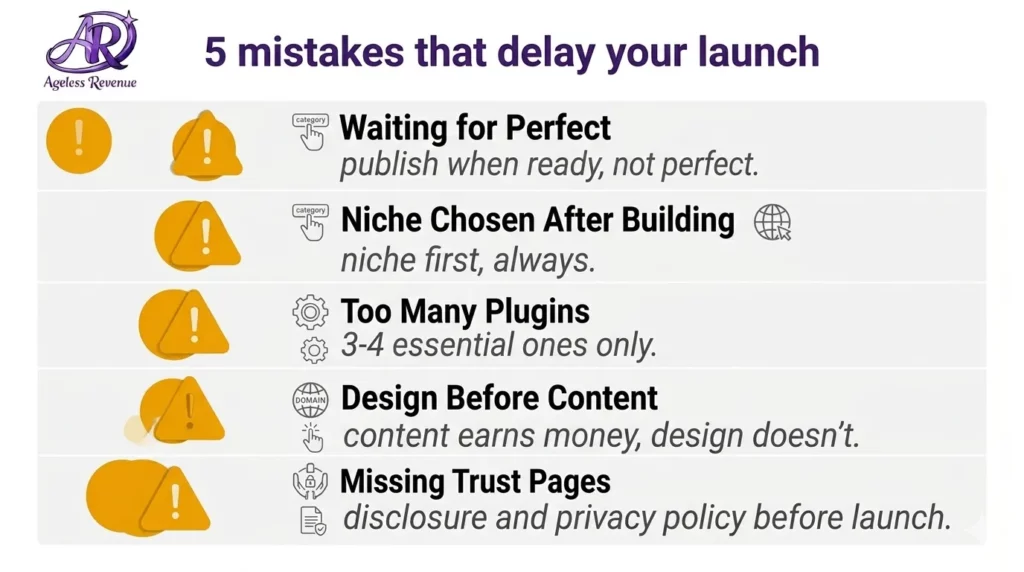
Mistake 1: Trying to build the “perfect” site before publishing anything
Many beginners spend weeks picking fonts, colors, and plugins. A clean site is important, but content is what grows your traffic. Permit yourself to launch “simple,” then improve later. A helpful post on a plain site beats an empty site with a perfect design.
Mistake 2: Choosing a niche that’s too broad
“Health,” “travel,” or “making money online” can be too broad for a new site. Narrow it so you can become the helpful “go-to” resource for a specific person. For example: “low-impact home fitness for beginners over 60” or “budget travel comfort tips for seniors.” Narrow first, expand later.
Mistake 3: Writing for everyone instead of one reader
If your post tries to help everyone, it often helps no one. Picture one person reading on their phone, maybe a little overwhelmed, wanting a clear next step. Write to that person. Use calm language, short paragraphs, and simple explanations.
Mistake 4: Publishing short, vague posts
Google and readers want real answers. If a post is thin, add examples, steps, and small checklists. You don’t need to write fluff, but you do want to be thorough. If you mention a tool, explain when to use it, who it’s for, and what to do if it doesn’t work.
Mistake 5: Forgetting internal links and next steps
A visitor should never finish a post and feel stuck. Add a short “Next step” section near the end with links to two related posts. This keeps people on your site longer and helps your SEO.
How to Choose Topics That Actually Rank (2026)
You don’t need fancy keyword tools to start. You need to match real questions people are already typing into Google. Here are simple ways to find those questions:
- Google suggestions
Start typing your topic and look at the autocomplete suggestions. Those are real searches. - People Also Ask boxes
Search your topic and look at the “People Also Ask” questions. Each question is a potential heading or a full post. - YouTube search suggestions
YouTube autocomplete can reveal what beginners are trying to learn. Even if you don’t make videos, those phrases are great article topics. - Amazon reviews and product Q&A
Look at reviews for popular products in your niche. Notice what beginners complain about (“too complicated,” “hard to assemble,” “not for seniors”)—those complaints make great post ideas. - Forums and Facebook groups
Repeated questions are content gold. If the same question is asked every week, write a post answering it clearly and calmly.
A beginner-friendly “topic ladder” (easy → harder)
• Start with “what is” and “how to” posts (easy wins)
• Then add checklists and mistakes posts (high trust)
• Then add “best for beginners” lists (high conversions)
• Finally, add comparisons and deeper reviews (strong buyer intent)
Trust and Compliance (2026): Simple Rules That Protect You
Affiliate marketing works best when readers trust you. In 2026, trust is also part of compliance. Here are beginner-safe habits:
• Always disclose affiliate links
Keep a short disclosure near the top of posts that include affiliate links.
• Recommend with honesty
If something has a downside, mention it. Honest reviews convert better because they feel real.
• Keep claims realistic
Avoid big income promises. Focus on what your readers can control: publishing consistently, learning the basics, and improving step by step.
• Make your site easy to contact
A simple contact page builds trust and helps with approvals.
• Use clear privacy policy language
If you collect emails or use analytics, your privacy policy should reflect that. Most sites start with a template and adjust as needed.
Optional but Powerful: Building an Email List Without Overwhelm (2026)
An email list is not required to start, but it can make your affiliate site stronger because it gives you a way to bring people back. The calm way to start is with one simple freebie (your Starter Kit is perfect) and one helpful weekly email.
A beginner-friendly email list plan:
• Offer one clear free download: a checklist or starter guide
• Add one opt-in box in your sidebar and one inside your Start Here page
• Send one email per week with one tip and one link back to a helpful post
You don’t need fancy sequences at first. A simple weekly calm progress email is enough.
A Simple Monetization Plan (2026)
Many beginners put links everywhere and hope something happens. A better plan is to be intentional:
Phase 1: Content first (weeks 1–4)
Focus on publishing helpful posts and building trust. Add affiliate links lightly where they truly fit.
Phase 2: Add a few buyer posts (weeks 5–8)
Create posts that help people decide, like:
• Best ____ for beginners (2026)
• ____ vs ____ (which is better for seniors?)
• Is ____ worth it in 2026?
Phase 3: Improve what already works (ongoing)
Once you have traffic, look at your posts with the most visitors and improve them:
• Add clearer headings
• Add 2–3 internal links
• Add a short FAQ section
• Add a stronger recommendation moment where the link fits naturally
This is how small sites grow steadily and safely.
FAQs (2026)
Q: How much does it cost to build an affiliate website in 2026?
A: Most beginners can launch for about $40–$100 for a domain and a year of basic hosting. Paid themes and plugins are optional.
Q: Can you make $100 a day with affiliate marketing?
A: It’s possible, but it usually takes time. Most beginners start small and grow as content and rankings improve. Consistency and patience matter most.
Q: How do beginners start as affiliates?
A: Pick a niche, set up a simple website, join 1–2 beginner-friendly programs, and publish helpful content regularly with clear disclosures.
Q: How do I know what content to publish?
A: Write posts that answer real questions. Use Google’s People Also Ask, forums, reviews, and repeated beginner questions.
Q: How long does it take to get traffic?
A: Many new sites see their first visitors after a month or two. Publishing consistently and targeting specific questions helps traffic build faster.
Final Thoughts (2026): Keep It Simple and Keep Going
Starting your first affiliate site isn’t about building something perfect on day one. It’s about creating a simple, trustworthy home base online and improving it one calm step at a time.
Your calm next steps:
• Choose one niche direction you can write about regularly.
• Set up a clean WordPress site you control.
• Publish helpful posts that answer real questions.
• Join a few affiliate programs and place links honestly and clearly.
• Stick to a simple weekly routine so your site grows steadily over time.
If you want the calm checklists that make this easier, start here with my Starter Kit.
CTA: Want training + hosting + support in one place?
If you’d like an all-in-one beginner platform (training + hosting + support), here’s my recommended next step (affiliate link):
Final encouragement: If you feel behind, remember that one helpful post per week adds up to 12 posts in three months. That’s enough to start seeing traffic. Keep your site simple, keep your promises, and keep going. Calm consistency is the strategy that wins in 2026.
This is hands down one of the most practical and beginner-friendly guides I’ve seen on starting an affiliate website. It’s easy to get overwhelmed when diving into affiliate marketing for the first time, but the way you broke everything down—from picking a niche to getting that first bit of traffic—makes it feel totally doable.
I especially appreciated the reminders about long-term success: updating content, building trust, and staying transparent with affiliate links. It’s not just about quick wins—it’s about creating something valuable and sustainable. Great job, Gila! Definitely bookmarking this to share with a few people who keep asking me how to get started the right way.
Thank you so much, Jason! I’m really glad the guide resonated with you—it means a lot coming from someone who clearly understands the challenges of getting started. You’re absolutely right: long-term success in affiliate marketing comes down to trust, value, and consistency, not just chasing quick wins. I appreciate you bookmarking it and sharing it with others—that’s the biggest compliment I could ask for. Wishing you continued success, and feel free to drop by anytime with questions or tips of your own!
All the best
Gila
Great guide! I love how you break down each step clearly—it really helps take the overwhelm out of starting an affiliate site. The focus on picking a niche you enjoy and building realistic income goals is super encouraging.
I’m curious—have you noticed certain niches or strategies that help beginners earn their first commission faster?
Thanks so much, Kiersti! I’m really happy to hear the guide helped make things feel a bit less overwhelming—that was exactly my goal. ???? Picking a niche you genuinely enjoy makes such a big difference, especially when you’re in it for the long run.
As for getting that first commission faster, I’ve noticed that niches with clear buyer intent—like product comparisons or “best of” lists—can give beginners a quicker win. Also, focusing on solving specific problems for a defined audience (even a small one) tends to build trust faster. Happy to share more if you’re exploring ideas—just let me know!
All the best
Gila
I love the way you elaborated this opic. Affiliate marketing is a great way to start earning money online, especially if you’re broke. It’s cheap to get into, no need for stock or shipping, and you work on your own schedule. You promote products through links, and when someone buys, you earn a commission. Platforms like Amazon and ShareASale make it easy for beginners.
Spending on affiliate marketing is set to hit $8.2 billion in the U.S., so it’s clearly growing. Lots of people are making $50–$100 a day once they get the hang of it, even without prior experience.
It’s low-cost, flexible, and a great way to learn new skills. So, why not give it a shot?
Hi Linda,
Thank you so much for your thoughtful comment, and I apologize for the delayed response—I’ve been dealing with some health issues, but I’m back now! I’m so glad you found the article helpful. You’re absolutely right—affiliate marketing is an excellent option for those just starting out, especially since it has such low upfront costs and offers flexibility. No stock, no shipping, and the ability to work on your own schedule make it a fantastic opportunity for anyone looking to earn money online.
It’s also great to see that you pointed out the incredible growth in affiliate marketing, with spending on track to hit $8.2 billion in the U.S. It’s clear that this industry is only going to continue expanding, and many people are already seeing success, even without prior experience.
Thanks again for sharing your thoughts, Linda! I’m excited for anyone who decides to give affiliate marketing a shot—it really can be a game changer.
Best,
Gila
Thanks for laying it all out so clearly. I really appreciate how you broke the process down into manageable, confidence-building steps. It’s refreshing to see advice that doesn’t just hype up the potential earnings, but actually emphasizes the foundational work like niche research, honest reviews, and trust-building content.
One thing that stood out to me (and often gets glossed over in other posts) was your emphasis on realistic expectations like how $100/day won’t happen overnight, and why focusing on value and consistency is key.
As someone currently researching niches, I found your method of cross checking interest, profitability, and competition very helpful. I also took away some useful tips on wordpress plugins and webpage content and layout.
Have you found it more effective to start with product reviews or broader “how-to” content when launching a brand new site with no traffic yet? I am torn between writing helpful guides before doing product focused posts early on.
Also, I’d love to hear how often you revisit and update old content. I imagine that keeps older posts ranking well, but I’m curious if there’s a certain trigger (e.g., once per quarter, after traffic drops, etc.)
Again, thanks for sharing such a thoughtful, encouraging guide to staring in affiliate marketing!
Hi Saschi,
Thank you so much for your kind words and for taking the time to leave such a thoughtful comment. I truly apologize for the delayed response—I’ve been dealing with some health issues, but I’m back now and so glad to see your feedback!
I’m thrilled that you found the step-by-step guide helpful and that the focus on realistic expectations resonated with you. It’s so important to emphasize the hard work and consistency required, especially in the beginning when results can take time. I’m glad the niche research tips and WordPress suggestions were useful for you as well!
As for your question, I personally recommend starting with helpful “how-to” content first, especially for a brand-new site with no traffic. Establishing authority and providing value through educational content can help build trust and attract organic traffic. Once you’ve established that foundation, you can start incorporating product reviews, which will benefit from the trust and traffic you’ve built.
In terms of revisiting and updating old content, I usually make it a habit to revisit posts every 3–6 months. It’s a great way to ensure that your information stays current and relevant, which helps maintain or improve rankings. If I notice traffic starting to dip on a specific post or the content feels outdated, that’s usually my trigger to give it an update.
Thanks again for your thoughtful comment, Saschi! I’m so glad the guide helped, and I’m excited to hear about your progress as you move forward with affiliate marketing. If you have any more questions or need additional tips, feel free to reach out!
Best,
Gila