Social Media Affiliate Marketing for Retirees: The Complete Beginner’s Guide (2026)
Social media affiliate marketing sounds more complicated than it is. At its core, it is this: you share something genuinely useful on a platform you already use, someone buys through your link, and you earn a commission. No inventory. No customer service. No shipping.
Social media affiliate marketing is an exciting opportunity for retirees looking to monetize their online presence through trusted recommendations.
By engaging in social media affiliate marketing, retirees can leverage their social media skills to share valuable product insights.
Understanding social media affiliate marketing is crucial to ensure you select the best products for your audience.
For retirees, this model works particularly well. You already spend time on Facebook, Pinterest, or YouTube. You already have opinions about products you use and trust. And — crucially — your life experience gives you a credibility that younger content creators simply cannot replicate.
This guide covers everything you need to get started: what social media affiliate marketing actually involves, which platform suits your life best, how to set up your first account properly, what to post and when, and the mistakes that cost most beginners months of wasted effort.
Affiliate disclosure: This post contains affiliate links. If you buy through them, I may earn a small commission at no extra cost to you. I only recommend tools I genuinely believe help retirees succeed online.
TL;DR
- Social media affiliate marketing = share helpful content + recommend products you trust + earn commissions when people buy through your link.
- Pick one platform and learn it properly before adding a second
- Pinterest and Facebook are the most beginner-friendly platforms for retirees
- You need a niche, a consistent posting routine, and an affiliate disclosure — nothing else to start
- Most retirees see their first clicks within 2–4 weeks and first commissions within 1–3 months of consistent posting
- A blog paired with your social media produces far better long-term results than social media alone
What Social Media Affiliate Marketing Actually Is
Social media affiliate marketing means promoting products or services through social media posts using unique tracking links. When someone clicks your link and buys, the sale is tracked back to you, and you earn a commission. You do not handle the product, the payment, or the customer relationship.
The keyword is “through.” You are not selling — you are directing. Your job is to create content that helps people discover a product they will genuinely find useful. The merchant does the selling; you do the recommending.
This is different from influencer marketing, which typically involves large audiences and paid brand deals. Affiliate marketing is performance-based — you earn when someone actually buys, which means your income is directly tied to how helpful and targeted your recommendations are, not how many followers you have.
Why Retirees Have a Genuine Advantage
Your journey in social media affiliate marketing will begin with identifying the right niche and audience.
Every major social media platform’s algorithm currently rewards authenticity over production value. A senior who genuinely uses a mobility aid and explains exactly what works about it will consistently outperform a 25-year-old reviewing the same product from a script.
Your decades of real experience in a hobby, career, or lifestyle area mean your recommendations carry weight. A retired nurse recommending health supplements, a lifelong gardener recommending accessible garden tools, a former teacher recommending educational software — these recommendations have the kind of specific, credible detail that converts.
You also have time. The retirees who succeed at social media affiliate marketing are the ones who show up consistently for months. That consistency is far more achievable when you are not juggling a full-time job alongside your content creation.
Utilizing social media affiliate marketing allows retirees to monetize their expertise and experiences effectively.
With social media affiliate marketing, retirees can create meaningful connections with their audience and provide genuine recommendations.
Engaging in social media affiliate marketing is not just about sales; it’s about building trust and sharing knowledge.
Step 1: Choose Your Niche
Choosing the right products is essential in social media affiliate marketing to build credibility with your audience.
Your niche is the specific topic your social media presence focuses on. It needs to be specific enough that your content serves a clear audience — not so broad that you are competing with every general lifestyle account on the platform.
Strong niche choices for retirees combine personal knowledge with search demand:
- Accessible gardening for adults with mobility limitations
- Simple healthy cooking for one or two people
- Retirement travel — slow, comfort-focused, or budget-conscious
- Technology for seniors — smartphones, tablets, voice assistants explained simply
- Gentle fitness and joint health for adults over 60
- Beginner crafts — watercolour, quilting, woodcarving, model making
- Senior pet care
- Downsizing and home organisation after retirement
The right niche is not the most profitable one. It is the one you can talk about naturally, consistently, and with genuine knowledge for at least a year.
Step 2: Choose Your Platform
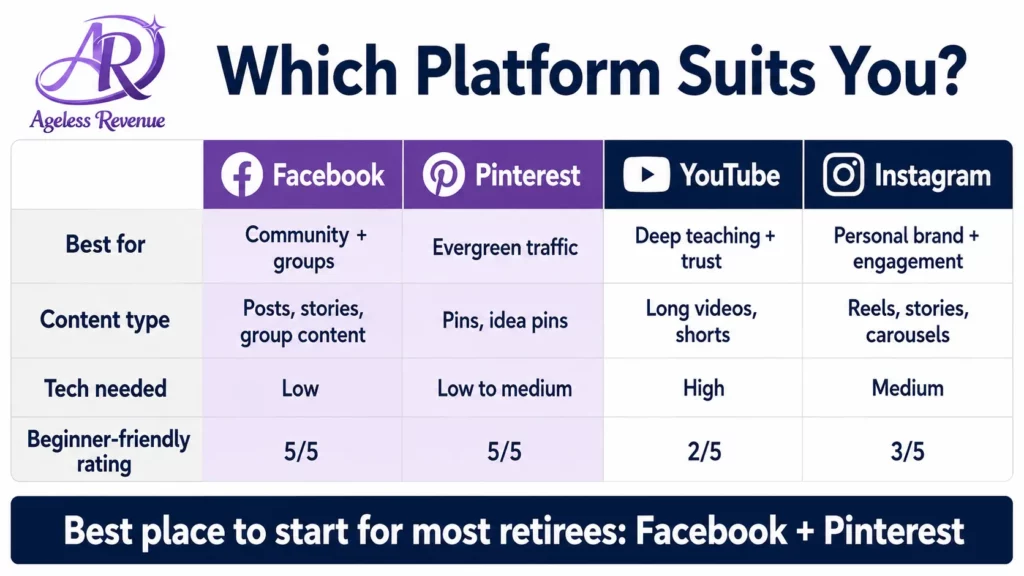
This is where most beginners waste time — trying to be present on every platform simultaneously. Pick one platform and learn it properly before considering a second.
Facebook — Best for Community and Conversation
Facebook’s core strength for affiliate marketers is community. Facebook Groups let you participate in existing communities around your niche topic or build your own. Group members ask questions you can answer helpfully, with a relevant product recommendation included naturally.
Facebook Pages work well for sharing blog posts, tips, and product recommendations to an audience that has explicitly chosen to follow you. Organic reach on Pages is lower than Groups, but a consistent Page builds long-term authority.
Best for: retirees who enjoy conversation, Q&A, and helping others solve problems. Niches that work especially well: health, gardening, cooking, and technology.
Pinterest — Best for Retirees Who Prefer Writing Over Video
Many retirees find success by focusing their social media affiliate marketing efforts on platforms where they feel most comfortable.
Pinterest is a visual search engine, not a traditional social media platform. Users search for specific things — “accessible raised bed garden,” “simple healthy recipes for one,” “best tablet for seniors” — and Pinterest surfaces pins that match those searches. Pins can drive traffic to your blog or directly to affiliate products for months or years after posting.
Each platform has unique advantages for social media affiliate marketing, so choose wisely based on your strengths.
Pinterest rewards consistency and keyword-rich descriptions over viral moments. It suits retirees who are willing to post regularly without expecting instant results.
Best for: retirees who enjoy creating visual content, linking to blog posts, or promoting physical products. Niches that work especially well: gardening, crafts, cooking, home organisation, wellness.
For a complete Pinterest setup guide, read Pinterest for Affiliate Marketing Beginners.
YouTube — Best for Retirees Comfortable Talking on Camera
Visual content often performs well in social media affiliate marketing, attracting more engagement and clicks.
Understanding your audience’s needs is key in social media affiliate marketing to tailor your recommendations effectively.
YouTube is the world’s second-largest search engine. How-to videos, product reviews, and tutorials rank in both YouTube and Google search — giving your content two discovery paths simultaneously. The affiliate links live in the video description, where viewers can click them.
You do not need professional equipment. A modern smartphone with good natural light and clear audio produces perfectly acceptable video. What matters is whether you explain things clearly and honestly.
Best for: retirees who are comfortable speaking on camera or doing hands-only demonstrations. Niches that work especially well: crafts, cooking, technology tutorials, and fitness.
Video content can greatly enhance your social media affiliate marketing strategy by providing a personal touch.
Instagram — Best for Visual Niches
Instagram suits niches where aesthetics matter: food, travel, crafts, home design, wellness. Short-form Reels currently receive the most organic reach. The affiliate link typically lives in the profile bio or through Instagram’s native shopping features.
Instagram tends to require more visual production effort than other platforms and has a younger primary demographic — though older audiences are growing. It is the hardest platform for beginners to build traction on and is generally not recommended as a starting point for retirees new to affiliate marketing.
Step 3: Set Up Your Profile Properly
Instagram offers excellent opportunities for social media affiliate marketing through engaging visuals and storytelling.
Before posting a single piece of content, your profile needs to communicate three things clearly: who you are, who you help, and what they will get from following you.
Profile photo: A warm, clear headshot. Not a logo, not an avatar — a real photo of you. People trust people.
Bio: One sentence on what you help people do, one sentence on who you are. Example: “I help retirees find the tools that make gardening easier and more enjoyable. Former primary school teacher, lifelong gardener.”
Link: On Instagram and Pinterest, your profile link should go to your blog or a simple landing page, not directly to an affiliate programme. On Facebook and YouTube, make sure your About section includes a brief description of your content focus.
Affiliate disclosure: Add a brief disclosure statement to your profile bio and include it in every post that contains affiliate links. This is required by the FTC and by most affiliate programmes. Example: “This post contains affiliate links. I may earn a small commission at no extra cost to you.”
Step 4: Join Your First Affiliate Programmes
Apply to affiliate programmes once your profile is set up and you have published two or three pieces of content. Most programmes only need to see a real account with genuine content — they are not looking for thousands of followers.
Amazon Associates is the right first programme for most beginners. Easy approval, access to millions of products across any niche, and a familiar brand that readers trust. Commission rates are low (1–10% depending on category), but the conversion rate is high.
One affiliate network gives you access to hundreds of brand programmes from a single account. ShareASale and Impact are the most beginner-friendly. Inside a network, you can apply to individual brands in your niche — typically paying 10–30% commission with longer cookie windows than Amazon.
Direct brand programmes — once you have been active for a few months, search Google for “[your niche product] affiliate programme.” Many brands run their own programmes with better commission rates than what you would find through a network.
For a full list of programmes that work well for retirees, read Best Social Media Affiliate Programmes for Beginners.
Step 5: Create Helpful Content — Value First, Link Second
Every piece of content you create should answer a specific question or solve a specific problem for your target reader. The affiliate link is the natural next step after the genuinely helpful answer — not the starting point.
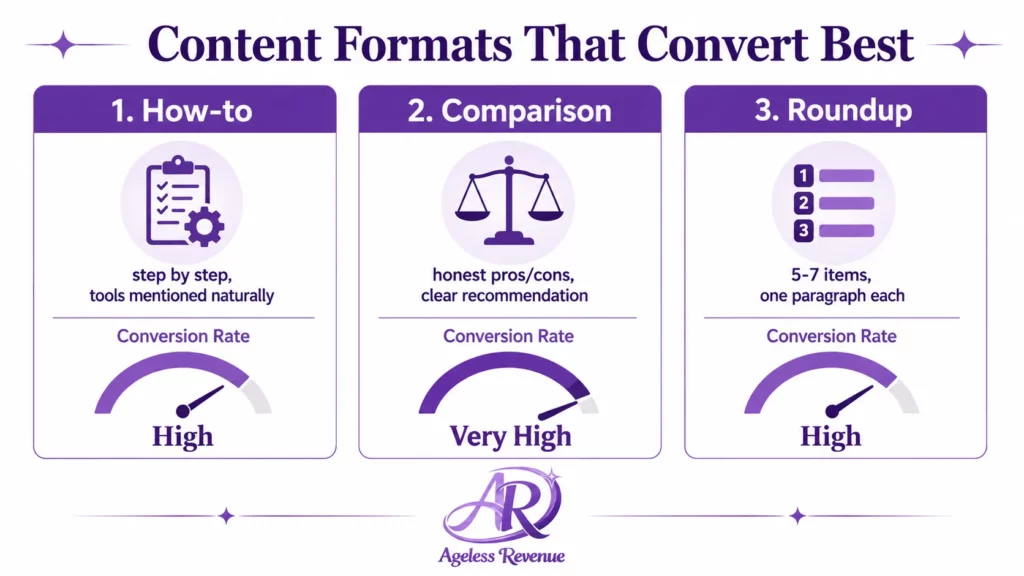
The three content formats that convert best on social media:
How-to content: “How to set up raised beds when you have limited mobility” — step by step, with the tools needed mentioned naturally. Affiliate links to the specific tools.
Comparison content: “Raised bed kits vs building your own — which is easier for beginners?” — honest pros and cons, clear recommendation, affiliate links to the recommended option.
Roundup content: “5 lightweight garden tools that actually help with arthritic hands” — one paragraph per item, honest about what each one does and does not do, affiliate link per item.
What converts poorly: generic posts that could have been written by anyone, posts that are clearly written to sell rather than to help, posts that mention products without specific detail about why they work for your specific reader.
Step 6: Build a Consistent Posting Routine
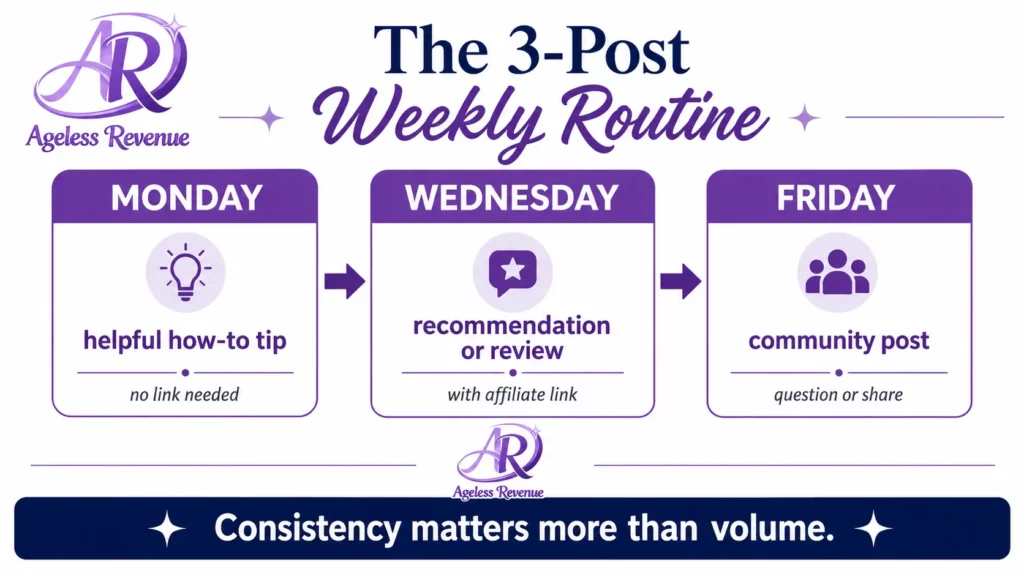
Consistency matters far more than volume. Three focused posts per week, maintained for six months, produce far better results than daily posting for three weeks followed by nothing.
A simple weekly routine:
- Monday: One helpful how-to post or tip — no affiliate link needed
- Wednesday: One recommendation or review with contextual affiliate link
- Friday: One community post — a question, a share, something that invites responses
Three posts per week. Every week. For at least three months before evaluating results.
Track your results monthly — not daily. Social media affiliate marketing takes time to compound. The content you post in month one typically generates its best results in month three. Checking daily produces anxiety without useful information.
Step 7: Pair Social Media With a Blog
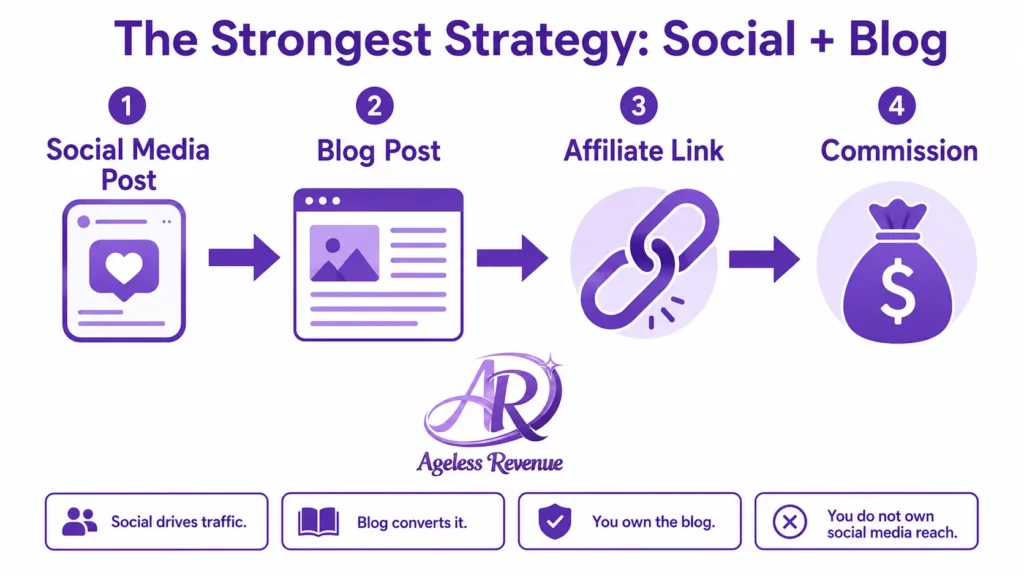
Social media alone is a fragile affiliate marketing strategy. Platform algorithms change. Accounts get suspended. Reach collapses overnight for reasons outside your control. A blog gives you a permanent home for your content that you own and control completely.
The most effective approach for long-term affiliate income is to use social media to drive traffic to your blog, where readers find more depth, more detail, and more affiliate link opportunities than any social post can contain.
For a complete guide to building your first affiliate blog, read Starting Affiliate Marketing With No Experience. For a structured path with training, hosting, and keyword tools included, Wealthy Affiliate combines everything in one place.
Common Mistakes to Avoid
Promoting products you have not used. Readers detect inauthenticity immediately. Only recommend products you have personally used and genuinely believe in.
Skipping the affiliate disclosure. Include it in every post with a link. It is a legal requirement, and it builds rather than breaks reader trust when done honestly.
Chasing follower counts instead of engagement. 200 engaged followers in your specific niche will generate more affiliate income than 2,000 generic followers who followed you for an unrelated viral post.
Switching platforms every few weeks. Pick one platform and give it three months of consistent effort before evaluating whether it is working for you.
Avoid common pitfalls in social media affiliate marketing by remaining authentic and engaging with your audience.
Posting links without context. A bare affiliate link with no helpful context does not convert. The recommendation needs to earn the click before the click can earn the commission.
For a full breakdown of what goes wrong, read Avoiding Common Mistakes in Social Media Affiliate Campaigns.
Tracking Your Progress
Two numbers matter in social media affiliate marketing: link clicks and conversions.
Most affiliate programmes provide a dashboard showing clicks and sales attributed to your links. Check these monthly. Identify which posts are generating clicks and create more content similar to those posts.
On Pinterest, Pinterest Analytics shows which pins are receiving saves and click-throughs — saves indicate content worth creating more of, click-throughs indicate content that converts. For Google Analytics setup and social media traffic tracking, read our Google Analytics for Social Media Traffic guide.
Continuous tracking of your efforts in social media affiliate marketing is crucial for understanding and improving performance.
Frequently Asked Questions
Do I need a large following to earn affiliate commissions on social media?
No. A small, engaged, niche-specific audience consistently outperforms a large, unfocused one. Retirees with 300 followers in a specific health or hobby niche regularly earn commissions that general accounts with 10,000 followers do not, because the recommendation is trusted and relevant.
Many newcomers to social media affiliate marketing wonder about the effectiveness of their strategies and how to improve.
Which platform should a complete beginner start with?
Pinterest or Facebook, depending on your preference. Pinterest suits retirees who prefer creating visual content and writing over video. Facebook suits those who prefer conversation and community. Both are more beginner-friendly than Instagram or YouTube for someone starting from scratch.
Do I need to disclose affiliate links on social media?
Yes, always. FTC guidelines require disclosure whenever you have a material connection to a product you are recommending — a commission qualifies. The disclosure should be clear and upfront, not buried at the bottom of a post. Most affiliate programmes also require disclosure in their terms.
How long before I earn my first commission?
With consistent posting in a specific niche, most retirees see their first affiliate link clicks within 2–4 weeks and their first commission within 1–3 months. Building a reliable monthly income typically takes 6–12 months of consistent effort.
As you advance in social media affiliate marketing, refine your methods and adapt to audience feedback.
Can I do affiliate marketing on social media without a blog?
Incorporating audience insights will enhance your social media affiliate marketing strategies and lead to better engagement.
Yes, but a blog significantly improves your results. Social media posts are short-lived; a blog post can drive traffic and affiliate income for years. The strongest approach uses social media to drive traffic to longer blog content, where conversions happen at a higher rate.
Your Next Step
Pick one platform from this guide that matches your natural style. Set up your profile today using the three-point profile structure above. Post one piece of genuinely helpful content this week — no affiliate link needed yet.
Once you have two or three posts live, apply to Amazon Associates and one affiliate network. Then build your posting routine and give it three months before judging results.
For a structured, guided path with training, hosting, and community support all in one place, Wealthy Affiliate is the platform I recommend to retirees starting from zero.
For the complete hub of everything Ageless Revenue has written about social media affiliate marketing, visit the Affiliate Marketing Guide for Retirees.
This post contains affiliate links. If you buy through them, I may earn a small commission at no extra cost to you. This is all a part of my journey in social media affiliate marketing.
Actively participating in conversations can elevate your social media affiliate marketing efforts significantly.
For best results, integrate social media affiliate marketing with a blog to provide comprehensive content and resources.