

Google Analytics for Retiree Bloggers: The 3 Numbers That Actually Matter

Google Analytics sounds intimidating. When you first log in, the dashboard can feel overwhelming — graphs, numbers, reports, and menus that seem designed for data analysts rather than retiree bloggers.
The good news is that as a retiree blogger building affiliate income, you only need answers to three questions. How many people are visiting my blog? Which posts are they reading most? And what search terms are bringing them there? Everything else in Google Analytics is useful eventually, but those three questions are all you need to make good decisions in your first one to two years of blogging.
This guide covers exactly what you need to know — no jargon, no agency-level complexity, just a plain-English walkthrough of the numbers that actually matter for a retiree affiliate blogger.
TL;DR
- You need two free tools: Google Analytics 4 (GA4) for your website traffic data, and Google Search Console (GSC) for your search performance data. They work together, and both are completely free.
- The three numbers to check weekly: total sessions, your top five posts by traffic, and your organic search traffic percentage.
- Google Search Console is more useful than Google Analytics for a new blogger — it shows you which search terms are bringing people to your site and which posts are close to ranking on page one.
- Check your analytics once per week, not every day. Daily checking creates anxiety without giving you actionable information.
- Use the data to improve existing posts, not to second-guess yourself. A post with growing traffic is working — make it better. A post with zero traffic after three months may need a keyword rethink.
The Two Tools You Actually Need
Before anything else, set up these two free tools if you have not already. They are both from Google, both free, and they work best when connected to each other.
Google Analytics 4 (GA4)
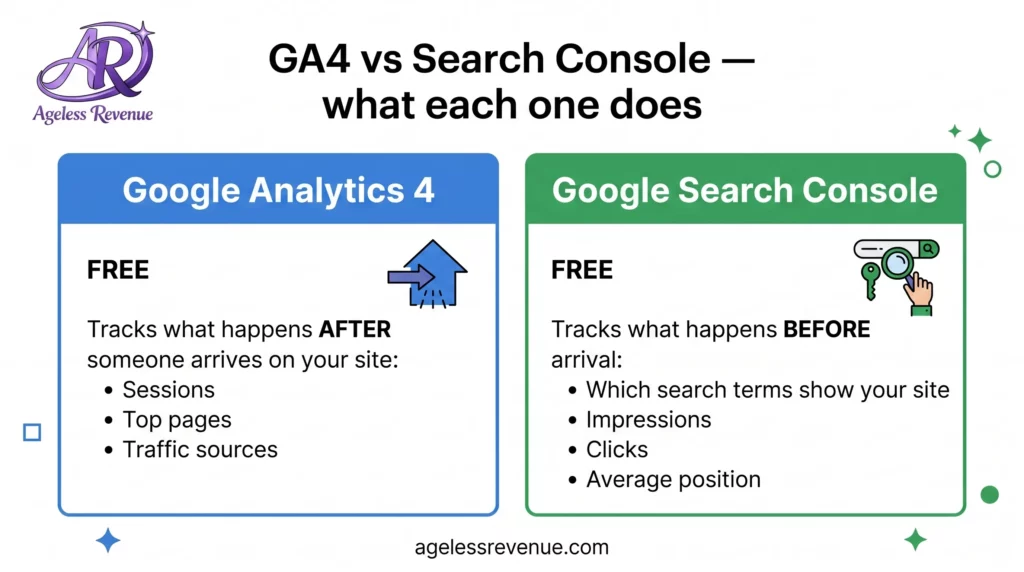
Google Analytics tracks what happens on your website after someone arrives. It tells you how many people visited, which pages they read, how long they stayed, and where they came from (Google search, Pinterest, direct link, and so on).
To set it up: go to analytics.google.com, create a free account, and follow the setup wizard. You will end up with a piece of code called a Measurement ID that you paste into your WordPress site. If you are using Wealthy Affiliate hosting, the setup process is guided. If you are on your own WordPress site, the easiest way to add the code is through the free Google Site Kit plugin, which connects both GA4 and Google Search Console to your WordPress dashboard in a few clicks.
Google Search Console (GSC)
Google Search Console tracks what happens before someone arrives on your site — specifically, how your site performs in Google search results. It shows you which search terms caused your pages to appear in Google (called impressions), how many people clicked through to your site from those results (clicks), and where your pages rank on average for those terms (average position).
For a retiree blogger, Search Console is often more immediately useful than Google Analytics because it directly connects your content to your keyword strategy. When you see that a post is appearing for a relevant search term but not getting many clicks, you know to improve the post title and meta description. When you see a post sitting at average position 15 (page two of Google), you know that improving and updating that post could push it to page one.
To set it up: go to search.google.com/search-console, add your website URL, and verify ownership (Google Site Kit can handle this automatically if you are using it for GA4 too).
Connecting the two: Link GA4 and Search Console together so you can see search query data inside your Analytics dashboard. In GA4, go to Admin → Property Settings → Search Console Links → Add. Once linked, a Search Console section appears inside GA4 under Reports → Acquisition.
The Three Numbers to Check Every Week
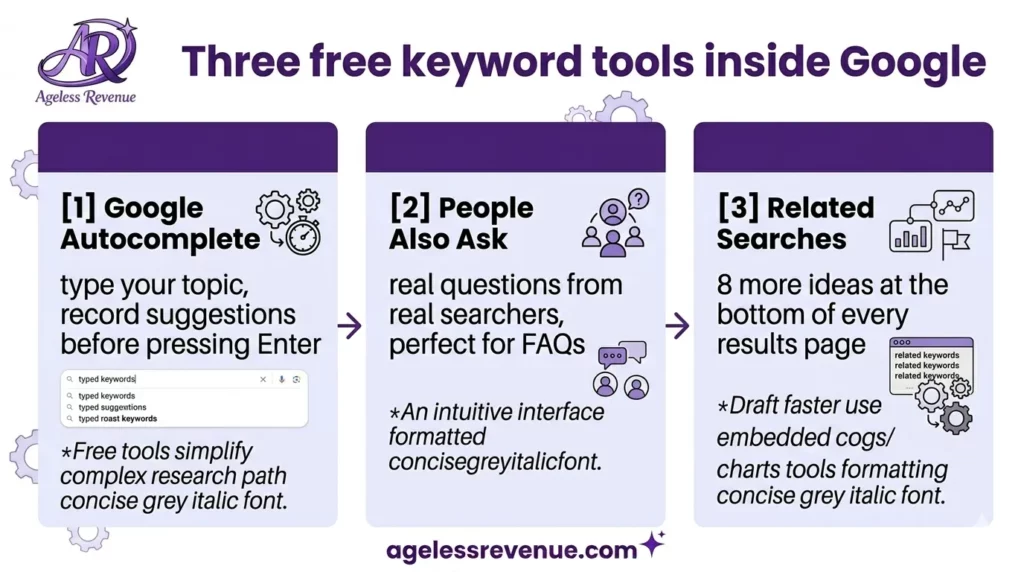
Once both tools are set up, here is the simple weekly routine that gives you everything you need without overwhelming you.
Number 1 — Total sessions this week vs last week
In GA4, go to Reports → Overview. The main number at the top is Sessions — the number of visits your site received. Compare this week to last week. Is it growing? Flat? Declining? You are looking for a general upward trend over months, not dramatic week-to-week movements. Traffic in the first six months is typically very low and slow — this is normal. Do not be discouraged by small numbers early on.
A meaningful benchmark: most retiree bloggers reach 500 to 1,000 monthly sessions somewhere between months six and twelve if they are publishing consistently. By months eighteen to twenty-four with consistent effort, 3,000 to 5,000 monthly sessions is realistic for a focused niche blog.
Number 2 — Your top five posts by traffic
In GA4, go to Reports → Engagement → Pages and screens. This shows you every page on your site ranked by how many times it was viewed. Look at your top five posts. These are your best performers — your proven content. Note them down.
Your top performers deserve attention. Consider whether they have clear affiliate recommendations with good links. Check whether the content is up to date. Look at whether they link to your other related posts. A post that is already working hard for you is worth investing more effort in — expanding it, improving its internal links, and making sure its affiliate recommendations are the best they can be.
Number 3 — What percentage of traffic comes from organic search
In GA4, go to Reports → Acquisition → Traffic acquisition. This shows you where your visitors come from. The channel called “Organic Search” is the one to watch — it represents people who found you through Google. As your blog matures, this should become your largest traffic source, growing from a small percentage in your first few months to fifty percent or more by the end of your first year.
If organic search is low after six months of consistent publishing, it may indicate that your posts are not targeting searchable keywords or that your site has a technical issue preventing Google from indexing your content properly. Search Console (covered below) will help diagnose both.
How to Use Google Search Console as a Retiree Blogger
Search Console is where the most actionable data lives for a new blogger. Here are the three reports to check monthly.
Performance report — your keyword goldmine
In Search Console, click Performance in the left menu. This shows you all the search terms your site has appeared for in Google over the last three months. For each term, you can see impressions (how many times your site appeared in results for that term), clicks (how many times someone clicked through), and average position (where you typically rank).
Sort by impressions to see which terms Google already thinks your site is relevant for. Look for terms where you have many impressions but few clicks — these indicate your post is appearing in results but your title and meta description are not compelling enough to attract the click. Rewriting the post title to be more specific and benefit-led often significantly improves clicks without any other changes.
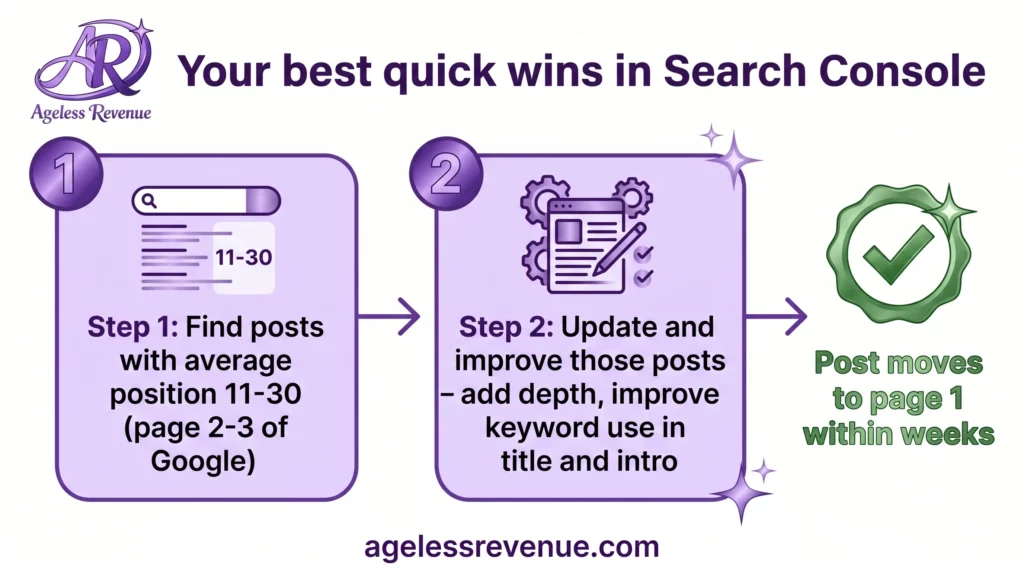
Look for terms where your average position is between 11 and 30 — meaning you are appearing on page two or three of Google. These are your best quick-win opportunities. Google already considers your post relevant for that search term. Improving and expanding the post, adding more depth, and making sure the keyword appears clearly in the title and opening paragraph can often push these posts to page one within a few weeks of the update being reindexed.
Coverage report — is Google finding your posts?
In Search Console, click Pages in the left menu (formerly called Coverage). This shows you how many of your pages Google has indexed — meaning how many are officially included in Google’s search results. If you have published twenty posts but only ten are indexed, some of your content may have a technical problem preventing Google from including it.
For most retiree bloggers using a standard WordPress setup, this report should show all your posts as indexed within a few days to two weeks of publishing. If pages are consistently missing, check that your WordPress settings have not accidentally set your site to “discourage search engines” — it is a single checkbox in WordPress Settings → Reading that is sometimes accidentally ticked.
Search appearance — are your posts showing up correctly?
In Search Console, click Search appearance to see how your pages look in Google results. This section also shows you which posts have been enhanced with structured data (like FAQ schema), which is useful to check after adding FAQ JSON-LD to your posts.
The Weekly Analytics Habit That Works
Here is a sustainable routine that gives you useful information without consuming your writing time. Set aside fifteen minutes every Monday morning.
Open GA4. Note your sessions total for the previous week. Check your top five posts by views — has anything new entered the top five? Open Search Console. Scan the Performance report for any new keywords where you are appearing with good impressions. Check for any pages showing as not indexed in the Coverage report. Write down one or two posts that might benefit from an update based on what you saw. Done.
That is your entire analytics routine as a retiree blogger. Fifteen minutes, three tools, five actions. Once a month, spend an extra thirty minutes going deeper — looking at which posts have grown the most, which affiliate links are getting clicks, and which Search Console keywords are worth targeting in new posts.
What to Do When Traffic Is Not Growing
If your traffic has been flat or growing very slowly for more than three months of consistent publishing, the most common causes are easy to diagnose with these two tools.
Your posts are not targeting searchable keywords. Check Search Console Performance. If your posts have very low impressions across the board, Google is not seeing them as relevant for any searches. This usually means the posts are not targeting specific enough keyword phrases. Review your keyword research process and ensure each new post targets a phrase with real search volume. Read my guide to keyword research for retiree bloggers for a practical process.
Your posts are not indexed. Check Search Console Coverage. If many posts show as not indexed, address the technical issue before publishing more content. An unindexed post gets zero organic traffic regardless of how well-written it is.
Your posts are on page two or three. Check Search Console for posts with an average position of 11 to 30. These posts are the most valuable to update — they are close to page one, and a focused improvement effort can push them over. Update the post with more depth, clearer structure, and better use of the target keyword in the title and opening sections.
Your blog is too new. Google typically takes three to six months to start sending meaningful traffic to a new blog, regardless of content quality. If your blog is under three months old and traffic is low, the most useful action is to keep publishing — not to obsessively check analytics.
Which Numbers Do Not Matter in Your First Year
Google Analytics contains dozens of metrics that are genuinely useful for large websites and e-commerce stores but provide no actionable information for a retiree blogger in their first year. You can safely ignore these until your blog is well established:
Bounce rate/engagement rate: These measure whether visitors read multiple pages in one visit. On a small blog where most posts are standalone resources, single-page visits are normal and expected. A high bounce rate does not indicate a problem for an affiliate blog.
User demographics: Age, location, and device breakdowns are interesting eventually, but provide no actionable information in year one. Focus on traffic and keywords first.
Real-time reports: These show who is on your site right now. Checking them is a distraction. They are only useful if you have just published something and want to confirm it is live and being indexed.
Custom reports and exploration features: These are powerful tools for established sites with thousands of daily visitors. They are not useful for a blog with a few hundred monthly sessions and will only add confusion.
Conversion tracking setup: Tracking specific button clicks and form submissions through Google Tag Manager requires technical setup and is worth doing eventually, but not in year one. Your affiliate platform’s own dashboard shows you clicks and commissions — that is your conversion tracking for now.
Frequently Asked Questions
Do I really need Google Analytics if I am just starting out?
You need Google Search Console from day one — it is more immediately useful than Analytics for a new blogger and shows you directly how Google is finding and indexing your content. Google Analytics becomes more useful as your traffic grows and you want to understand which posts are driving affiliate clicks and subscriber signups. Install both from the start using Google Site Kit, but focus your attention on Search Console in your first six months.
How long before I start seeing meaningful traffic in Analytics?
Most new blogs publishing one post per week see very little organic traffic in the first three months. Traffic typically begins building meaningfully between months four and six as Google indexes and ranks your content. The growth is slow at first and then accelerates — month six might bring 200 sessions, month twelve might bring 1,500, month eighteen might bring 5,000. Consistency over time, not any single viral post, is what builds real traffic.
What is the difference between sessions and pageviews?
A session is one visit to your site by one person. During that session, they might view one page or five pages. Pageviews count every individual page viewed. For a simple affiliate blog, sessions is the more meaningful number — it tells you how many people visited, regardless of how many pages they looked at during the visit.
Should I check Analytics every day?
No. Daily checking creates anxiety without giving you useful information — traffic fluctuates day to day for reasons entirely outside your control. Weekly checking gives you a meaningful trend view. Monthly gives you the clearest picture of real growth. Set a specific time once per week for your analytics review and do not check outside of that time.
My posts are appearing in Search Console but not getting any clicks — why?
If impressions are high but clicks are low, your post title and meta description are not compelling enough to attract the click. The most common fix is rewriting your post title to be more specific and benefit-focused. “Raised Garden Bed Tips” gets fewer clicks than “Best Raised Garden Beds for Seniors with Bad Knees (2026 Tested Guide).” The more specifically your title matches the reader’s exact search and promises a clear answer, the higher your click-through rate will be.
Conclusion
Google Analytics and Google Search Console are powerful tools, but a retiree blogger does not need to master them fully to use them well. Set them both up on day one, check three simple numbers every week, and use what you find to improve your existing content and guide your keyword choices. That discipline — consistent, calm, data-informed improvement — compounds into real traffic growth over your first year and beyond.
The goal is not to become a data analyst. It is to make slightly better decisions each week than you did the week before. These tools give you what you need to do exactly that.
Your Next Step
If you have not yet set up Google Search Console, do that today — it is the single most useful free tool available to a new blogger and takes about ten minutes to set up. Go to search.google.com/search-console and follow the setup wizard.
Once Search Console is running, read my guide to keyword research for retiree bloggers so you know how to use the search term data it shows you to improve your content strategy. And if you want structured training that covers SEO, keywords, and analytics together in a beginner-friendly format, Wealthy Affiliate walks you through all of it step by step.