Wealthy Affiliate Dashboard Explained: A Beginner’s Tour (2026)
If you have just joined Wealthy Affiliate and feel a little lost when you first log in to the Wealthy Affiliate dashboard, that is a normal reaction. The platform has more features than most beginners expect, and in 2026, the interface is organised differently from what older tutorials show.
This guide is a plain-English tour of the dashboard as it exists in 2026 (see our Wealthy Affiliate Hub for everything else we’ve written about the platform), what you see when you log in, where to find everything, and how to navigate without getting overwhelmed.
Affiliate disclosure: This post contains affiliate links. If you join Wealthy Affiliate through one of our links, we may earn a commission at no extra cost to you.
The 2026 Dashboard: What Changed and Why
Wealthy Affiliate significantly updated its interface in 2024–2025 with the introduction of Business Hubs. If you have seen older screenshots or tutorials from 2022 or 2023, they will show a different layout — a general dashboard with a site manager, a separate keyword tool, and training in distinct sections.
The Wealthy Affiliate dashboard is designed to help you easily access all the tools you need for your affiliate marketing journey.
The 2026 interface is built around Business Hubs as the central organising concept. Instead of managing everything through a single global dashboard, each niche or website project gets its own Hub — a dedicated workspace that brings together the site, keyword research, content planning, and AI tools for that specific project.
This is a meaningful improvement. It means that if you are building a site about accessible gardening and later start a second site about travel for retirees, each project has its own clean workspace rather than everything being mixed in a single interface.
When You First Log In: The Main Dashboard
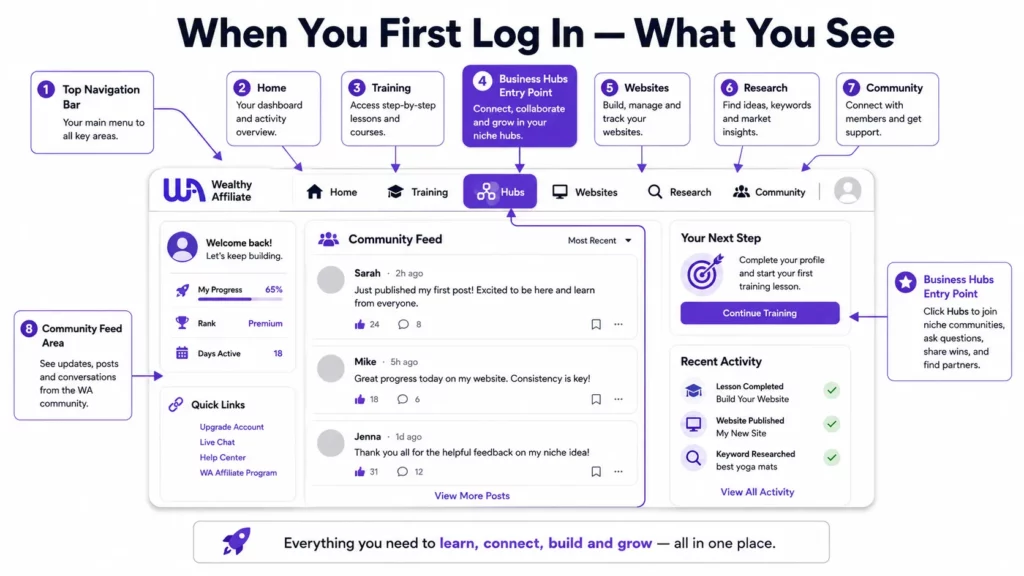
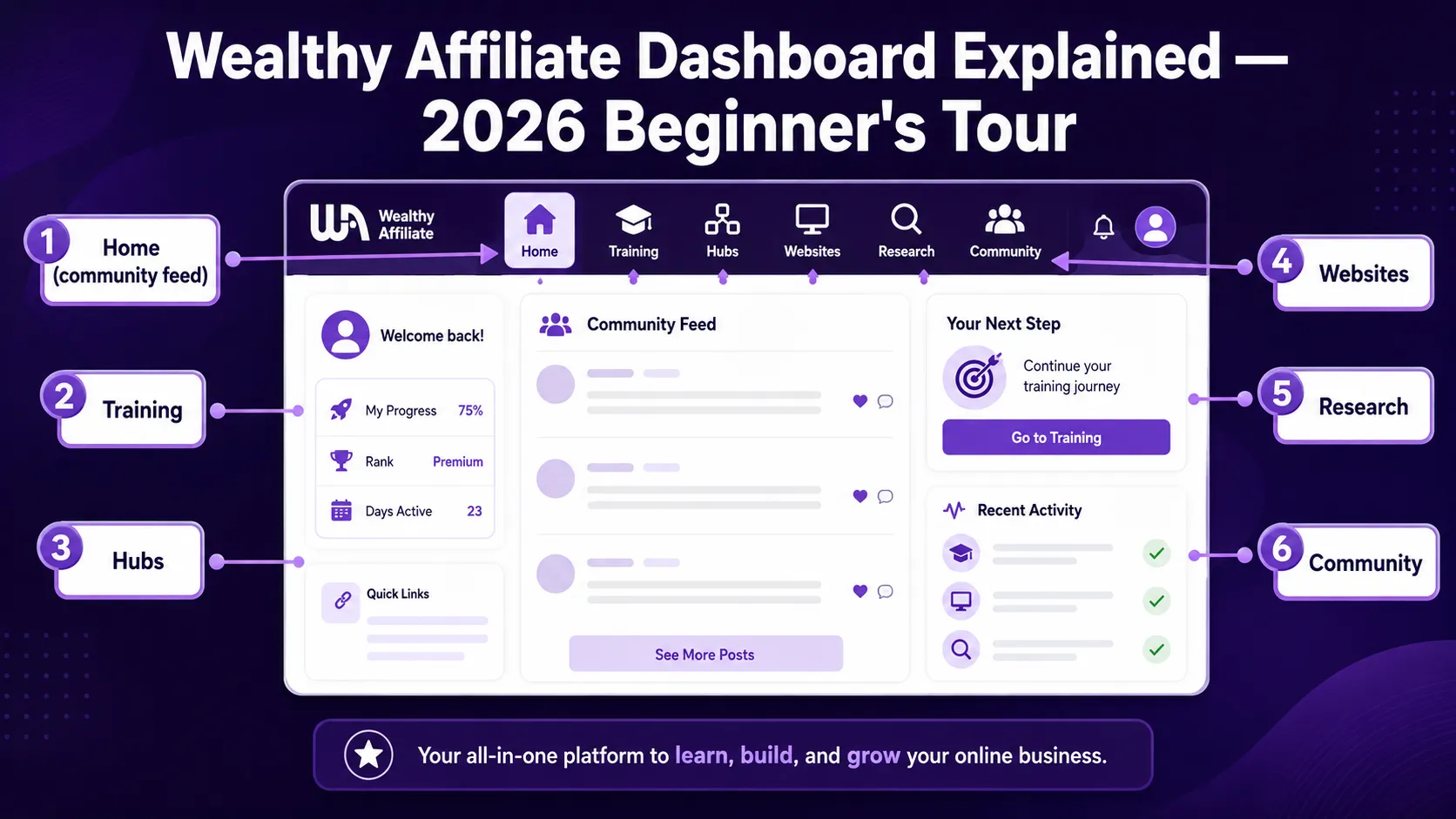
The first screen you see after logging in is the main Wealthy Affiliate home feed. This shows recent posts and activity from the community — member blog posts, training updates, questions from other members, and live class announcements.
This feed can feel busy at first. The practical advice: do not spend too much time here in your first week. It is useful for staying connected with the community and seeing what other members are working on, but it is not where the actual work of building your site happens. That happens inside your Business Hub.
The main navigation runs across the top of the dashboard and includes:
- Home — the community feed described above
- Training — access to all Core Training modules and live classes
- Hubs — your Business Hubs (one per niche/site project)
- Websites — your hosted WordPress sites and technical management
- Research — Jaaxy, WA’s AI research platform for keywords, niches, and content topics
- Community — live chat, messaging, member profiles
Business Hubs: Where Your Work Actually Happens
Business Hubs are the most important part of the 2026 platform to understand. When you start your first niche, you create a Hub for it. That Hub becomes the central workspace for that project.
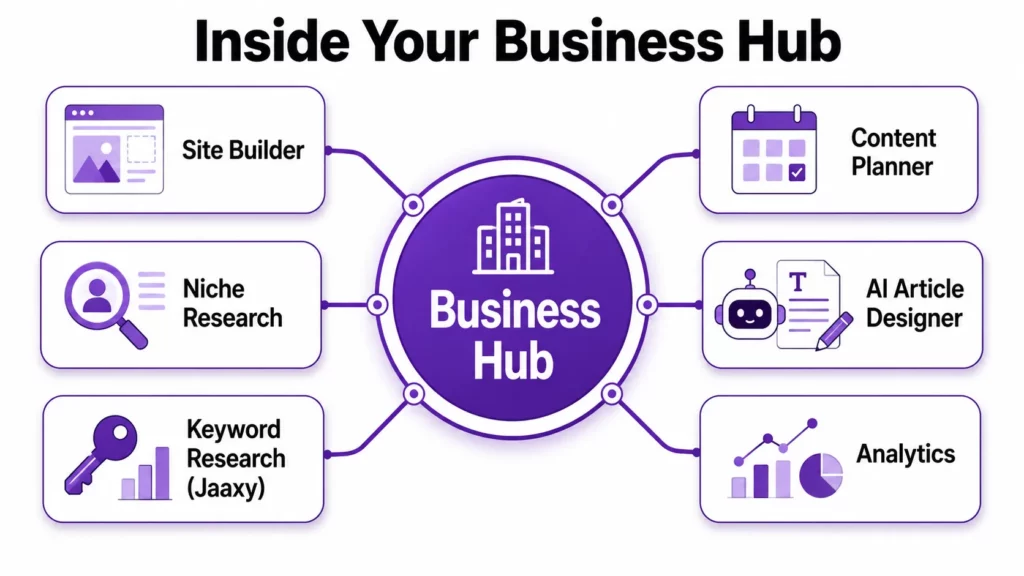
Inside a Business Hub, you have access to:
- Site Builder — Set up your WordPress website directly from the Hub. Domain registration, theme selection, essential plugins, and initial configuration all happen here. For a step-by-step walkthrough of building your first site, read our Getting Started guide.
- Niche Research — Tools for validating your niche idea, understanding your target audience, and identifying the gap your site will fill.
- Keyword Research — Jaaxy is integrated directly into the Hub. Type a topic and get AI-generated keyword suggestions, questions, and clusters without leaving your workspace, then save findings straight to that Hub’s research list.
- Content Planner — A simple content calendar where you can plan, track, and manage your article ideas and publishing schedule.
- AI Article Designer — Draft and refine content using WA’s AI writing tool. The practical approach: use it to generate an outline and a first draft, then rewrite substantially in your own voice. Google rewards content that reads like it was written by a specific, knowledgeable person — not by AI.
- Image Studio — AI image generation for blog graphics, Pinterest pins, and social images. Particularly useful for creating featured images and Pinterest pin designs without needing Canva or external image tools.
- Analytics — Basic traffic and performance data for your site.
The Training Section
The Core Training is organised into two paths:
Core Training — For building a site around any niche you choose. This is the path most members follow. It’s a step-by-step curriculum covering niche selection, site setup, content creation, traffic building, and monetization — each lesson ending in a specific action task.
Affiliate Bootcamp — For building a site specifically about promoting Wealthy Affiliate. This path makes sense for people whose content naturally covers online business and affiliate marketing topics. It is not a requirement — most members build niche sites unrelated to WA.
You can switch between paths at any time, and the core skills (content writing, SEO, keyword research, affiliate link placement) are the same regardless of which path you follow.
Live Classes — Premium Plus+ members have access to 200+ live expert training sessions per year, held weekly and all recorded. The Friday night class hosted by Jay (Magistudio), covering SEO, affiliate strategy, and AI content creation, is the most popular. You can watch recordings of past classes if you miss a session.
The Community
The community is one of Wealthy Affiliate’s most genuine differentiators. The live chat is active around the clock — because members are spread across time zones globally, someone is almost always available to answer a question.
Asking good questions gets faster and more useful answers. “Why isn’t my site getting traffic?” is a question that will receive vague answers. “I have published 12 posts targeting keywords Jaaxy rated Good or Excellent for SEO, my site is three months old, and I have three indexed pages. What should I focus on next?” will receive specific, useful responses.
Expert coaching is available by tagging specific experienced members or posting in the Q&A sections. For particularly technical questions, site support is available 24/7 through the Websites section.
Jaaxy: The AI Research Platform
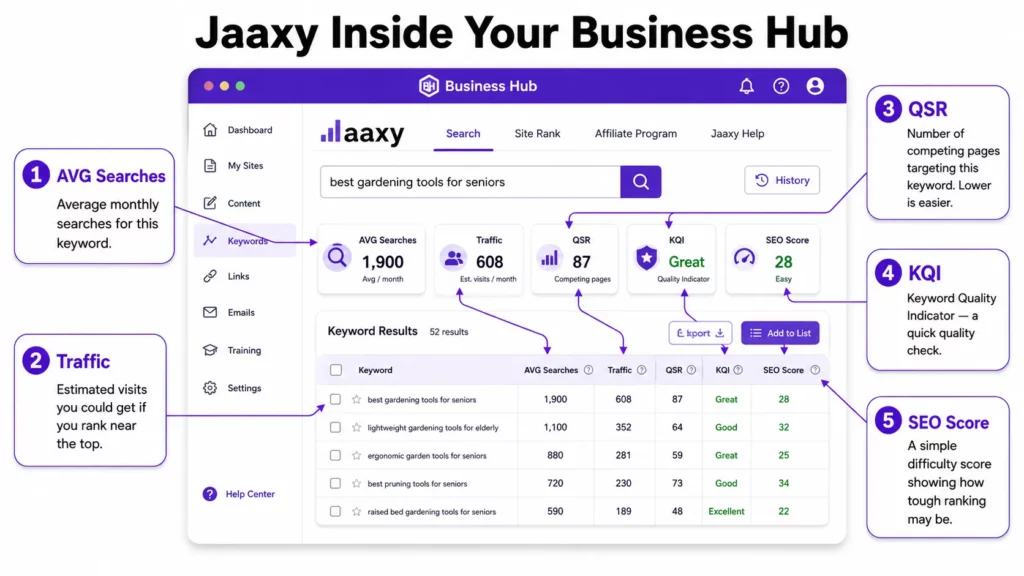
Jaaxy was rebuilt in late 2025 and now lives directly inside Wealthy Affiliate — no separate login or leaving the platform to research. It sits behind the Jaaxy Research link in the sidebar, opening a research dashboard.
Each search draws on your monthly AI credit pool (shared with the Article Designer and Image Studio): 100 credits per search. The free Starter account’s 1,500 total AI credits stretch to roughly 15 Jaaxy searches if used exclusively on research. Premium members get a dedicated 10,000 credits/month, and Premium Plus+ members get 30,000 credits/month.
There are three research modes to choose from depending on your goal:
- SEO — for organic ranking potential, rating keywords Excellent/Good with hover tooltips explaining each metric
- PPC — for paid ad research, surfacing commercial-intent and buying-stage terms
- Social — for engagement-driven content suited to Reels, Shorts, and awareness posts
A simple Jaaxy workflow: type your topic in SEO mode, review the AI-generated suggestions that appear as you type, click Generate Keywords for up to 100 results plus related questions and clusters, and save the strongest ones to a Keyword List or directly to your Business Hub to build your content calendar around them.
The AI Tools: What They Do and How to Use Them Effectively
The AI tools in Wealthy Affiliate’s 2026 platform are genuinely useful when used correctly — and genuinely counterproductive when used incorrectly.
AI Article Designer works best as a research and outline assistant. Give it your target keyword, let it generate a structure, use that structure as your starting point, and write the actual article in your own voice. Do not publish AI-generated text without substantial rewriting. Google’s algorithms are increasingly effective at identifying thin AI content, and readers who arrive at your site expecting the perspective of a specific, knowledgeable person will leave if the content reads like a generic AI summary.
Image Studio is the tool that gets the most consistent praise from experienced members. Generating professional-quality featured images and Pinterest pins without external tools saves meaningful time for active publishers.
DsgnPop handles logo creation and basic brand design. Useful for getting a professional-looking logo quickly without design software.
Frequently Asked Questions
How is the 2026 dashboard different from older screenshots I have seen?
The main change is Business Hubs. Older screenshots show a global site manager and separate tool sections. The 2026 interface organises everything around project-specific Hubs, which bring your site, keywords, content, and AI tools together in one workspace per niche.
Where do I start when I first log in?
Go to Training → Core Training. Complete the lessons in order and do the action tasks at the end of each one. Building your Business Hub and first site happens in the first few lessons.
Can I manage multiple websites on Wealthy Affiliate?
Yes. Premium Plus+ includes up to 10 websites, each with its own Business Hub. The free Starter account allows one site on a SiteRubix subdomain.
How do I contact support if something goes wrong with my site?
Go to Websites → Site Support. Technical hosting issues are covered 24/7. For training and strategy questions, the community live chat and Q&A sections are faster and often more useful.
Your Next Step
The most useful thing you can do after reading this guide is to log into your Business Hub and complete the next lesson in your Core Training sequence. One lesson, one action task, one small forward step.
For the day-by-day structure of your first week, read our first 7 days guide. For a full review of what Wealthy Affiliate offers and whether it suits your situation, read our complete Wealthy Affiliate review.
To see everything included in your membership, read our Wealthy Affiliate Toolbox guide. And for the full platform walkthrough, read our How to Use Wealthy Affiliate guide.