
The Best Online Business Tools for Retirees: A Simple Starter Stack (2026)
Starting an online business after retirement should feel manageable, not overwhelming. The problem is that most “tools for bloggers” guides list thirty different platforms and leave you with no idea where to begin. This guide focuses on essential tools for retirees starting an online business.
When considering the tools for retirees starting an online business, it’s essential to prioritize simplicity and ease of use.
Utilizing effective tools for retirees starting an online business can streamline your process and enhance your learning curve.
This guide does the opposite. It covers the exact tools a retiree needs to build an affiliate blog — the ones that are genuinely beginner-friendly, mostly free, and actually used by people running real sites. Nothing on this list is there because it pays a high commission. Everything is here because it works.
You do not need a giant tech stack. You need a small, reliable set of tools, a weekly routine you can maintain, and the patience to grow at a pace that suits retirement life.
Affiliate disclosure: This post contains affiliate links. If you buy through them, I may earn a small commission at no extra cost to you.
Using the right tools for retirees starting an online business helps in achieving better organization and efficiency.
TL;DR
For those considering this journey, having the right tools for retirees starting an online business can make all the difference.
- You need five categories of tools: website, email, images, SEO, and tracking.
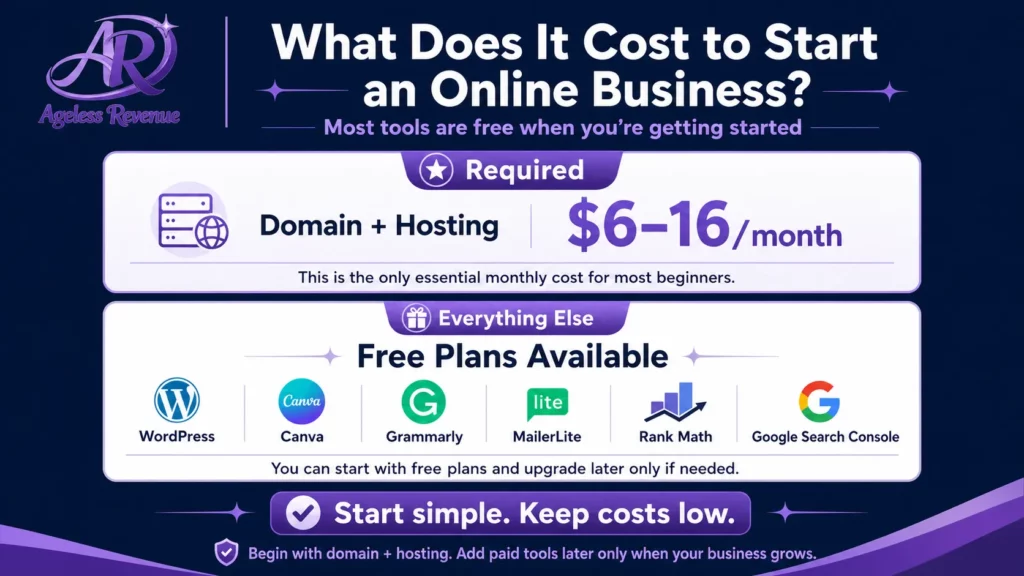
- Total required cost: $6–16 per month (domain and hosting only)
- Everything else on this list has a free plan sufficient for year one
- Start with three tools. Add more only when you hit a real limit
- The best tool is the one you will actually use consistently
What You Actually Need (and What You Do Not)
Before the tool list, a principle worth stating clearly: most new bloggers buy too many tools and use none of them well.
The retirees who build reliable online income are not the ones with the most sophisticated setups. They are the ones who chose a small number of tools, learned them properly, and used them consistently week after week.
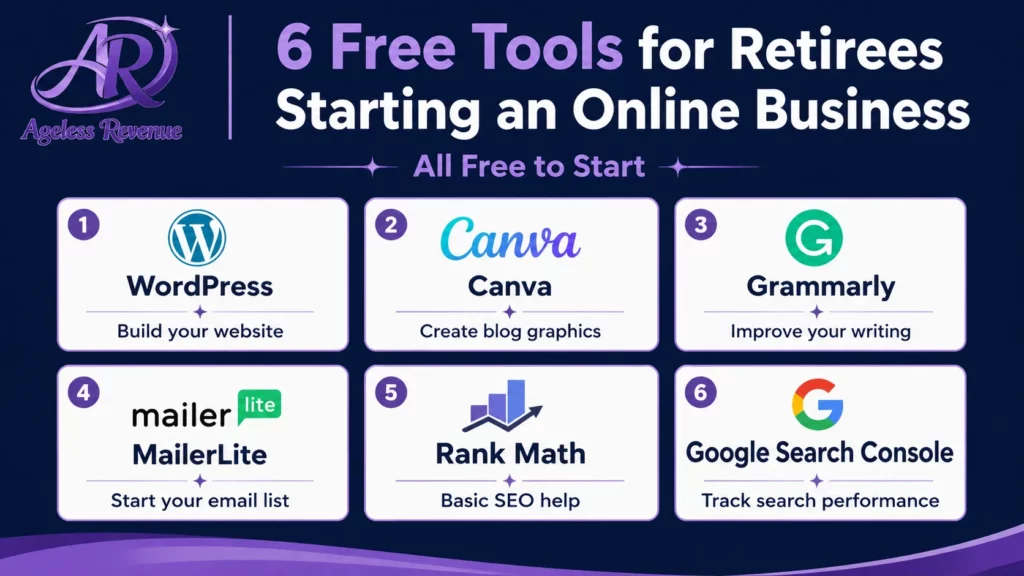
The essential categories for an affiliate blog are five:
- Website — where your content lives
- Email — how you stay in contact with readers
- Images — featured images and Pinterest pins
- SEO — helping Google find and rank your content
- Tracking — understanding what is working
That is it. A retiree blogger with these five categories covered has everything needed to build meaningful affiliate income. Everything else is optional and can wait.
Category 1: Website — WordPress and Hosting
What you need: a domain name, hosting, and WordPress
Total cost: $6–16 per month
Your website is your home base. Everything else — your content, your affiliate links, your email subscribers — connects back to it. Unlike social media profiles that platforms can change or suspend, your website is yours.
Domain name ($10–15 per year): your domain is your address on the internet. Choose something short, easy to spell, and easy to say aloud. Avoid hyphens and numbers. Register it through your hosting provider or a separate registrar like Namecheap.
Hosting ($5–15 per month): Your hosting is where your website files live. For a new affiliate blog, shared hosting is sufficient. Look for a host that includes SSL (the padlock in the browser), automatic backups, and responsive support. Avoid hosts with complex control panels — you want one-click WordPress installation and clear documentation.
WordPress (free): WordPress powers over 40% of all websites on the internet. It is free, flexible, well-documented, and has thousands of tutorials written specifically for beginners. Your hosting provider will offer one-click WordPress installation — the whole process takes under ten minutes.
Among the top tools for retirees starting an online business are essential platforms that facilitate growth and engagement.
Choosing the best tools for retirees starting an online business will set you up for long-term success.
GeneratePress theme (free): a lightweight, fast theme that is easy to customise. Ageless Revenue uses GeneratePress. Avoid themes with heavy page builders or lots of built-in features — they slow your site down and create technical headaches. Start with something clean and simple.
Essential pages to create immediately:
- Home (what your blog is about and who it is for)
- About (your story in 2–3 paragraphs — this is one of the most important pages on your site)
- Contact (a simple form)
- Affiliate Disclosure (legally required before you add any affiliate links)
Category 2: Email — MailerLite
What you need: an email marketing platform. Cost: free to 1,000 subscribers
Your email list is the only part of your audience you fully own. Google can change its algorithm and reduce your search traffic. Pinterest can change how it surfaces pins. Your email list cannot be taken away from you.
Start building your list from the day you publish your first post — even before you have significant traffic. The mechanics are simple: offer something useful for free (a checklist, a short guide, a resource list relevant to your niche) in exchange for an email address. Add an opt-in form to your sidebar and at the end of every post.
MailerLite is the right choice for most beginner retiree bloggers. It is free to 1,000 subscribers, has a genuinely simple drag-and-drop email builder, includes forms and landing pages on the free plan, and has automation built in from the start. Most retirees feel comfortable in the interface within one or two sessions.
A simple welcome sequence to set up in week one:
- Immediately on signup: delivery of your free resource + a warm welcome note
- Day 2: one helpful tip from your niche + a link to your best blog post
- Day 5: a brief personal story or experience relevant to your topic
- Day 9: a gentle product recommendation with an affiliate link and disclosure
Four emails. Set them up once in MailerLite’s automation, and every new subscriber receives them automatically without any further effort from you.
With the right tools for retirees starting an online business, you can effectively manage your tasks.
Category 3: Images — Canva
What you need: an image creation tool. Cost: free (Canva Free plan)
Every blog post needs two images: a featured image that appears at the top of the post and in search previews, and at least one Pinterest pin to drive social traffic.
Canva is the standard tool for both. It is free, runs in your browser, uses a drag-and-drop interface, and has templates already sized correctly for both blog images (1920×1080px) and Pinterest pins (1000×1500px).
The workflow that saves the most time: set up one blog image template and one Pinterest pin template in your first week, with your brand colours and a consistent layout. For every new post, copy the template, swap the background image, update the text overlay with your post title, and download. This takes 10–15 minutes per post once your templates exist.
Key Canva practices:
- Use tall 2:3 ratio images (1000×1500px) for Pinterest — the platform shows these more prominently in search than square or landscape images
- Create 2–3 Pinterest pin variations per post with slightly different titles — each variation is another opportunity to surface in Pinterest search.
- Set up a Brand Kit in Canva with your colours and font so every image is consistent without extra effort.
- Download images as WebP format — smaller file size, faster page loading
For a complete step-by-step Canva guide for retiree bloggers, read How to Create Blog Graphics With Canva.
Category 4: SEO — RankMath
What you need: an SEO plugin for WordPress. Cost: free (RankMath Free plan)
SEO — search engine optimisation — is how Google finds and ranks your blog posts. Without a basic SEO setup, even excellent content can go unnoticed.
RankMath is the SEO plugin Ageless Revenue uses. It installs like any WordPress plugin and immediately improves how your site communicates with Google. The key things it does:
For every post: as you write, RankMath analyses your content against your focus keyword and gives you a score with specific suggestions. It prompts you to add your keyword to the title, meta description, first paragraph, and subheadings — the places Google weighs most heavily.
Sitewide: RankMath generates an XML sitemap automatically (a map of your site that Google uses to find and index your content), handles redirections when you change a URL, and provides a site-wide overview of your SEO health.
Schema markup: RankMath adds structured data to your posts that helps Google understand what type of content each post is — an article, a product review, a how-to guide. This can unlock rich results in search (the expanded listings with additional information) over time.
Setup takes about 20 minutes using RankMath’s guided wizard. Connect it to your Google Search Console account for the most complete picture of your search performance.
Category 5: Tracking — Google Search Console and Google Analytics
What you need: two free Google tools. Cost: completely free
Google Search Console shows you which of your posts are appearing in Google search results, which keywords are triggering them, and how many people are clicking through to your site. This is the most important performance data available to a new blogger because it tells you whether your SEO work is paying off.
Connect Search Console through RankMath’s settings or by installing the Site Kit by Google plugin. Give it 30 days of data before drawing conclusions.
The one monthly check that matters most: go to Performance → Search Results and look for posts with high impressions (appearing in search results) and low click-through rates (under 3%). These posts are close to ranking well — they just need a more compelling title or meta description to generate clicks. Update one per month.
Google Analytics 4 shows you how visitors behave on your site — where they come from, how long they stay, which pages they visit, and whether they are clicking your affiliate links. It works alongside Search Console to give you a complete picture.
Connect GA4 through the Site Kit by Google plugin or through RankMath’s analytics settings. Check it once per month alongside Search Console. The three numbers that matter most: sessions by channel (where traffic comes from), engagement rate (are visitors staying or leaving immediately), and events (are they clicking your affiliate links).
Optional But Useful: What to Add Next
Once your core five-category stack is working, these are the tools worth considering in order of usefulness:
Grammarly (free): a browser extension that checks grammar and clarity in real time, working directly in your WordPress editor. Install it, forget it is there, and it will quietly improve every post you publish.
BlogToPin (paid, affiliate-friendly): a Pinterest scheduling tool that lets you schedule pins in bulk rather than posting individually. Ageless Revenue uses BlogToPin for Pinterest scheduling. Once you have a library of Pinterest pins to schedule, this saves significant time each week.
Google Keyword Planner (free): shows how many people search for a specific phrase each month and how competitive it is. Use it before writing any post to confirm real search demand. Access it at ads.google.com/home/tools/keyword-planner — no need to run ads.
Incorporating SEO tools for retirees starting an online business is crucial for visibility in search engines.
WP Rocket (paid, ~$59/year): a caching plugin that significantly speeds up WordPress sites. Not necessary immediately, but worth adding once you are publishing consistently — faster sites rank better and convert better. Ageless Revenue uses WP Rocket.
Updraft Plus (free): a WordPress backup plugin that automatically backs up your site to Google Drive or Dropbox on a schedule you set. Daily backups are worth the few minutes of setup — a corrupted site with no backup is a genuine disaster.
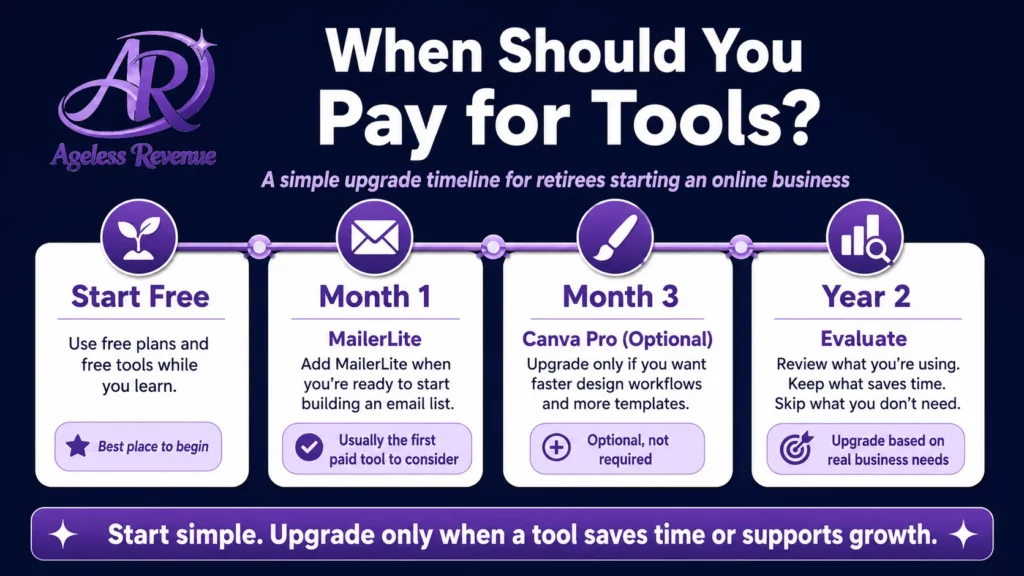
The Tool Stack at a Glance
| Tool | Category | Cost | When to add |
|---|---|---|---|
| Domain + Hosting | Website | $6–16/month | Day 1 |
| WordPress | Website | Free | Day 1 |
| GeneratePress | Website | Free | Day 1 |
| RankMath | SEO | Free | Day 1 |
| MailerLite | Free to 1,000 | Week 1 | |
| Canva | Images | Free | Week 1 |
| Google Search Console | Tracking | Free | Week 1 |
| Google Analytics 4 | Tracking | Free | Week 2 |
| Grammarly | Writing | Free | Month 1 |
| Google Keyword Planner | Research | Free | Month 1 |
| BlogToPin | Paid | Month 2+ | |
| WP Rocket | Speed | ~$59/year | Month 3+ |
| Updraft Plus | Backups | Free | Month 1 |
A Simple Weekly Routine
The most common reason retiree bloggers fail to build traffic and income is not having the wrong tools — it is failing to use any tools consistently. A simple weekly routine prevents this.
Monday (45 minutes): write or continue your current blog post. Focus on one specific keyword. Aim for 1,000–1,500 words.
Tuesday (30 minutes): finish and publish the post. Set the focus keyword in RankMath. Add 2–3 internal links to related posts. Write the meta description.
Wednesday (20 minutes): create one featured image and two Pinterest pin variations in Canva. Schedule pins in BlogToPin or upload directly to Pinterest.
Thursday (15 minutes): send your weekly email to subscribers. Link to the new post. Include one affiliate recommendation with disclosure.
Friday (15 minutes): check Google Search Console. Note any posts with high impressions and low clicks. Update one title or meta description if needed.
Total: approximately 2 hours per week. Consistent for 12 months, this routine builds a library of 50 keyword-targeted posts, a growing Pinterest presence, an engaged email list, and compounding organic traffic.
Remember, the tools for retirees starting an online business should complement your skills and enhance your workflow.
Frequently Asked Questions
How much does it actually cost to start an affiliate blog?
Focus on the tools for retirees starting an online business that will enhance your capabilities.
Each tool for retirees starting an online business serves a unique purpose that can aid in your blogging journey.
The only required costs are a domain name ($10–15 per year) and hosting ($5–15 per month). WordPress is free. Every other tool on this list has a free plan that is sufficient for at least the first year. Total required investment: approximately $6–16 per month.
Do I need all these tools at once?
No. Start with hosting, WordPress, RankMath, and Canva. Add MailerLite in week one. Add Google Search Console and Google Analytics in week two. Add Grammarly and Google Keyword Planner in month one. Everything else can wait until you are publishing consistently.
What is the single most important tool for a new retiree blogger?
Your WordPress site — because everything else connects to it. A strong blog with good content and basic SEO will outperform a technically sophisticated setup with thin content every time. Get your site live and start publishing before worrying about optimising your tool stack.
Should I use an all-in-one platform instead of separate tools?
Finding the best tools for retirees starting an online business is crucial for building a sustainable brand.
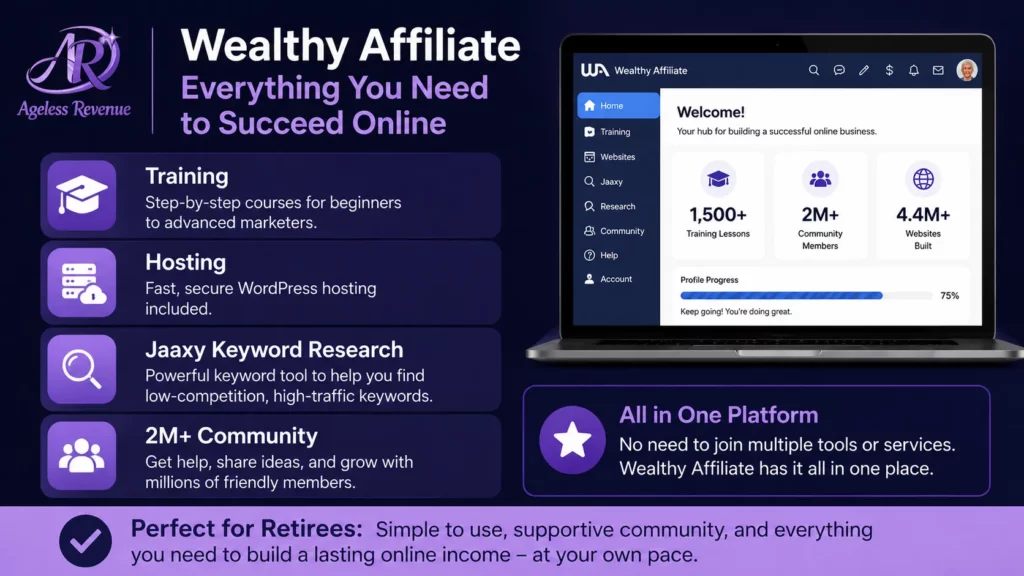
Wealthy Affiliate is worth considering if you want training, hosting, keyword research, and community support bundled into one platform rather than piecing tools together separately. It removes a lot of early-stage friction and is particularly well-suited to retirees who want a structured path. The free starter account lets you explore before committing.
Your Next Step
Pick one tool from this list that you do not currently have set up and spend 30 minutes this week getting it in place. If you have nothing yet, start with hosting. Choose a provider, install WordPress, and get your first three pages live. Everything else follows from there.
For a complete content strategy to put these tools to work, read Content Marketing for Retiree Bloggers.
For a structured path with training, keyword tools, and hosting bundled together, try Wealthy Affiliate free →
This post contains affiliate links. If you buy through them, I may earn a small commission at no extra cost to you.
Investing time in selecting the proper tools for retirees starting an online business can lead to significant benefits.
Many retirees overlook the importance of choosing the right tools for retirees starting an online business.
Understanding which tools for retirees starting an online business are available can provide clarity in your journey.
Take advantage of the various tools for retirees starting an online business for a successful venture.
In conclusion, understanding the tools for retirees starting an online business will pave the way for future endeavors.
Explore the tools for retirees starting an online business that best align with your objectives.
Every retiree should be aware of the tools for retirees starting an online business necessary for success.
Utilizing these tools for retirees starting an online business will simplify your learning process.