
Last Updated on 3 months ago by Gila
What Are The Top Tools For Email List Building? High-Converting Software for Growth
Introduction:
As a small business owner or solopreneur, your time is your most precious resource. Every hour spent manually sending welcome emails or following up on abandoned carts is an hour you can’t spend on strategy or customer service.
The solution is not more hours, but Email Automation.
TL;DR: The best email automation tools for small businesses help you welcome subscribers, recover abandoned carts, and follow up with customers automatically, without needing a tech team.
- Start with three non-negotiable workflows: a Welcome Sequence, Abandoned Cart emails, and a Post-Purchase Follow-Up.
- Choose tools that offer an intuitive visual workflow builder so you can “see” your automation steps.
- MailerLite and Brevo are great for affordability and ease; ActiveCampaign and Klaviyo shine for advanced funnels and e-commerce data.
- Look closely at pricing tiers around 10k–20k subscribers so you’re not surprised as you scale.
- Begin with simple, clear sequences instead of trying to automate everything on day one.
- Review your automations regularly to remove outdated messages and keep content relevant.
This guide is dedicated to finding the Email Automation Tools For Small Businesses that deliver maximum power and scalability without requiring a large budget or a massive technical team. We will show you the exact automated sequences you need and the top tools that make them effortless.
Part 1: Why Automation is Essential, Not Optional, for Small Businesses
Automation isn’t just for big companies—it’s how small businesses scale. For a limited team, automation provides three key benefits:
- Efficiency and Time Savings: Automating just a simple Welcome Sequence and an Abandoned Cart email can save 5–10 manual hours per week.
- Perfect Timing: Automated emails are sent instantly based on a customer’s action (a “trigger”), guaranteeing the message arrives when it is most relevant (e.g., an order confirmation immediately after payment).
- Revenue Generation: Automated sequences convert dramatically better than manual campaigns. An abandoned cart sequence alone can recover 10–20% of lost revenue.
Before you turn automation on, it helps to strengthen your list growth and segmentation foundations:
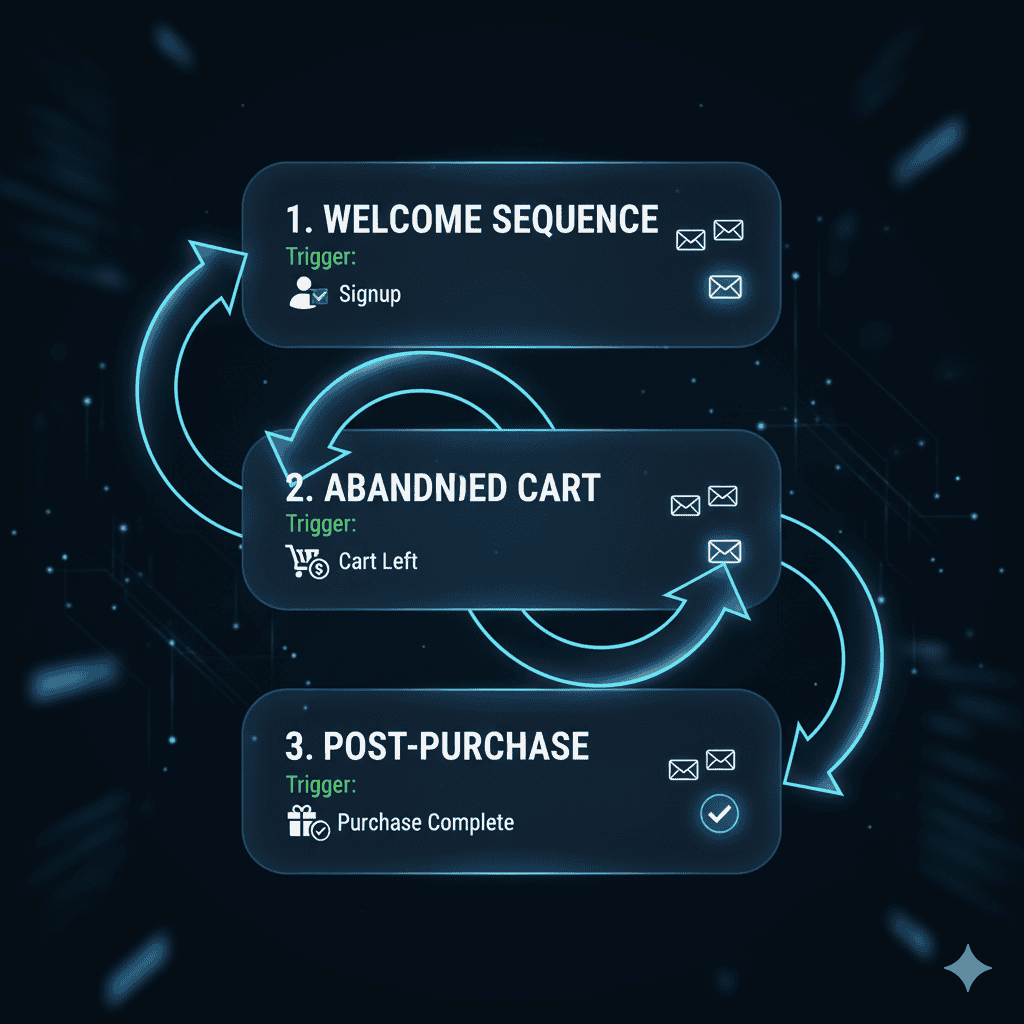
Part 2: 3 Non-Negotiable Automation Workflows
If you’re new to automation, start with these three high-impact workflows. Your chosen tool must make these simple to build.
1. The Welcome Sequence (Onboarding)
- Trigger: New subscriber joins the list (via your website form or lead magnet).
- Goal: Build trust, set expectations, and drive the first purchase.
- Sequence Example (3 Emails):
- Email 1 (Immediate): “Welcome! Here is the free resource you requested.”
- Email 2 (Day 2): “Our Origin Story: Why we started [Your Business].”
- Email 3 (Day 5): “Your First Offer: Get 15% off your first purchase.”
2. The Abandoned Cart Recovery (E-commerce Focus)
- Trigger: A customer adds items to their cart but does not complete the checkout.
- Goal: Recapture lost sales before the customer buys from a competitor.
- Sequence Example (2 Emails):
- Email 1 (1 Hour Later): “Did you forget something? Your items are waiting.” (No discount yet.)
- Email 2 (24 Hours Later): “Last Chance: Complete your order now and get Free Shipping.” (Introduce a small incentive).
3. The Post-Purchase Follow-Up (Retention)
- Trigger: Customer completes a purchase.
- Goal: Encourage a second purchase, gather a review, and build loyalty.
- Sequence Example (3 Emails):
- Email 1 (Immediate): “Thank You + Order Confirmation.” (Transactional)
- Email 2 (Day 7): “Check-in: How do you like the product? Click here to leave a review.”
- Email 3 (Day 30): “Reorder Time? Get 10% off your next purchase.”
Once your three core workflows are mapped out, these guides can help you plug them into a calm, long-term email strategy:
Part 3: Top Email Automation Tools For Small Businesses (Comparison)
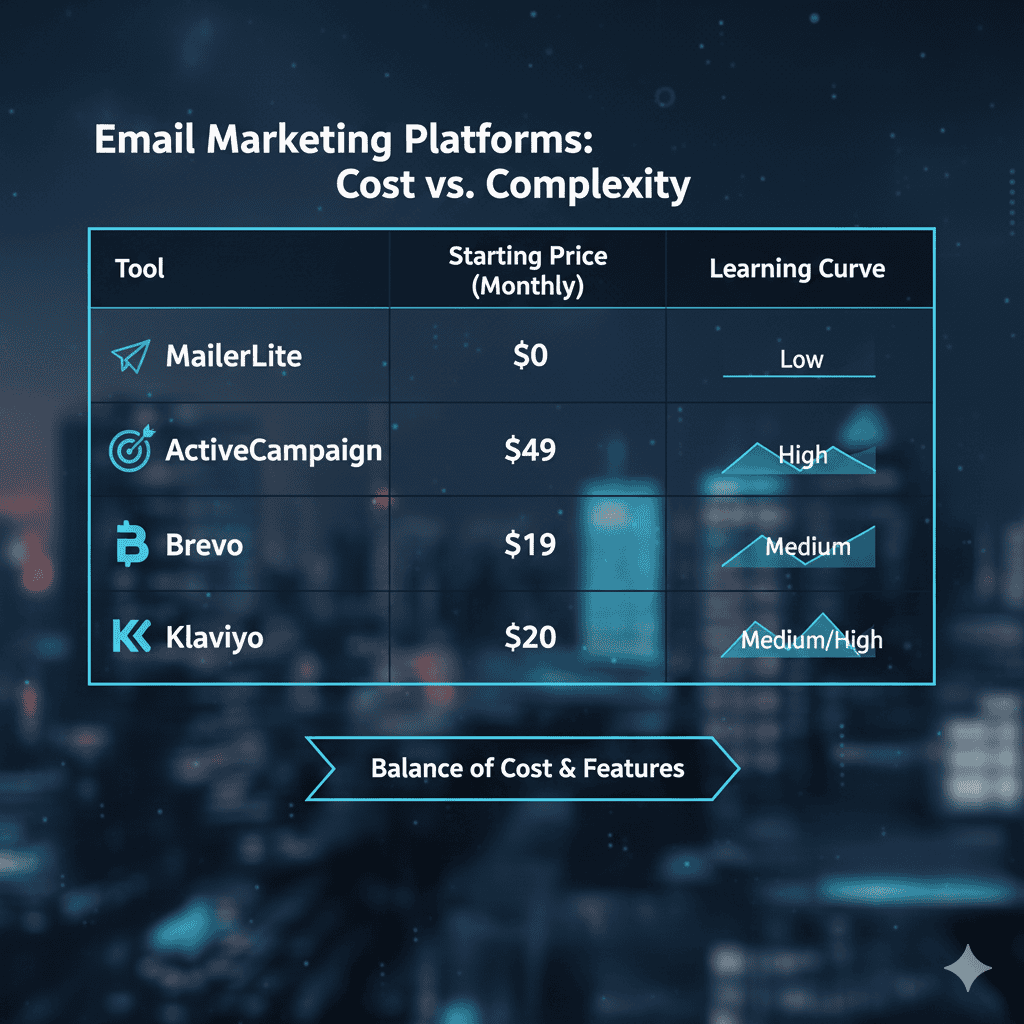
The Email Automation Tools For Small Businesses below are consistently rated as the best blend of ease-of-use, powerful automation features, and low cost at entry-level.
| Tool | Best For | Standout Automation Feature | Free/Starting Price (Approx.) | Learning Curve |
| MailerLite | Simplicity & Affordability | Intuitive Visual Builder: Easiest-to-use drag-and-drop workflow editor for beginners. | Free (Up to 1,000 Subs) | Low |
| ActiveCampaign | Power & Advanced Funnels | Deep Automation: Advanced conditional logic, lead scoring, and integrated CRM for complex sequences. | Starts at $\$29/month | Medium/High |
| Brevo (Sendinblue) | Budget & Multi-Channel | Affordable Multi-Channel: Includes Email, SMS, and built-in CRM for managing contacts, often priced by sends. | Free (Up to 300 Sends/Day) | Medium |
| Klaviyo | E-commerce Revenue | Data-Driven Triggers: Best integration with Shopify/WooCommerce for hyper-specific abandoned cart triggers. | Free (Up to 250 Contacts) | Medium |
Helpful External Resources for Email Automation Tools
Why Cost Matters for Small Business Automation
Small businesses must scrutinize the cost of scalability. The best tool is often the one that gives you the full automation features on the lowest-priced plan, ensuring you don’t have to upgrade just to build a simple abandoned cart sequence. (MailerLite and Brevo excel here).
As you think about long-term cost and scalability, these articles can help you choose a calm, sustainable path for your business:
⚡ Quick-Answer Summary: Automation
Question: What is the single most important feature to look for in an automation tool as a small business?
Answer: The Visual Workflow Builder. An intuitive, drag-and-drop workflow editor is essential because it allows non-technical users to build complex sequences like Abandoned Cart or Lead Nurturing without needing to write code or hire an expert.
Part 4: Frequently Asked Questions (FAQ)
Q: What is a “trigger” in email automation?
A: A trigger is the event that automatically starts an email sequence. Common triggers are: “Customer signs up for newsletter,” “Customer views product page,” or “Customer hasn’t opened an email in 60 days.”
Q: Do I lose personalization when I use automation?
A: No, the opposite is true. Automation is designed to increase personalization. You build the message once, and the system dynamically inserts the customer’s name, last viewed product, or last purchase date, making the message perfectly relevant.
Q: What is the most affordable email automation tool for beginners?
A: MailerLite is consistently ranked as the most user-friendly and affordable tool for small businesses, offering a generous free plan that includes the core visual automation builder, which is crucial for getting started.
Q: How long should my Welcome Sequence be?
A: A minimum of three emails is recommended. The first email delivers the promised value, the second builds trust/brand story, and the third provides a low-friction Call-to-Action (like a discount).
Conclusion
Automating your email marketing is the most efficient way to maintain customer engagement and scale revenue as a small business. By choosing the right platform—one that focuses on ease of use and offers full workflow power at an affordable price—you can set up your three non-negotiable sequences and turn your email marketing into a powerful, passive income stream.
Next Steps: Choose One Tool and Turn On One Workflow
You don’t have to master every feature at once. Start by choosing one email automation tool that feels manageable, then turn on a single, simple workflow like a Welcome Sequence. Let your experience guide the next improvements.
If you’d like help connecting email automation to a calm, beginner-friendly online income plan, you can download my free Affiliate Marketing Starter Kit for Beginners . It’s designed especially for retirees and ageless beginners and shows how email, content, and affiliate marketing fit together without overwhelm.
For step-by-step training, website tools, and a friendly community, you can also learn inside Wealthy Affiliate . Their lessons pair well with the automations in this guide and can help you build your list and income at a pace that suits your energy and schedule.
This week, pick one workflow—Welcome, Abandoned Cart, or Post-Purchase—and set up just the first email. Small, steady steps are enough to turn your email tool into a quiet, reliable asset.