
Last Updated on 3 weeks ago by Gila
Simple Tools & Metrics That Matter
Introduction
Affiliate marketing on social media is like your personal billboard on the internet highway. You get to champion products or services while earning a commission every time someone interacts positively with your promo link. But here’s the kicker – how do you really know your strategy’s working? That’s where performance tracking comes in.
In 2026, tracking your social media affiliate performance isn’t optional anymore – it’s essential. Whether you’re promoting on Instagram, Facebook, Pinterest, or TikTok, understanding which posts drive clicks and conversions sets successful affiliates apart from those who just post and hope.
The good news? You don’t need expensive software or a data science degree. Free tools like Google Analytics, platform-specific insights, and even a simple Excel spreadsheet can give you everything you need to track what matters. This guide walks you through the exact tools, metrics, and methods to monitor your affiliate performance without overwhelm.
Metrics are your best friends in this journey. Keep an eye on key metrics, such as engagement rates and sales conversions. They tell you what content vibes well with your audience. This isn’t just about numbers; it’s about understanding your crowd to serve them better.
It’s all about making people-first moves. Focus on creating content that resonates with your audience while you track any shifts in their behavior. This combo makes tracking not just about data, but about really connecting and growing with your followers. Let’s dive into how you can start tracking like a pro today.
TL;DR (Too Long; Didn’t Read)
Quick takeaways for tracking social media affiliate performance in 2026:
- Why Track? Know which posts make money, which platforms perform best, and where to focus your energy for maximum ROI.
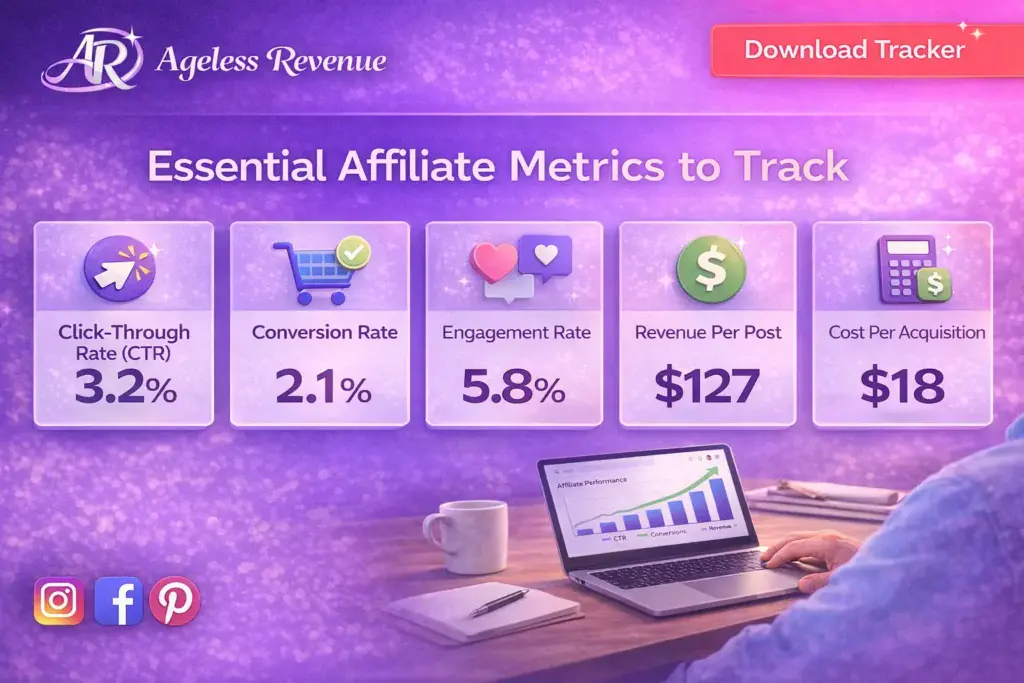
- Essential Metrics: Focus on click-through rate (CTR), conversion rate, engagement rate, revenue per post, and cost per acquisition.
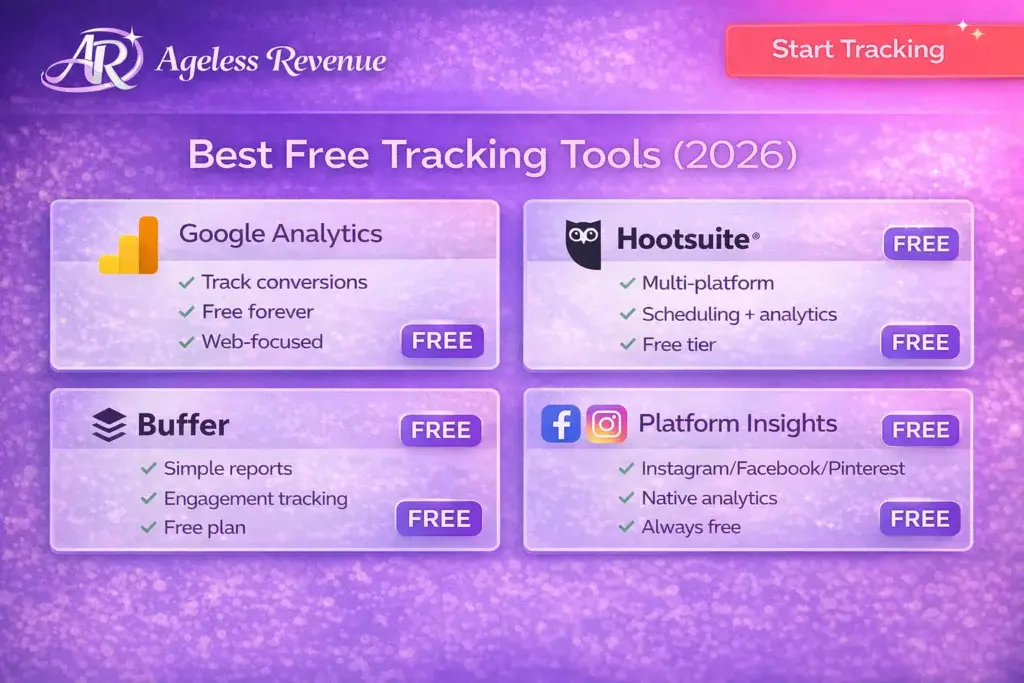
- Free Tools That Work: Google Analytics for website conversions, Instagram Insights/Facebook Analytics/Pinterest Analytics for platform data, Hootsuite or Buffer for multi-platform tracking, Excel for custom dashboards.
- Track Weekly, Review Monthly: Check metrics weekly to spot trends, but review monthly for deeper insights.
- Bottom line: Start with free tools, focus on metrics that drive revenue, and use data to create more of what works.
The Best Free Social Media Analytics Tools
Who doesn’t love a deal, especially when it’s free? Free tools can be your best pals in tracking social media affiliate performance without burning a hole in your pocket. Google Analytics is a great starting point for anyone diving into the analytics game. It helps you figure out where your audience is coming from and what content keeps them hanging around.
Hootsuite‘s another gem that deserves mention. It doesn’t just schedule your posts; it gives you a clear picture of how your content’s performing across various platforms. Tracking reach and engagement has never been easier!
Then there’s Buffer, a favorite among many for its straightforward analytics dashboard. Insights on post performance and audience engagement? Check! Plus, Buffer’s reports are easy to digest at a glance, perfect when you’re juggling a lot of tasks. If you’re looking to get started with affiliate marketing, these tools are essential.
Each of these tools brings something unique to the table, so choose based on what suits your needs best. Seeking real-world feedback? Look for user reviews and case studies to see how businesses leverage these tools for actual gains. It’s like hearing a friend dish on why they love using them – relatable and reliable insights ready to guide you on your affiliate tracking journey.
Utilizing Excel for Social Media Analytics Tracking
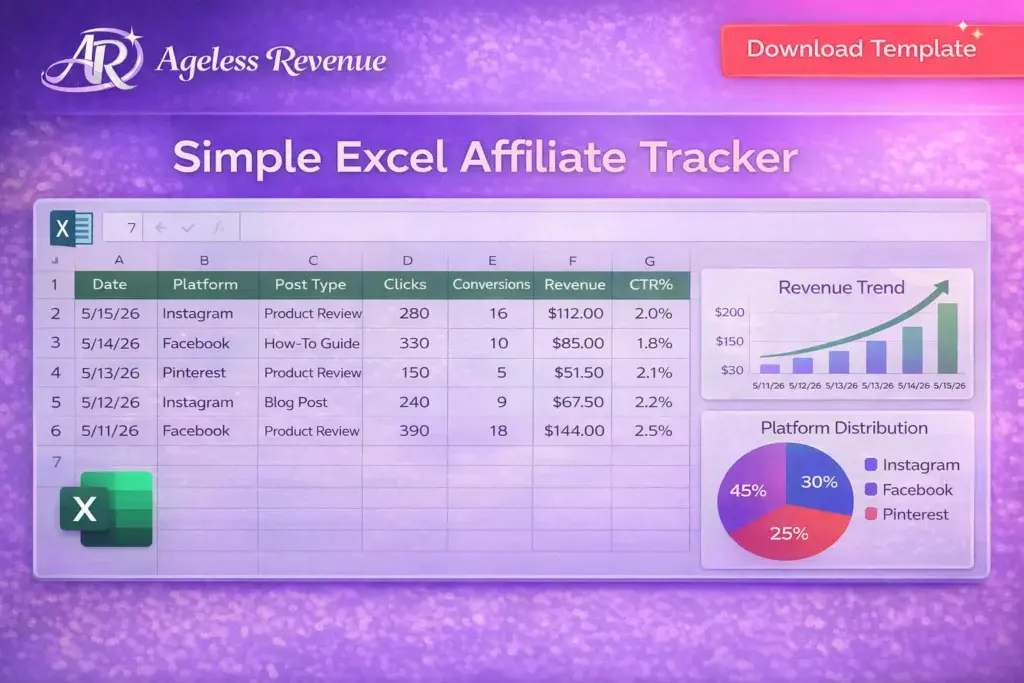
Excel might not be the flashiest tool out there, but it’s a powerhouse for analytics if you know your way around a spreadsheet. Setting up a tracker in Excel helps keep all your important metrics in one handy place. It’s like having your personal analytics assistant, just organized neatly in columns and rows.
Start by listing your key performance indicators (KPIs) – think engagement numbers, conversion rates, etc. With the right formulas, you can automate the number-crunching process, saving you time and energy. VLOOKUP and pivot tables are your friends for pulling insights from heaps of data.
One of the coolest things about using Excel is customization. You’re not stuck with someone else’s layout. Design your dashboard to focus on metrics that matter most to you. Add colorful charts and graphs to make data visualization pop. This way, whenever you look at your spreadsheet, it isn’t just numbers hitting your eyeballs – it’s a clear picture of your social media performance. Want to learn more about email and list building? These tracking skills transfer perfectly.
Excel’s a great tool for its versatility. Whether you’re a pro or just getting started, it lets you take control of your data like a boss. And with online guides and tutorials, leveling up your Excel game is just a click away.
Analyzing Competitors with Free Social Media Tools
Sizing up the competition can give you that extra edge in your affiliate game, and luckily, there are some handy free tools out there to help you do just that. SocialBlade, for example, offers in-depth analytics on YouTube, Instagram, and Twitter. It’s a solid tool for peeping into the number of views, followers, and content success, painting a clear picture of what the top players in your niche are doing right.
Then you’ve got SimilarWeb, which is like your magnifying glass into website traffic and market insights. With this tool, you can get data-driven answers about your competitors’ audience sources and engagement levels. It’s an insightful way to see where competitors are pulling in traffic and how they’re retaining their followers’ attention.
Using these tools, you can nab insights into what’s working for others and adapt those strategies to enhance your own performance. Keep an eye on competitors’ content types, posting frequency, and engagement tactics, and see how they align with your goals. For more strategies, check out our guide on SEO and traffic strategies.
Having your competitors’ strategies laid out in front of you isn’t just about mimicking them. It’s about being part detective, part creator – busting out innovative ways to give your audience something fresh and engaging. Use competitor data as inspiration to set your own path and stand out in the crowded social media space.
Deep Dive into Analytics for Specific Platforms
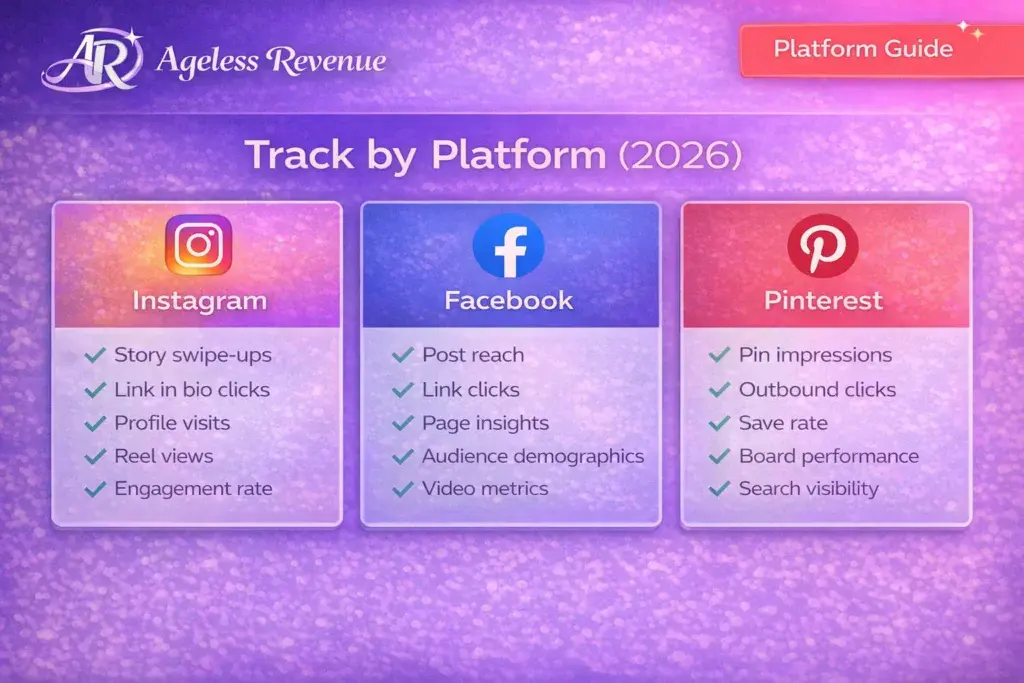
Each social media platform plays by its own rules and has its own nuances. Facebook, for instance, offers tools like Creator Studio and Facebook Insights to help you see how well your posts are performing. You can track engagement metrics to find out what kind of content your audience loves most.
Instagram doesn’t slack off either. With its built-in analytics tools, you can check out metrics like profile views and website clicks directly from your business profile. It’s perfect for understanding how your visuals and hashtags are landing with your crowd.
Pinterest has built-in analytics tools that show what pins are leading to website clicks and saves. It tells you a lot about how users are interacting with your pins and how your content is spreading across the platform. Looking to boost your content creation and blogging efforts? Platform-specific tracking is key.
Each platform’s analytics dashboard is jam-packed with insights, giving you a feel of your audience’s behavior without having to break a sweat. Real-life case studies can be a goldmine here, showing which Instagram strategies or Facebook campaigns drove engagement and conversions. They’re your map to creating content that not only resonates but also reaps rewards across each unique platform.
By mastering platform-specific analytics, you’re not just understanding the numbers; you’re reading the pulse of your audience. It’s all about picking up on signals that tell you how to craft your messaging for maximum impact.
Social Media Analytics Examples and Their Impact
Real-life examples show how relying on analytics can turn casual engagement into strategic success. Imagine a campaign where someone used data to tweak their approach and ended up doubling their click-through rate. That’s the power of analytics in action.
Take a look at brands that deconstructed their performance metrics to identify which platforms led to the highest conversions. They discovered insights that shaped future content creation and posting schedules.
For affiliates, data-driven insights are key to understanding what makes audiences tick. It’s all about capturing trends and then riding that wave to boost your own efforts. Interested in social media affiliate strategies? Analytics will be your best friend.
Analytics isn’t just for the big players. Entrepreneurs and small businesses have used analytics to sidestep common pitfalls and connect with audiences in meaningful ways.
Tracking analytics helps affiliates pinpoint challenges, like low engagement or high bounce rates, and strategize solutions that keep the audience hooked. It’s all about using data as your spotlight to highlight what’s working.
Integrating Website Analytics for a Holistic View
Social media isn’t just its own walled garden; it’s part of a bigger ecosystem that includes your website. Bridging the gap between social media analytics and website analytics gives you a complete picture of your audience’s journey.
Using tools like Google Analytics helps paint this broader picture by linking social media efforts to website hits and conversions. This integration allows you to see how traffic from platforms like Facebook or Instagram is behaving once it lands on your site.
Synergizing data from both realms means more informed decision-making. It helps you hone in on what content is not only grabbing attention on social media but also driving meaningful actions on your website.
Pay attention to tools that offer comprehensive insights, combining metrics across platforms, like HubSpot or Google Data Studio. These tools offer an integrated approach, bringing various data streams under one umbrella for a clearer, more actionable report.
Keeping an eye on future trends in analytics can tip you off to new ways of measuring success. It’s not just about clicks and likes anymore; it’s about understanding the user journey and experience for long-term brand building.
By weaving together insights from both social media and website analytics, you’re equipped to tailor content strategies and leverage deeper, actionable insights that align with broader business goals.
Frequently Asked Questions (FAQ)
Tracking helps you understand which content drives clicks and conversions, which platforms perform best, and where to focus your efforts for maximum ROI. Without tracking, you’re guessing instead of making data-driven decisions. You might be spending hours creating content for Instagram when Facebook is actually driving 80% of your sales. Tracking reveals these insights so you can work smarter, not harder.
Google Analytics is essential for tracking website conversions and understanding where your traffic comes from. Platform-specific tools like Instagram Insights, Facebook Analytics, and Pinterest Analytics show engagement and reach metrics specific to each platform. Tools like Hootsuite and Buffer help you track performance across multiple platforms in one dashboard. For custom tracking, Excel or Google Sheets work perfectly and give you complete control over what you monitor.
How do I track affiliate links on Instagram?
Use Instagram’s built-in analytics (available for business accounts) to track profile visits and website clicks. Create unique tracking links for each post using UTM parameters or your affiliate network’s tracking system. Monitor link clicks in your bio and story swipe-ups (if you have 10K+ followers or are verified). You can also use link-in-bio tools like Linktree or Beacons that provide click analytics. Tag each link with campaign identifiers in Google Analytics to see exactly which Instagram posts drive conversions.
Focus on these key metrics:
- Click-Through Rate (CTR): Percentage of people who click your affiliate link
- Conversion Rate: Percentage of clicks that turn into sales
- Engagement Rate: Likes, comments, shares relative to your reach
- Reach & Impressions: How many people see your content
- Revenue Per Post: Total earnings divided by the number of posts
- Cost Per Acquisition (CPA): How much you spend to get one sale
These metrics show which content resonates and generates actual sales, not just vanity metrics like follower count.
Yes! Excel is excellent for creating custom tracking dashboards. Set up columns for date, platform, post type, clicks, conversions, and revenue. Use formulas to automatically calculate CTR (clicks/impressions), conversion rate (conversions/clicks), and ROI (revenue/cost). Add charts to visualize trends over time. Excel gives you complete flexibility to track exactly what matters for your business without monthly subscription fees.
How often should I check my affiliate performance metrics?
Check weekly to spot trends and make timely adjustments to your content strategy. Review monthly for deeper analysis of what’s working long-term and to identify seasonal patterns. Daily monitoring can lead to overreacting to normal fluctuations – social media performance naturally varies day-to-day. The sweet spot is weekly check-ins for course corrections and monthly deep dives for strategic planning.
Conclusion
Tracking your social media affiliate performance doesn’t have to be complicated or expensive. With the free tools and simple methods covered in this guide, you now have everything you need to understand what’s working, what’s not, and where to focus your efforts.
Here’s your action plan to start tracking today:
- Set up the basics – Install Google Analytics on your website and enable business accounts on your active social platforms to access built-in analytics.
- Choose your tracking method – Start with platform-specific tools (Instagram Insights, Facebook Analytics, Pinterest Analytics) and add Google Analytics for website conversions. Use UTM parameters on all affiliate links.
- Create your tracking system – Whether you use Excel, Google Sheets, or a tool like Hootsuite, build a simple dashboard that tracks your key metrics: clicks, conversions, revenue, CTR, and conversion rate.
- Review weekly, optimize monthly – Check your metrics every week to spot trends, but make bigger strategic decisions based on monthly patterns. Don’t overreact to daily fluctuations.
- Focus on what drives revenue – Track engagement for insights, but prioritize metrics that directly tie to affiliate commissions: clicks, conversions, and revenue per post.
Remember, the goal isn’t to become a data analyst – it’s to make smarter decisions about your content. Which posts drive the most clicks? Which platforms generate the most revenue? What types of content resonate best with your audience? These are the questions tracking answers.
Start simple. Pick one or two tools from this guide, track your top three metrics, and build from there. As you get comfortable with basic tracking, you can expand to more advanced analytics and optimization strategies.
The affiliate marketers who succeed in 2026 and beyond aren’t necessarily the ones with the biggest followings – they’re the ones who track their performance, learn from their data, and continuously improve based on what the numbers tell them.
Your tracking journey starts now. Set up one tool this week, add one metric to track, and watch how data transforms your affiliate marketing results. You’ve got this!
Ready to take your affiliate tracking further? Download our free Social Media Affiliate Performance Tracker template and start monitoring your success today. Plus, check out our Starter Kit for more tips on optimizing your affiliate strategy based on real data insights.
___
Published by Ageless Revenue | AgelessRevenue.com
© 2026 | All Rights Reserved