

Let’s be honest: “Artificial Intelligence” can sound intimidating. It can bring up images of complex coding, confusing dashboards, or futuristic robots taking over the world. But for us “ageless” entrepreneurs, AI isn’t about science fiction — it’s about making blogging simpler, calmer, and more doable.
If you want to use AI to write a blog without sounding robotic, here’s the most important mindset shift: AI is not your replacement. AI is your assistant. It helps you do the heavy lifting (brainstorming, organizing, drafting, polishing), while you do the part AI can’t do — the part that readers actually trust: your experience, your opinions, and your personal voice.
In 2026, the internet is flooded with generic content. People can feel it. You can feel it. And search engines can often spot it too. So the goal isn’t “write with AI.” The goal is “write with AI and still sound like a real person.” That’s how you build trust, grow readers, and get clicks that actually convert.
TL;DR: Use AI to speed up blogging — but keep your voice human.
- Never publish a raw AI draft. Edit until it sounds like you.
- Add “experience injection”: a story, an opinion, and fact-checking.
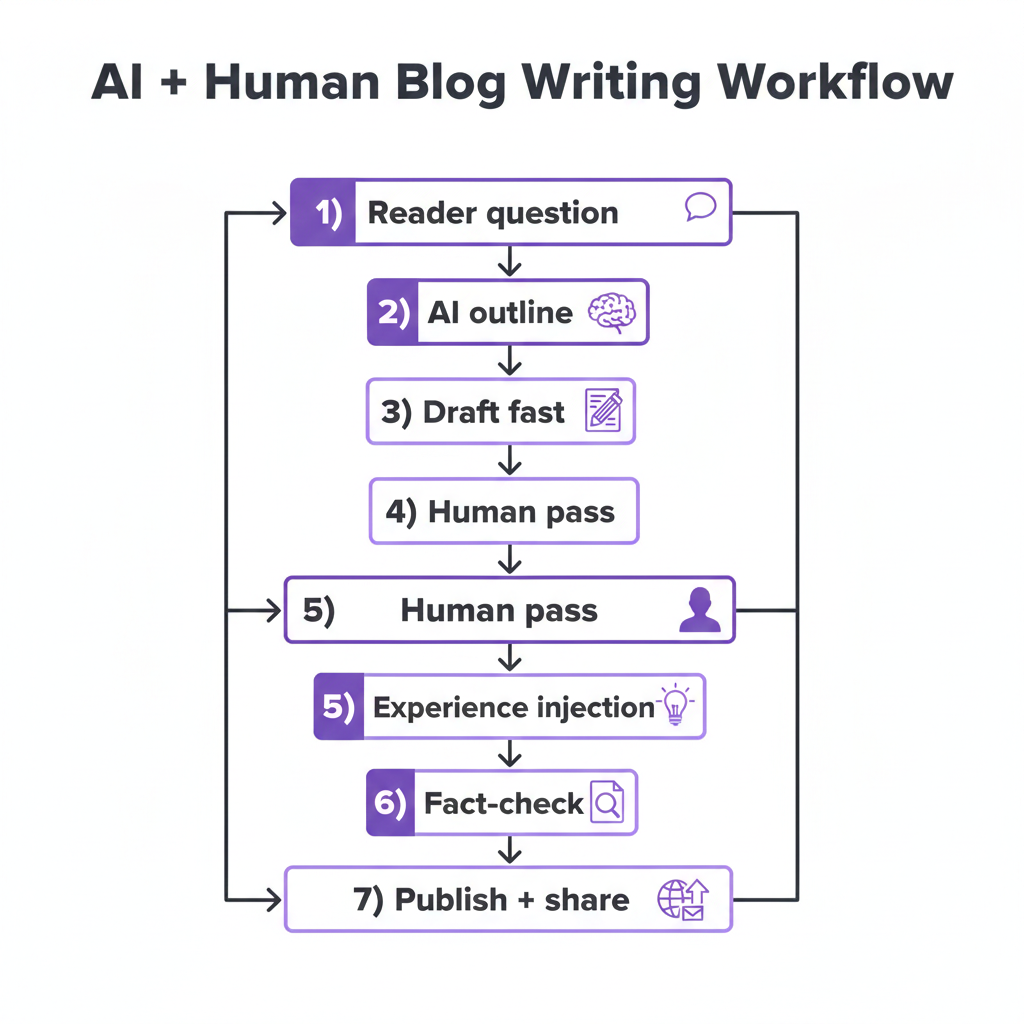
- Use a simple workflow: question → outline → draft → human edit → verify → publish.
Jump to:
Workflow •
Human Pass Checklist •
Prompt Library •
Case Study •
FAQ
Want a simple step-by-step path (without overwhelm)?
Includes a beginner-friendly checklist so you know exactly what to do next.
The Golden Rule: AI Is Your Assistant, Not Your Author
This is the most important takeaway: never hit “Publish” on a raw AI draft.
Imagine hiring a brilliant new assistant. You wouldn’t hand them a topic and expect them to write a heartfelt letter to your grandkids, right? You’d give them context, stories, and a few examples of your tone. Then you’d review their draft and adjust it until it sounds like you.
AI works the same way. It’s excellent in structure and speed. But it doesn’t have your life experience, your patience for beginner questions, your sense of humor, or your “real talk.” That’s why AI-only articles often feel a little… cold. They’re technically correct, but they don’t feel like a person.
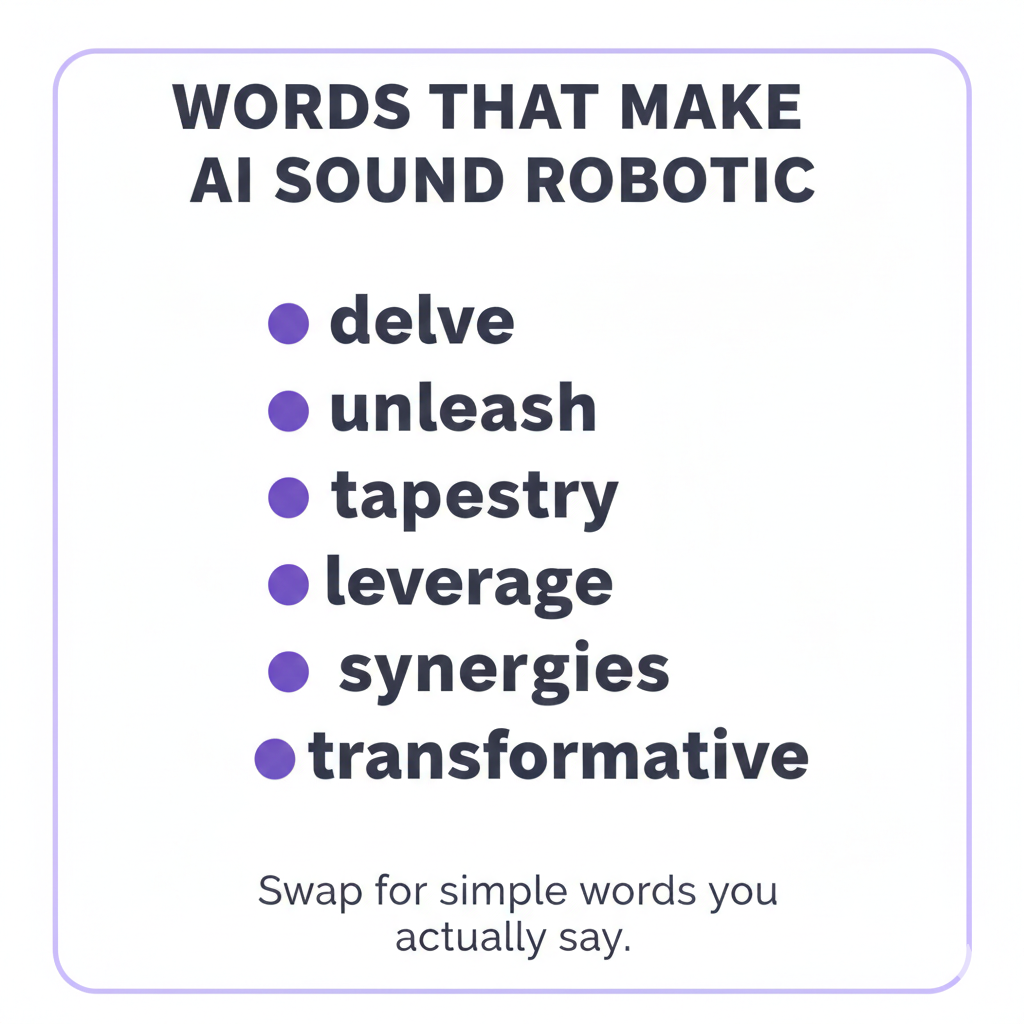
Gila’s Pro Tip: If an AI sentence sounds too “fancy” or uses words like tapestry, delve, or unleash, delete them. Replace them with words you would actually say.
If you want the official search engine perspective, these are the most useful references:
Google’s guidance on AI-generated content and
Google Search Essentials on using generative AI.
They focus on helpfulness and quality, not “how” the text was produced.
Your “Experience Injection”: How to Stand Out in 2026
In a world full of generic AI content, readers are actively looking for something that feels real. This is your advantage. You can add what AI can’t: lived experience.
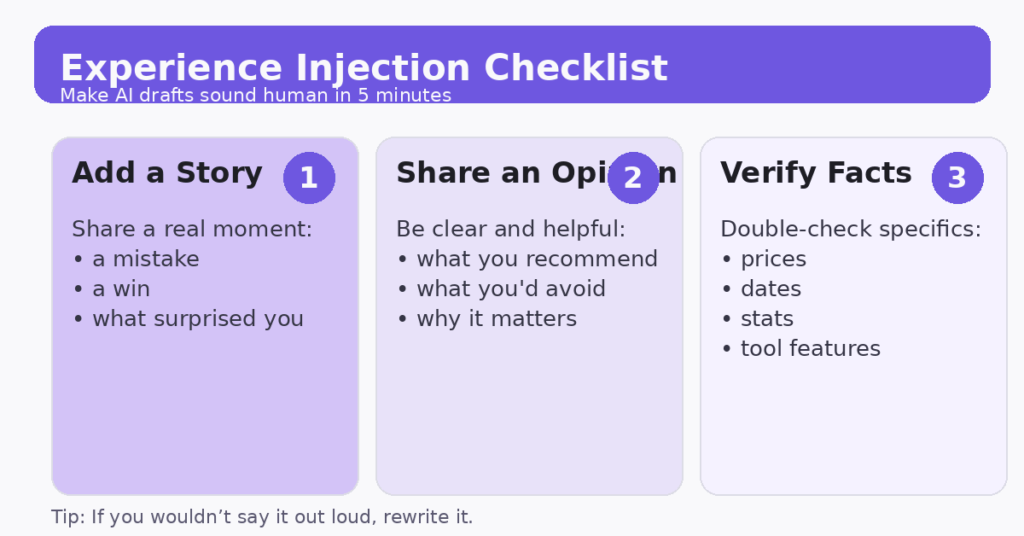
Before you publish, ask yourself these three questions:
1) Where can I add a story?
AI doesn’t have memories. You do. Add a short moment from your journey:
- a mistake you made when you started
- something that surprised you
- a tiny win that gave you hope
Example: “When I first started blogging, I thought I had to sound professional — and my writing sounded stiff. The day I started writing like I talk, people stayed on the page longer.”
2) What is my opinion?
AI is designed to be neutral. Beginners don’t need neutral — they need guidance. If you recommend keeping tools simple, say it. If you think a popular tool is overhyped, say that too. People follow people with clarity.
3) Is this factually true?
AI can “hallucinate” — meaning it can generate confident-sounding information that’s wrong. Always verify dates, pricing, stats, and “rules.” If you want a simple explanation, read
Why language models hallucinate.
Beware of “AI Shiny Objects”
There are new AI tools launching constantly. Many are distractions. If you’re building a blog, your success comes from doing the basics consistently, not chasing every new thing.
Here are three common traps I see:
- The “fully automated blog” trap: Tools that promise to run everything for you usually produce generic content. Generic content doesn’t build trust.
- The “tool overload” trap: Using 8 tools feels productive, but it usually leads to confusion and quitting. A simple setup wins.
- The “perfect post” trap: AI can make you keep rewriting forever. Instead, aim for clear, helpful, and human — then publish.
3 Simple AI Tools for Beginners (No Tech Overwhelm)
1) ChatGPT or Claude (Brainstorming + Outlines)
Use AI for headlines, outlines, examples, and rewrites. Keep control of the final wording. If you want to try Claude, here it is:
Claude.
2) Grammarly (Clarity + Tone)
Grammarly is like a gentle proofreader. It catches typos and helps your writing stay clear and friendly. Learn more here:
Grammarly features.
3) Canva Magic Studio (Images + Pinterest Pins)
Canva helps you create visuals quickly — perfect for Pinterest. Start here:
Canva Magic Studio.
A Simple “Human + AI” Workflow You Can Repeat Every Week
If you want to use AI to write a blog without sounding robotic, this workflow is the easiest way to stay consistent without getting overwhelmed.
Step 1: Start with one real reader question
Pick a beginner question your reader is already asking. Examples:
- “How do I write a blog post faster?”
- “How do I use AI without sounding fake?”
- “What should I write about as a beginner?”
Step 2: Ask AI for an outline (not a finished post)
Your outline is your map. It prevents rambling and makes writing easier.
Step 3: Draft fast
Let AI draft sections quickly. Don’t judge the first draft. Your job is to shape it into something helpful and human.
Step 4: Do a “Human Pass”
Rewrite the parts that matter most:
- The introduction (make it warm and personal)
- your story (AI can’t do this)
- Your opinion (AI is neutral; you shouldn’t be)
- your conclusion (encouragement + next step)
Step 5: Experience injection + fact-checking
Add one story, one opinion, and verify any specific claims.
If you want this workflow as a printable checklist, grab the Free Starter Kit.
Don’t try to share everywhere. Start with one platform you can stick with. If you want ideas, read
Best Social Media Affiliate Programs for 2026.
The Human Pass Checklist (Use This Before You Publish)
This is the simplest way to make sure your AI-assisted post still sounds like you. I recommend copying this list into a note and using it every time.
- Cut long sentences. If you need to breathe halfway through, split it.
- Remove “robot words.” Replace fancy language with normal speech.
- Add one personal moment. Even 2–3 sentences are enough.
- Add one opinion. What do you recommend for beginners and why?
- Check the facts. Especially prices, dates, or “rules.”
- Make it readable. Short paragraphs. Lots of whitespace. Simple headings.
Also: read your introduction out loud. If it sounds stiff, rewrite it like you’re talking to a friend.
Prompt Library: Copy/Paste Prompts That Keep Your Writing Human
Outline prompt
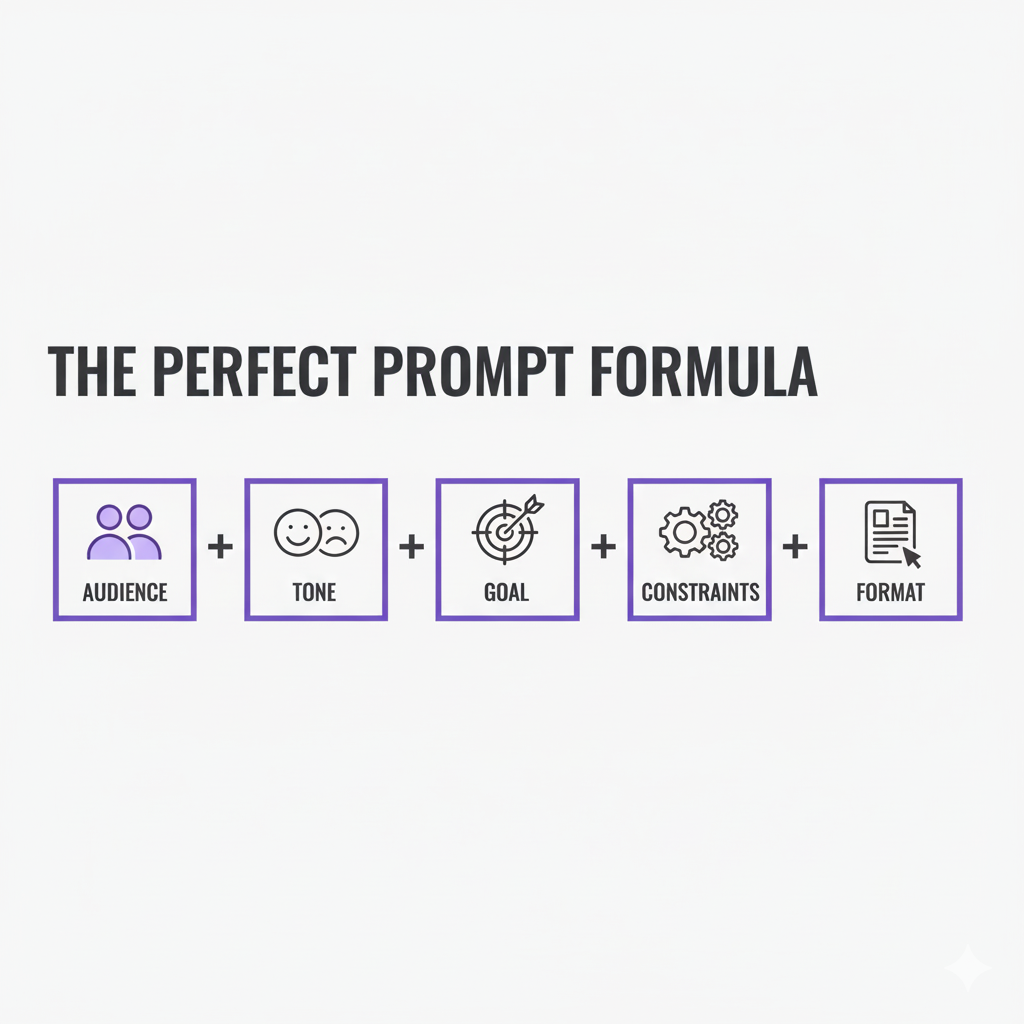
Create a detailed outline for a blog post about: [TOPIC]. Audience: retirees and beginners. Tone: warm, calm, simple. Use short paragraphs and step-by-step headings. Include a checklist at the end. Avoid hype and fancy words.
Voice pass prompt
Rewrite this section so it sounds like a friendly retiree explaining it over coffee. Use simple words. Remove buzzwords like “delve,” “tapestry,” “unleash,” “synergies,” and “transformative.” Keep sentences short.
Experience injection prompt
Ask me 8 questions that will help you add real human experience to this post (a story, an opinion, and a mistake I learned from). Then suggest where to insert my answers.
Fact-check prompt
List the statements in this draft that require verification (numbers, dates, pricing, tool features, claims). For each, tell me what to verify and what type of source to use.
Mini Case Study: How One Post Becomes Human (Without Extra Work)
Let’s say you want to write a post about using AI for blogging. You ask AI for an outline and a draft. The draft looks decent — but it feels generic. Here’s what you do next (this is the “secret sauce”).
What you keep from AI
- the structure (headings and steps)
- the first draft of explanations
- example ideas you can refine
What you change (fast)
- The intro: make it warmer and more personal
- The “tips”: make them simpler, with fewer fancy words
- The examples: make them real-life and beginner-friendly
A quick “before/after” example
AI-style sentence:
“Leveraging content strategies can unlock transformative outcomes through optimized workflows.”
Human version:
“Here’s the simple way to do this without getting overwhelmed — one small step at a time.”
That one rewrite makes the post feel like a person, not a brochure.
Quick Reminder: Disclose Affiliate Links (Keep Trust Simple)
If your blog includes affiliate links, keep disclosures clear and easy to understand. Trust matters.
Here’s your site’s Affiliate Disclosure, plus the official
FTC endorsement guides.
FAQ: Using AI for Blogging (Without Sounding Fake)
Q: Will Google penalize my blog if I use AI?
A: Google focuses on helpful, high-quality content — not whether you used AI. The risk comes from publishing low-value content that doesn’t help readers. See Google’s guidance on AI-generated content.
Q: How do I stop AI writing from sounding robotic?
A: Do a voice pass. Shorten sentences, remove buzzwords, and add a story or opinion. If you wouldn’t say it out loud, rewrite it.
Q: What parts of blogging should I use AI for?
A: Best uses: outlines, headlines, simplifying explanations, brainstorming examples, and rewriting unclear paragraphs. Avoid using AI for your personal story and conclusion.
Q: How much should I edit an AI draft?
A: Always edit the intro, your main tips, and the conclusion. Then skim the whole post for tone and accuracy.
Q: Can AI make mistakes with facts?
A: Yes. Verify numbers, dates, pricing, and strong claims — especially anything that looks too specific.
Q: Do I need to disclose that I used AI?
A: Usually no, but you should always disclose affiliate links clearly. Use your Affiliate Disclosure and follow the FTC endorsement guides.
Q: What’s the simplest tool setup for beginners?
A: One writing tool (ChatGPT or Claude), one proofreader (Grammarly), and one design tool (Canva Magic Studio).
Q: What’s a safe weekly routine I can follow?
A: Pick one question → outline → draft → add your story/opinion → verify → publish → share on one platform. Consistency beats complexity.
Conclusion: Your Voice Is the Secret Ingredient
AI can help you move faster — but your experience is what makes readers trust you and come back.
If you want a calm, step-by-step path for building income online, start here:
Ready to start without overwhelm?
Includes a beginner-friendly checklist so you know exactly what to do next.
If you’re ready for training and tools in one place, you may also want to read my honest Wealthy Affiliate review.